

Stop paying too much for wireless
Plus: Windows gets more efficient, a better iPhone keyboard, and free food for Prime members
 Jared Newman |
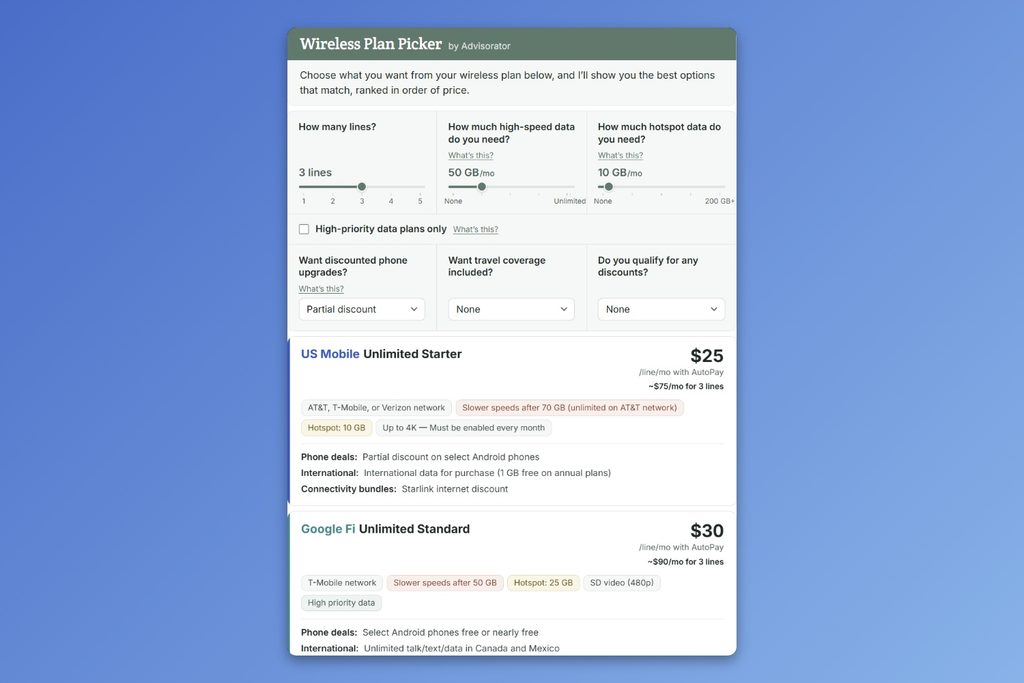
As I mentioned last week, it’s no-paywall November for the free edition of Advisorator. That means you’re getting the parts of the newsletter that I normally reserve for my lovely paying members.
This week I’ve got something extra special for you: It’s an all-new version of my Wireless Plan Picker. Here’s how it works:
- Enter the number of phone lines you need.
- Specify how much high-speed data you want each month.
- Choose from extras like discounted phone upgrades, international coverage, and high-priority data.
- I’ll show you the best options that match, ranked in order of price.
The latest version of this tool covers not just the major carriers (AT&T, T-Mobile, Verizon), but a curated selection of cheaper, prepaid plans that can potentially save you a lot of money. I’ve also updated T-Mobile to its new T-Mix plans, which are now some of the worst deals in wireless.
Check out the Wireless Plan Picker here →
Why I built it: I have great respect for existing tools like PrepaidCompare and BestPhonePlans, but I wanted to offer a more straightforward comparison between the major carriers and potentially cheaper alternatives. I also wanted to account for discounted phone upgrades and other perks, as phone subsidies remain a big pull for a lot of folks.
How I built it: While I used Claude AI to assemble the interactive components, the underlying data comes from a chart that I’ve been meticulously maintaining by hand for over six years. I don’t trust AI to get those details right.
Don’t see your plan? Let me know and I’ll consider adding it. The tool currently covers a curated selection plans based on reader feedback and my own experience.
The Wireless Plan Picker is usually behind a paywall, but you can access it for free through the end of November. I’m pretty confident it can help you save some money. Check it out here →
If you want to support this kind of work and become a paying member right now, you can get started for just $1.
News in brief
Windows needs less RAM now: Microsoft has overhauled Windows memory management to make laptops with 8 GB of RAM more tolerable. Multitasking scenarios, such as bouncing between apps and browser tabs, are up to 40% faster on these machines, Microsoft says, and it’s working with PC vendors to limit how much RAM their pre-loaded bloatware can use. You’ll need Windows 11, version 26H2, build 26300.9818 or newer for the latest improvements.
Laptops with 8 GB of RAM were getting harder to find a couple years ago, and many tech writers (including me) recommended avoiding them. With AI data centers driving up the cost of consumer RAM, and Apple’s MacBook Neo doing just fine with 8 GB, PC makers are now looking to do more with less. Kudos to the Windows team for meeting the moment, even if Microsoft’s own data center investments are contributing to the problem.
More notable news and reads:
- Spectrum lets internet customers try gigabit speeds for a few weeks. (You probably won’t notice the difference.)
- Beware of Apple Store employees sneakily signing you up for subscriptions. (Or better yet, just avoid shopping at the Apple Store.)
- Apple begins screening publicly-shared iCloud links for harmful content.
- Imperceptible aircraft noise can reveal where you shot a video.
- Sony’s new $60 wired headphones look like they’re from the 80s.
- Glenn Fleishman rounds up some ways to disable Apple AI features without turning off Siri entirely.
- Sonos finally lets you save speaker groups and volume settings.
- From the blog: AI isn’t a substitute for giving a crap.
Try these apps
Last week, a reader cancelled their paid subscription because I don’t write about Apple enough. A few weeks earlier, another reader cancelled because I write about Apple too much. What can I say? I reserve equal love for both my children and equal scorn for all major computing platforms. I like to think it makes for a richer perspective, at least.
With that in mind, here are this week’s app recommendations:
Better iPhone keyboard
I’ve written at length about Raycast, whose Windows and Mac apps offer a suite of powerful keyboard-based commands. Now, the iPhone version includes a full keyboard as well, it addresses my biggest beef with Apple’s built-in keyboard: You can add a dedicated row for numbers.
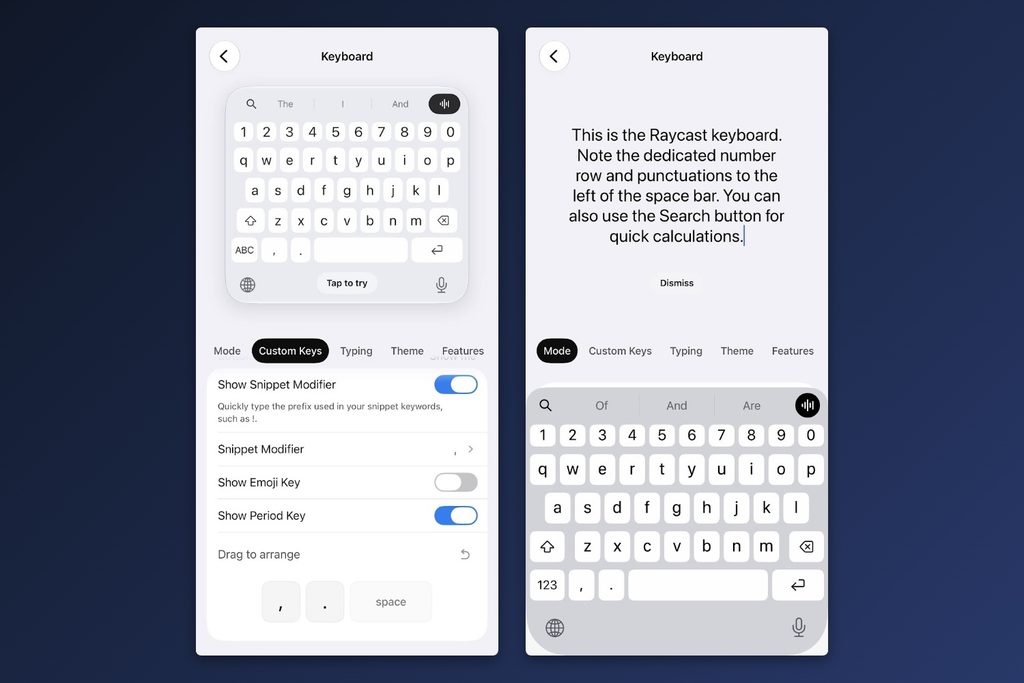
That’s not supposed to be the main draw. Raycast aspires to be a keyboard command center, and lately it’s been leaning into AI for things like dictation, search, and writing assistance.
But if you disable all that gunk, you just wind up with a better keyboard. It even supports haptic feedback instead of audible taps and a customizable space bar row, you can show/hide the period and add an extra punctuation mark for quick access. If you need help setting this up, check out this post on my blog.
Better Android search bar
As for keyboard-adjacent Android annoyances, I have a pet peeve with the search bar, which every Android phone handles differently. On Pixel phones, the home screen search bar primarily shows Google results (which I’d rather avoid), while an entirely separate bar in the app drawer covers things like contacts, calendar events, and in-app results. On Samsung phones, the search bar is buried in the app tray and doesn’t do web search at all.
What I really want is a universal, easily-accessible search bar akin to Apple’s Spotlight Search on iOS, and I might’ve finally found it in Quick Search.
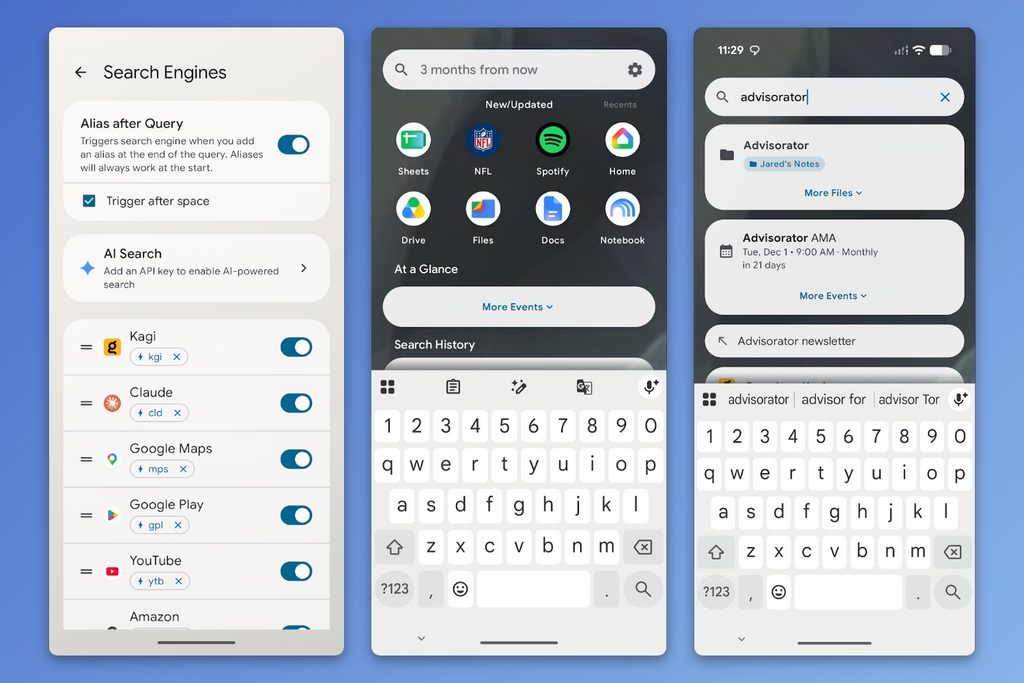
This free, open-source app lets you search the web in whatever search engine you want, while also looking across your contacts, files, calendar events, and more. You can also hand off queries to a variety of AI apps.
Sadly, Quick Search can’t replace your phone’s built-in search bars, but you can add it as its own home screen widget or set it as your phone’s default assistant so it appears with a long-press of the power button. I’ve decided to just use another app called Touch The Notch to open Quick Search by tapping my phone’s front camera cutout. Being able to do wild stuff like this remains one of Android’s best attributes.
Spend wisely
This section of the newsletter may include affiliate links, which earn me a commission if you wind up purchasing something.
Amazon drops Grubhub for Uber Eats: Amazon Prime memberships no longer include Grubhub+. Instead, Amazon’s offering $0 delivery fees on Uber Eats orders of $25 or more, plus $20 off your first two orders before November 18.
Uber Eats still charges a service fee of roughly 20% and (rightfully) adds a tip by default, so you’ll still pay a lot more compared to pickup. If delivery’s a must, make sure to start the order through this Amazon page to waive the delivery fee. Heading straight to Uber’s app or website won’t do it.
Other notable deals:
- Logitech MX Master 4 for $80 refurbished with code SHOPBRANDS20.
- AirPods 5 are $10 off at $119.
- AirPods Pro 3 drop $123 in “Good” refurbished condition with code NICEFIND10. Strongly consider pairing them with some replacement ear tips.
- 50-inch Hisense MiniLED Fire TV with 144 Hz refresh for $350, 65-inch for $500.
- I have this retro gaming handheld and it’s great if you know what you’re doing with ROM files, on sale for $38 with DBDEAL8. (If that doesn’t work, try USD1107 for $1 more.)
- 27-inch MSI QD-OLED 1440p monitor w/ 240 Hz refresh for $291 refurbished.
- MacBook Air returns to lowest price since the RAM shortage price hikes: Base model for $1,100, or $1,350 with 1 TB storage.
- LG C6 OLED: 55-inch for $800 refurbished with code SHOPBRANDS20, or 65-inch for $1,064 with code SHOPBRANDS20.
- One year of Visible+ Pro wireless for $225 with code BLACKFRIDAY. New customers only.
- Six months of US Mobile Unlimited Premium for $25, or Starter for $15. New customers only.
Consider an Advisorator membership!
This month, you’re getting the full Advisorator newsletter, including access to my just-updated Wireless Plan Picker that’s normally reserved for paying members. Support from hundreds of happy readers is what makes this newsletter possible.
Want to get started with a membership right now? Get your first month for $1, and you’ll get instant access to my in-depth guides , searchable archives, and member forum.
Let me know if you have any questions. Thanks for reading!
– Jared
Did someone share this newsletter with you? Sign up to get it every Tuesday.