
Hard times for hardware

What to do about the RAM shortage
Plus: Chrome’s split-screen mode, secure document storage, and a $40 portable monitor
 Jared Newman |
Hey there! I’m Jared Newman, a longtime tech journalist, and you’re reading the free edition of Advisorator, my weekly tech advice newsletter. Did someone share this newsletter with you? Sign up to get it every Tuesday.
While you’ll find RAM in pretty much every modern computing device, it’s not something you’re supposed to think much about.
Unfortunately, the AI boom is changing that. Thanks to a glut of demand from AI data centers, electronics makers are having a hard time securing RAM for phones, computers, TVs, game consoles, and all kinds of other products. The shortage has been getting worse over the past few months, and result will be price hikes, delays, downgrades, and discontinuations that could last into 2028.
Over at Fast Company, I made a list of devices that are already being wrecked by RAM shortages. But the real chaos is yet to come, as long-term supply contracts expire and bigger electronics brands run out of the supplies they’ve stockpiled.
Become a paying Advisorator member to read the rest of this week’s feature story on how you can navigate the RAM shortage. While I don’t suggest panic-buying anything, you will need to be more strategic about how and when to spend your money, and I’ve got advice on how to do that.
Subscribe for the full story →
News in brief
Pixel 10a: Google’s newest $500 phone is up for pre-order soon and seems pretty similar to last year’s Pixel 9a. The biggest differences are a completely flat backside—no camera bump—and some features that previously required a pricier Pixel, like satellite SOS messaging and a way to stitch together an ideal group shot with AI. Performance and camera specs are the same, and there’s no built-in PixelSnap magnetic accessory support. If those compromises aren’t RAM crunch-related, I’d be shocked.
Ring’s expanding surveillance: Remember a couple weeks ago when I wrote that if Ring’s camera network can search for lost dogs, it could easily locate people as well? In a leaked memo, CEO Jamie Siminoff is already hinting at tracking down more than just pets.
More notable news items and reads:
- Perplexity AI backs away from ads and will focus more narrowly on selling to businesses.
- Gemini’s “Personal Intelligence” feature, which pulls in info from Gmail and other Google services, sounds kind of obnoxious.
- DuckDuckGo adds free AI image editing.
- If ChatGPT promises to be your soulmate, please do not listen to it.
- Google Pixel 9 phones can now share files with Apple users through AirDrop.
- Mandatory age verification for websites is already turning into a security nightmare.
- OpenAI’s reportedly making a smart speaker with ChatGPT.
- Rumored from Apple next week: Cheaper MacBook, iPhone 17e, and MacBook Pro upgrades.
- Adorable: An MP3 player that looks like a Walkman. (Via Hiro)
Tip of the week
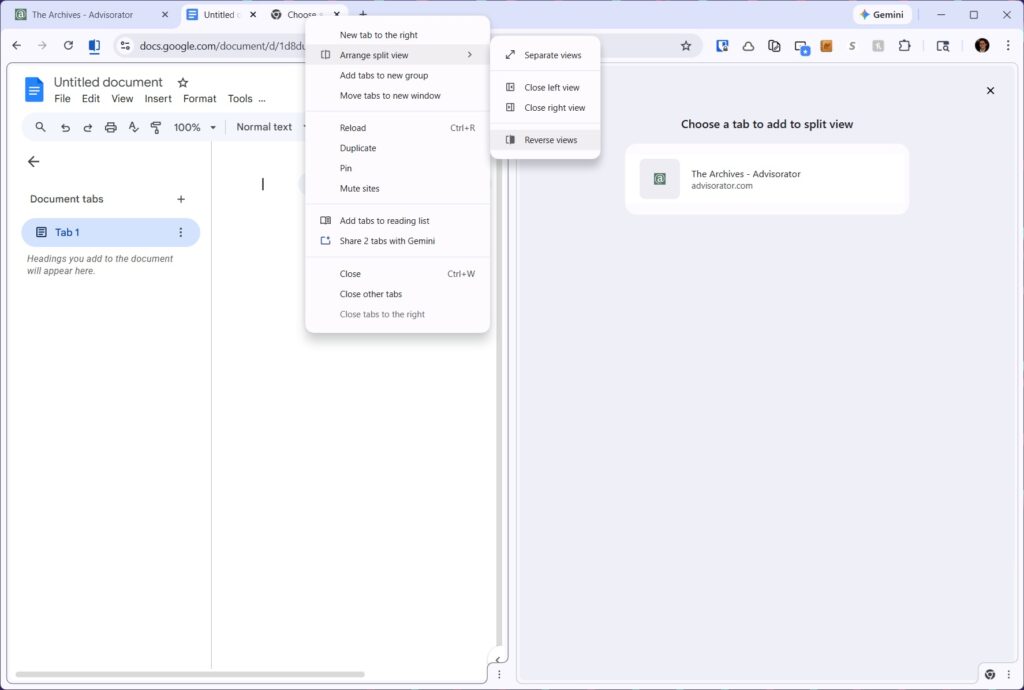
Chrome’s split-screen mode: Google Chrome has finally joined a bunch of other browsers in letting you view two tabs side-by-side in the same window on your computer. Try it out:
- Click the tab you want to appear on the left half of the screen.
- Right-click on the tab you want on the right half of the screen.
- Select “New split view with current tab.”
Alternatively, you can right-click your current tab and select “Add tab to new split view,” then use the right-hand menu to choose your other tab.
To split the tabs back up again, right-click on either one, then use the “Arrange split views” menu to select “Separate views.” You can also click the “X” icons in your tab list to close either tab entirely.
Using a different browser?
- Microsoft Edge, Vivaldi, and Opera let you drag and drop a tab into the browsing area to open it in split view.
- Floorp and Dia offer a split view menu when you right-click on a tab, similar to Chrome.
- Sorry, Safari users. You can’t do split-screen in a single window, but you can always have two browser windows running side-by-side instead.
Also new in Chrome: You can annotate and draw signatures on PDF files.
Try these apps
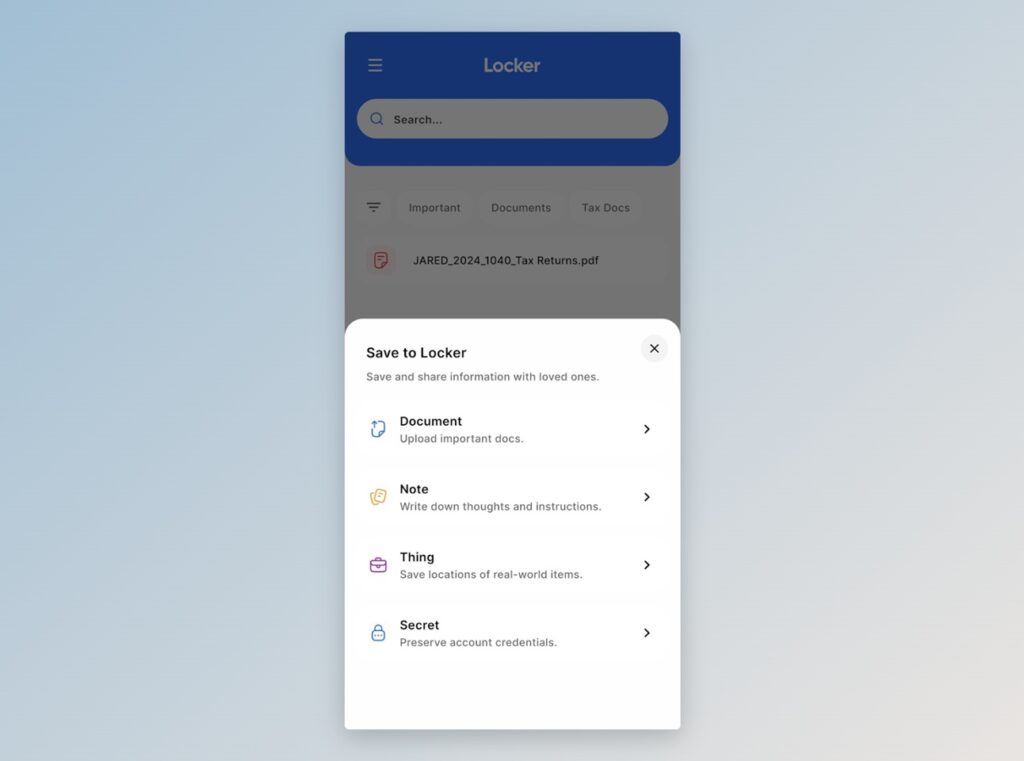
Secure document storage: Ente Locker is a new service for securely storing important documents and data, such as driver’s license scans, insurance policies, and medical records. Files are end-to-end encrypted, and you can share them with anyone. The free plan lets you store up to 100 documents.
I’ve been intrigued by Ente, which also offers a privacy-focused photo storage service and a free app for storing two-factor authentication codes. Locker looks like an interesting expansion for the company, and a deeper dive into its other offerings on my to-do list.
Block unwanted alerts: DoNotNotify is a free Android app for setting up rules to block specific notifications. If a shopping app constantly pesters you about sales, for instance, you filter out any alerts from that app with the words “sale” or “discount,” while still getting notified of important things like order status.
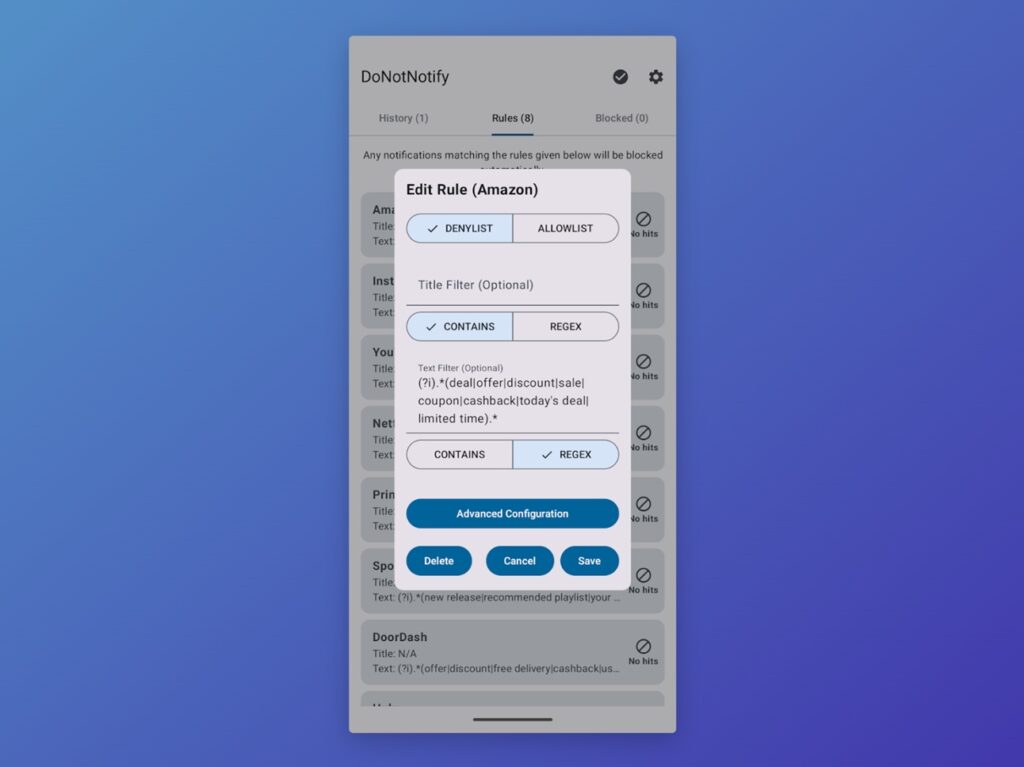
This can be useful if you don’t feel like fiddling with an app’s built-in notification settings, or if they don’t provide enough granular control. Check out JR Raphael’s Computerworld column on DoNotNotify for more details.
Spend wisely
Heads up: I’m thinking about including affiliate links in this section of the newsletter (and this section only). I wrote a blog post to explain further, and I’d really appreciate your feedback via email or in the Tech Buds forum. Thank you!
I’ve previously written about my appreciation for $50 portable monitors. Now you can get one for $40 instead. Just like my terrifically-named “BIGASUO” monitor, this one from the vaguely Lovecraftian “Yxk” has a 15.6-inch 1080p screen, built-in speakers, and options for either USB-C or Mini HDMI input, with cables included.
Don’t expect stellar screen quality, but monitors like these are great for adding a second screen to your laptop or even turning a phone into a portable PC. My portable monitor piece has more details.
More notable deals:
- Anker’s 737 power bank (24,000 mAh, 140W charging) is one of the best gadgets I’ve bought lately, and Best Buy has it for $69 open-box.
- Still available: Anker Nano 30W charger for $10.
- Select Roku customers: Streaming Stick for $10, Streaming Stick Plus for $15, Ultra for $50, Streambar SE for $50. (Must sign in to see these offers.)
- Apple Watch Series 9 with cellular and stainless steel case (41mm) for $249.
- The Apple Watch Series 11 returns to $299 (42mm in rose gold only), or $329 (46mm in black only)
- Samsung’s 27-inch 1440p OLED monitor hits a new low at $350.
Think about an Advisorator membership!
Advisorator’s paying members get the full newsletter every week, including this week’s lead story on dealing with the RAM shortage. You’ll also get access to my member forums (where we’re having a miraculously civil discussion about iPhone vs. Android) and all the guides I’ve published on the Advisorator website.
Thanks for reading! Catch you next week.
Until then,
Jared
Did someone share this newsletter with you? Sign up to get it every Tuesday.