
My storage-saving rampage

Get your Mac or PC storage space back
Plus: Spotify’s playlist folders, private notes, and unbeatable portable power station pricing
 Jared Newman |
Hey there! I’m Jared Newman, a longtime tech journalist, and you’re reading the free edition of Advisorator, my weekly tech advice newsletter. Did someone share this newsletter with you? Sign up to get it every Tuesday.
Last week, I realized that my Mac Mini had barely any storage space left.
This caught me by surprise as I don’t store many photos or videos on it—I have external drives and cloud storage for that—and it left me scrambling to clear things out so that my computer wouldn’t become unusable. With a little effort, though, I was able to get back nearly half of the Mac’s internal storage drive.
The ordeal inspired me to create a guide to freeing up storage space on your computer. Whether you have a Windows PC or a Mac, I’ve assembled some useful tools and clear steps to follow that can help reclaim your storage.
Learn to free up Windows and Mac storage space →
This guide is exclusively for Advisorator members. Sign up for $5 per month or $50 per year to get more in-depth advice each week, including guides and feature stories not included in the free edition. Learn more here.
News in brief
Permission Slip changes: I’ve previously recommended Consumer Reports’ Permission Slip app as a way to automatically wipe your information from data brokers and stop companies from selling your data to marketers. Now, Consumer Reports is transferring ownership of the app to DeleteMe, which operates its own data removal service.
Permission Slip initially cost nothing, though it eventually turned its automated data broker requests into a $10 per month premium feature. Consumer Reports says DeleteMe has more resource to support the app, which isn’t going away even if its long-term future just got murkier.
(Perhaps this is a story for another day, but something about these data removal firms always rubs me the wrong way. Maybe it’s that Consumer Reports once found that DeleteMe was largely ineffective at getting your data removed from people search sites . Or that the CEO of one data removal service had established dozens of sleazy people search sites himself. Or that if you want to keep your information hidden online, you can get most of the way there without paying for it.)
More notable news and reads:
- JR Raphael makes a strong case to stop buying Motorola phones.
- Facebook hopes you’ll pay $4 per month for extra features, but still won’t provide human support.
- Meanwhile, Meta’s AI-based support is helping hackers break into celebrities’ accounts.
- Qualcomm promises $300 laptops with lower-performance Snapdragon C chips.
- Booking flights from your library to avoid personalized pricing is probably overkill.
- Oura’s fifth-gen smart ring is much slimmer than previous versions.
- The Steam Deck portable gaming system gets a huge price hike. Once again, you can blame AI.
- Proton Mail now lets you send emails from your Gmail address to make switching easier. (I tried it for a while, but wound up with Fastmail instead.)
- Study: Employee spyware shares data with Facebook and Google. (Corrected link from last week.)
Tip of the week
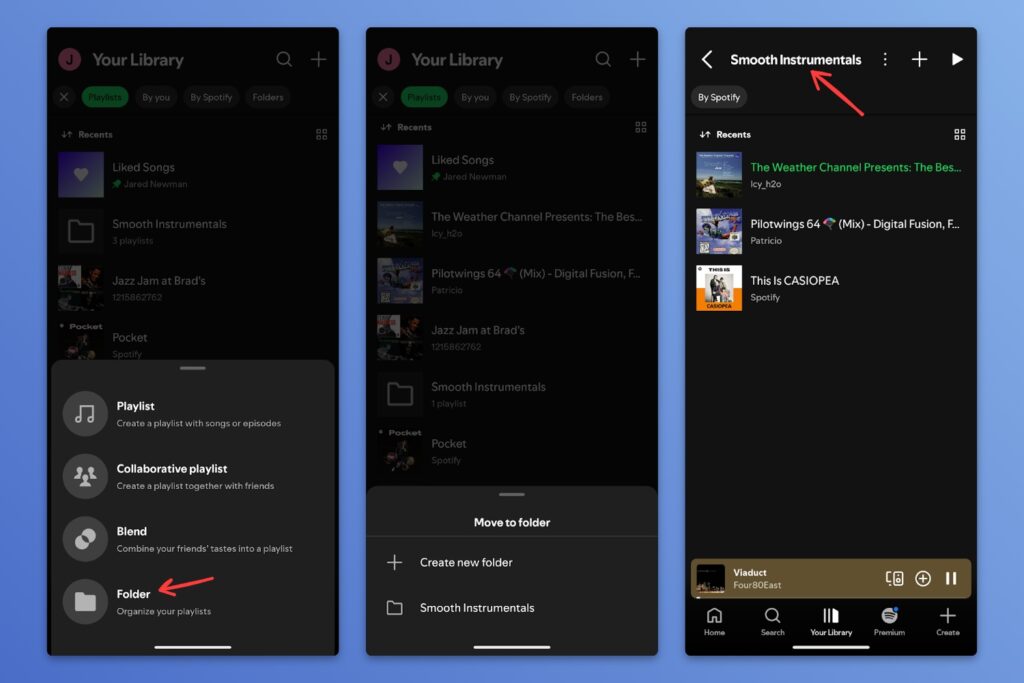
Spotify’s playlist folders: Spotify just had another smart idea, letting you sort playlists into folders. You can use organize not just the playlists you’ve created, but ones from others that you’ve added to your library.
To make a folder, head to the “Your Library” tab, hit the + button at the top, and select “Folder.” Then, long-press any playlist in your library and select “Move to folder.”
Spotify has also updated its iOS app to support background downloads for Premium subscribers, so your downloads will continue when you switch to another app. It’s about time.
Try these apps
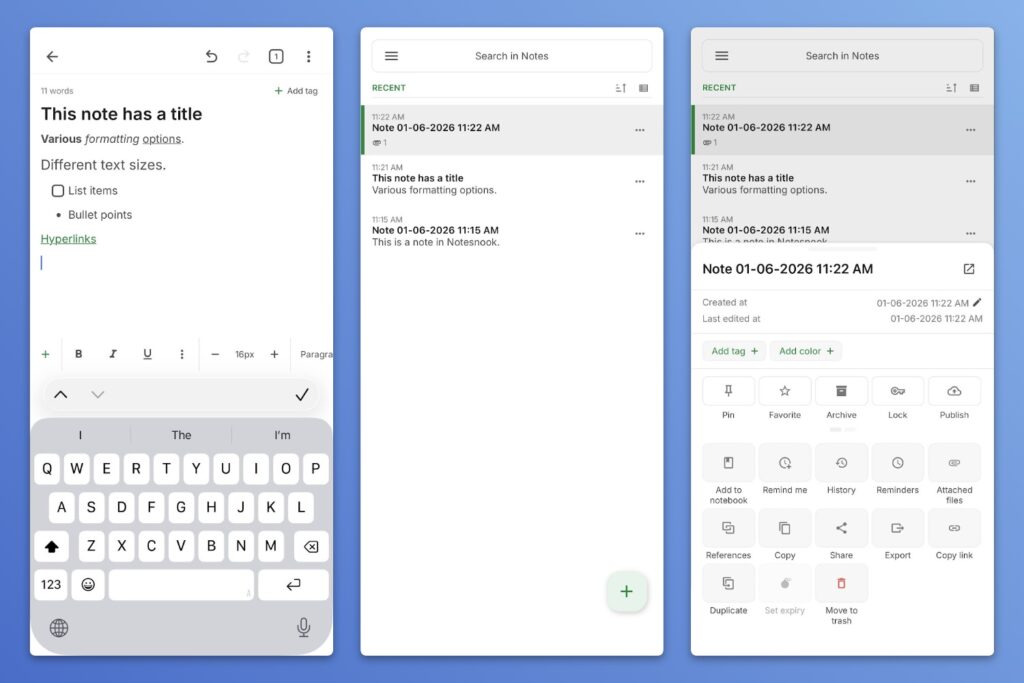
Private cross-platform notes: Notesnook is a note-taking app that works on practically any device (iOS, Android, Mac, Windows, Linux, web). It’s simple to use, but has a lot of handy formatting options, plus a web clipper for saving pages from your browser. Notes are end-to-end encrypted as well, so even the developers can’t see them. If you’ve been seeking an off-ramp from Evernote, maybe this is a possibility.
Windows-like taskbar on Mac: While spending more time with the MacBook Neo, I’ve been enjoying Taskbar by Lawand.io as a replacement for the MacOS app dock. Like in Windows, all your open windows appear along the bottom of the screen (including multiple windows from a single application), and they disappear when you close them.
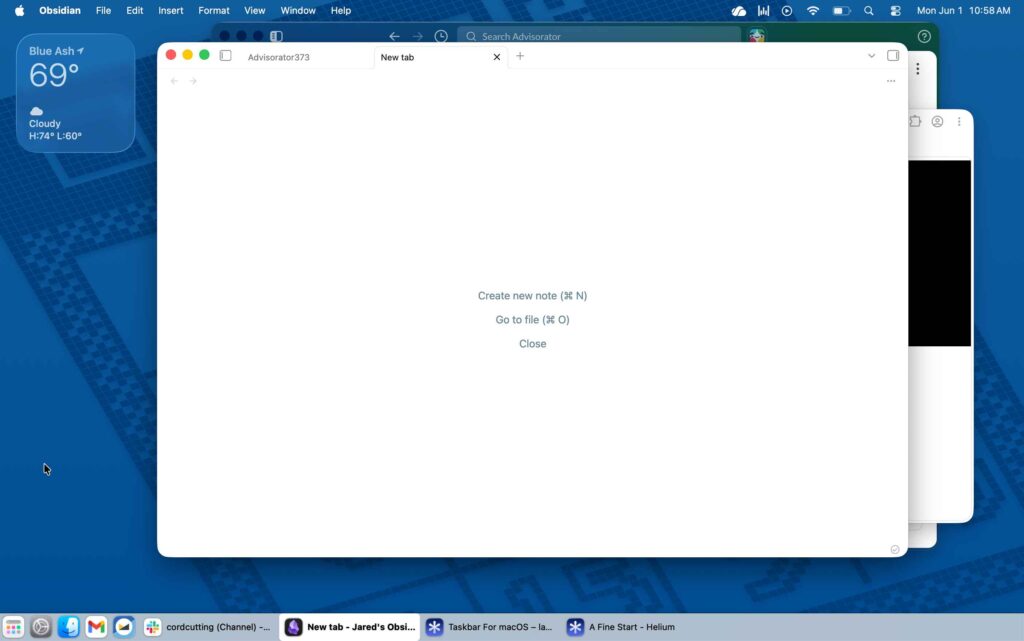
You can pin your favorites for quick access, and the Launchpad icon on the left replicates the Windows behavior of clicking the Start button and typing to find an app. I’ve tried other apps (including the more widely-known uBar), but none quite captured the Windows taskbar experience like this.
Taskbar is free until June 13, when the developer plans to launch a major new version for a $25 one-time purchase. As a longtime Windows taskbar appreciator, that’ll be an easy buy for me.
Spend wisely
This section of the newsletter may include affiliate links, which earn me a commission if you wind up purchasing something.
Jackery’s Explorer 1000 Portable Power Station is on sale for $256 through its direct store on AliExpress with promo code SSUS24. If you use PayPal as your payment method, you’ll get an extra $17 off, dropping the price to $239 before tax.
This is a 1,069 Wh power station with 1500W output, with three outlets for powering your devices during an outage or on a camping trip. It normally sells for around $450 on Amazon, and I’ve never seen it this cheap. Get it here, and remember to add the promo code SSUS24 at checkout.
(If you see an error that the item can’t ship to your state, tap the EN/USD drop-down to change your location, then change it back.)
Other notable deals:
- Anker’s Qi2 magnetic iPhone charging pucks are a little cheaper than usual at $24 for a two-pack.
- Apple Pencil Pro for $49 in used like-new condition. (Discount applies on the final checkout page.)
- AirPods Pro 3 for $147 in used like-new condition. (Discount applies on the final checkout page.)
- Or you can get them new for $199.
- Get the Ultimate Ears Wonderboom 4 Bluetooth speaker for $51, a record-low.
- Razer’s well-reviewed Pro Click Humanscale mouse drops to a record-low $50 from Woot. (More Razer gear on sale here.)
- Google’s official Pixel 10 Pro XL case drops to $23.
Thanks for reading!
Recently someone cancelled their Advisorator membership because they’re already getting plenty of valuable tech advice from the free edition that you’re reading now. I am not good at business.
But, if you enjoy this newsletter and want to contribute to its ongoing viability, please consider becoming a paying member. You’ll get in-depth guides like my new one on freeing up storage space, plus weekly feature columns, online archives, and access to my Tech Buds forum.
Until next week,
Jared
Did someone share this newsletter with you? Sign up to get it every Tuesday.