
Treat AI like an unreliable witness

How to really talk to AI
Plus: MacBook Neo alternatives, controlling what Google’s AI knows about you, and Office for less
 Jared Newman |
 Hey there! I’m Jared Newman, a longtime tech journalist, and you’re reading the free edition of Advisorator, my weekly tech advice newsletter. Did someone share this newsletter with you? Sign up to get it every Tuesday.
Over the weekend, I found myself having to disprove something that Google’s AI made up.
A reader of my Cord Cutter Weekly newsletter wanted to know why they couldn’t use the Apple TV app on their Roku after signing up for the service through the Roku Channel. This is in fact a notable downside with Roku’s subscription marketplace—you have to use Roku’s own apps and menu system to access the content—but Google’s AI overview was claiming otherwise.
Turns out Google was basing its answer on …
Keep reading this week’s feature story with an Advisorator membership. You’ll get the full newsletter every week, plus helpful online tech tutorials and access to my friendly reader forum.
News in brief
MacBook Neo alternatives: Intel is working with PC makers on a series of sub-$600 Windows laptops powered by its new Core 3 304 processors. While plenty of notebooks already exist in this price range, the goal here is to produce thin-and-light models that compete more directly with Apple’s MacBook Neo, which has far exceeded sales expectations.
Still, the laptops are only available in China for now, and the ones from bigger brands like HP and Asus are pricier than the Neo at $675 and up. I suspect this is just the start of more anti-Neo positioning from the PC industry to come. (Related: Last week’s column on the Neo replacing my iPad, and some good follow-up discussions in the Tech Buds forum.)
More notable news and reads:
- Microsoft starts previewing a movable Windows 11 taskbar.
- Walmart releases a new round of cheap Onn Android tablets.
- Study: Employee spyware shares data with Facebook and Google.
- Google, Samsung, and Warby Parker team on “Intelligent Eyewear” coming this fall.
- Google’s AI will let you talk about your Gmail and Docs files, but only if you pay for it.
- The Verge has a helpful roundup of Google’s other AI-related announcements last week (gift link).
- Hulry has a great list of Raycast tips. (From the archives; How I’m using Raycast to fly through my computer.)
Tip(s) of the week
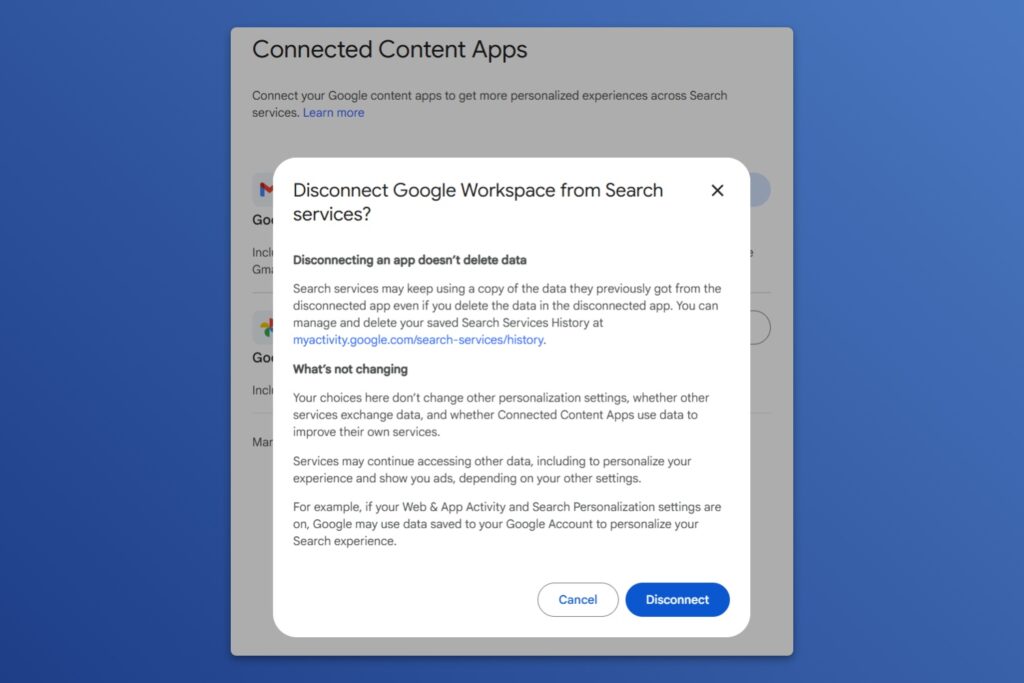
Control what Google’s AI knows about you: Earlier this year, Google started pulling personal information from services like Gmail and Google Docs into its AI answers for paid Gemini subscribers. Now it’s expanding that feature to all Gemini users, which means it can glean things like wedding details or travel interests from your emails and weave that information into its responses.
If you’d rather Gemini know as little about you as possible, head to this page. If either button says “Connected,” click on it and select “Disconnect.” (Conversely, click Connect to go all-in on letting Gemini into your personal life.)
Hide the Office Copilot button: Speaking of AI intrusions, Microsoft is rolling out a fix for the Copilot button that floats on top of your Word documents and Excel spreadsheets. Just right-click the button and select “Move to ribbon.” This will banish Copilot to the upper toolbar where it’s easier to ignore. (Not seeing this yet? In the meantime, you can still select “Dock” to make the floating button a bit less prominent.)
Try these apps
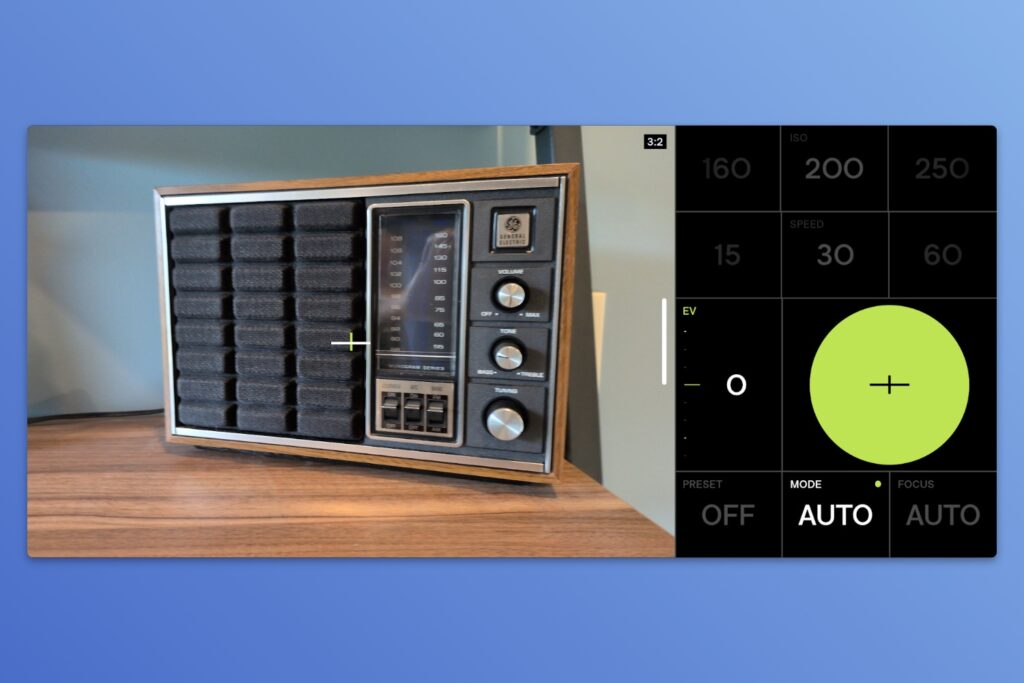
Anti-AI photography: VWFNDR+ MBL is a free Android camera app whose main hook is its lack of aggressive computational processing. If you’re ever put off by the unnatural highlights or colors in smartphone photos and would prefer to do your own post-processing, this app might be for you. (I also like how you can drag the white bar to switch between aspect ratios; drag it all the way down to see your photos.)
Car rental savings: My pal Rich DeMuro had a great list of travel apps in his latest newsletter, but the one that really caught my eye was AutoSlash. Provide the site with your car rental information after booking, and it will email you if the price drops. That way you can cancel and rebook at the lower rate. (The site, which is free to use, earns a commission when you rebook through its links.) I don’t have any rental bookings to try this with yet, but I’m looking forward to it.
Spend wisely
This section of the newsletter may include affiliate links, which earn me a commission if you wind up purchasing something.
Newegg is currently selling Microsoft 365 (i.e. Office) subscriptions at deep discounts. Microsoft 365 Family is on sale for $90 with a year of NordVPN or with a year of MalwareBytes Premium, versus a regular price of $130 for Office alone. Microsoft 365 Personal is on sale for $50 with NordVPN or with MalwareBytes Premium, compared to $100 for just Office.
You know how I feel about VPNs and extra antivirus, but these are good prices for Office even if you ignore the throw-ins, and you should be able to apply them to an existing account to extend your subscription.
Other notable deals:
- Best Buy Essentials 100W charger with USB-C and USB-A ports for $18.
- Anker 140W charger (3x USB-C, 1x USB-A) for $60 new, or $51 open-box.
- Need some cheap earbuds? JLab’s Go Air Pop+ are selling for $10 when you clip the on-page coupon.
- Sadly, $16 for a 128 GB MicroSD card is a good price these days.
- The Sonos Roam portable speaker drops to $134 with a free rugged Otterbox case.
- Samsung’s Galaxy Watch 8 drops to $160 open-box with promo code SLICKDEALS. Includes two wireless chargers.
- New low for the latest MacBook Air, now starting at $900. (B&H is also taking $150 off the 32 GB RAM models.)
- LG’s 32-inch 6K alternative to Apple’s Studio Display hits a new low at $1,300.
Thanks for reading!
If you enjoy this newsletter, please consider becoming a paying member. You’ll get in-depth features in each issue, plus access to my online tech guides, full newsletter archives, and friendly Tech Buds forum.
Until next week,
Jared
Did someone share this newsletter with you? Sign up to get it every Tuesday.