

How Claude says I used AI this year
Plus: Homeview reviews, menu bar/tray tricks, and extra-cheap earbuds
 Jared Newman |

Welcome to Advisorator! I’m Jared Newman, a longtime tech journalist, and this is my weekly advice newsletter.
It’s still no-paywall November here in Advisorator, so you’re getting the main feature story that I normally reserve for paying members. Enjoy!
Since the start of 2026, I’ve cursed at Claude approximately 20 times.
That’s according to Claude itself, as part of an analysis of how I’ve been using AI chatbots this year. Overall, my AI usage has more than doubled across Claude and ChatGPT, from 192 queries in 2025 to 434 in 2026. The conversations got longer as well: My average Claude chat contained less than three messages last year; it’s up to nearly seven this year.
Even with all the swearing, I’ve trusted AI with more kinds of queries as large language models have improved and my own AI skills have increased. I’ve also spent a lot of time on AI coding projects—things like my Wireless Plan Picker and Advisorator site redesign—which tend to involve hundreds of messages.
To get a better sense of how I’ve used AI in 2026, I exported all my data from Claude, then fed the resulting conversation records back into Claude for analysis. Perhaps this’ll give you some ideas on how to use these tools yourself:
Checking facts and finding links
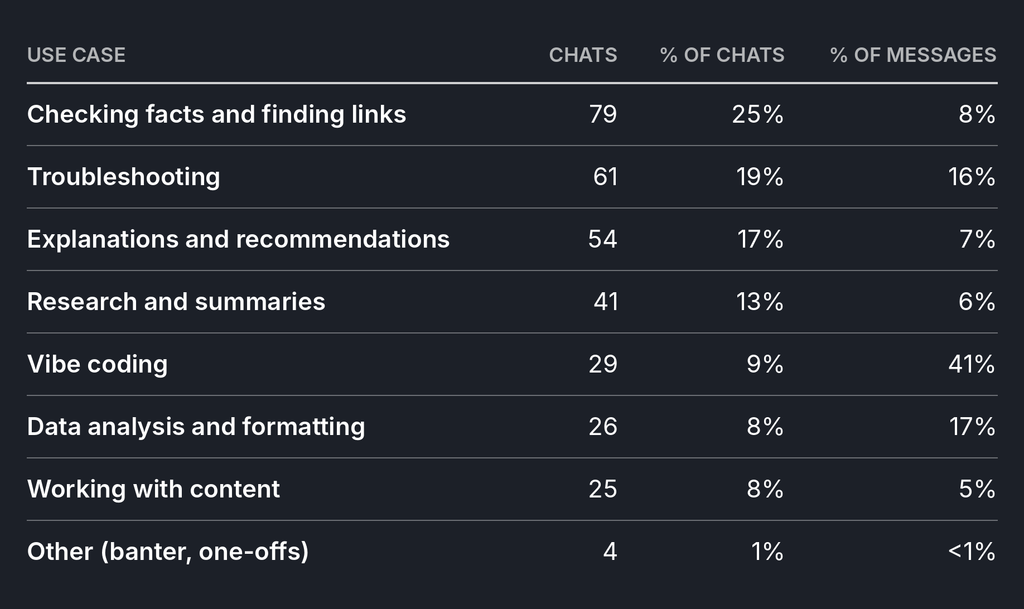
Oddly enough, my biggest use case for AI involves searching for links on the internet. Typically I’m trying to dig-up some half-remembered detail or check a specific fact, and describing what I need to AI is easier than figuring out the exact keywords for a traditional web search. These kinds of queries made up 25% of my Claude chats this year:
- “Find me the link to where Google said you’d never have to delete any Gmail because it was always adding more storage.”
- “Give me some famous examples of web pages that the Internet Archive preserved in their original form before they were changed or deleted.”
- “Is it true that in the mid-90s, the most popular way to access the internet was through portals like AOL and CompuServe?”
Troubleshooting
If you’re trying to fix something, AI can usually help when the solution is a little bit beyond your technical grasp. These kinds of queries made up 19% of my Claude chats this year:
- “Provide clear step-by-step instructions for using this Pluto TV Docker container with Channels DVR. Assume Channels is already set up, but Docker is not.”
- “My father-in-law’s Sonos soundbar keeps playing music from the Sonos app on his phone instead of the audio from the TV. How do we fix this?”
- “Walk me through the process of testing a redesign for my WordPress site. I want to be able to test a new theme without breaking my current site.”
Explanations and recommendations
AI can be helpful for clarifying confusion or answering questions about things that I’ve seen or read elsewhere. These are the kinds of queries that aren’t easily answered with links to other pages on the internet, and they made up about 17% of my Claude chats this year:
- “Translate this Brother printer privacy policy into plain English.”
- “Explain in layman’s terms the Real Time LUT on the Lumix L10, what it accomplishes, why it matters, and whether it’s meaningfully different from competing concepts.”
- “What does this mean? ‘Guaranteed Auto Protection (GAP) coverage may pay the balance due on a loan or lease if your covered vehicle is a total loss and the remaining loan amount exceeds the value of the vehicle.’”
Research and summaries
Not everything that I’m researching needs its own deep dive with a bunch of web searches and source materials. In the name of expediency, sometimes I’ll just have AI do the research and pull together a summary. This kind of thing made up 13% of my Claude queries this year:
- “Do some research Mark Graham, who heads the Wayback Machine at the Internet Archive. What do I need to know about him and his history? Any notable interviews, blog posts, etc.?”
- “Who else is working on smart rings for voice notes beyond Sandbar (Stream) and Pebble (Index)?”
- “Give me the gist of this 15-minute YouTube video. What’s the main argument?”
Vibe coding
While making software with AI only accounted for 9% of my Claude chats this year, it made up roughly 41% of all the messages I sent. This has been by far the most rewarding AI use case for me. Some examples:
- Redesigning the Advisorator website with a custom WordPress theme and search plugin.
- Turning my wireless plan comparison chart into an interactive phone plan picker.
- Building custom plugins and themes to fit my Obsidian note-taking workflow.
- Creating an app that clears out similar-looking or duplicate photos on your computer.
Data analysis and formatting
Similar to how AI excels at coding, it’s also useful for analyzing or formatting large datasets that would be tedious to work with on your own. This kind of thing accounted for 8% of my Claude usage this year:
- “Find the channel names that correspond with the images in this screenshot and list them all on a single line of text.”
- “Put these numbers on a line graph.”
- “Compare these two lists of TV channels and tell me which ones are missing from each.”
Working with content
I don’t use AI to write for me, because the words never come out right and I enjoy the writing process anyway. Generating images from whole cloth doesn’t work for me either, as the results often come out looking too weird or obviously AI-generated.
Still, about 8% of my queries involve small refinements to things I’m working on:
- “Expand the edges of this product image so it gracefully has a 3:2 aspect ratio”
- “Netflix’s standing in our home is no longer unimpeachable.” What’s a more appropriate word than unimpeachable?
- “Suggest some short and snappy headlines for this story about non-cancellable streaming gift cards.”
What I’m still not using AI for
One thing that I hope is clear from all this is that I’m not trying to offload all my thinking to AI. It’s helpful as a research assistant, and it’s been genuine breakthrough for personal software projects, but I treat every answer with skepticism. I’ve also avoided asking AI for personal advice (too many horror stories of folks who’ve destroyed their human relationships in the process), and even the AI companies tell you not to use them for medical diagnoses or financial advice. (Not that they’ll stop you from doing so.)
Arguably I’ve personified Claude too much with my little curses and insults, but it beats treating AI like some deific superintelligence. AI has become more useful to me over the past year, but it’s still a tool in the end.
I’m including feature stories like this one in the free newsletter through the end of this month. Want to keep going? You can get started for just $1.
News in brief
Homeview reviews: If you have 13 minutes to spare and are at all interested in Apple’s first smart display, Joanna Stern’s review is worth your time. I learned a lot. She mostly liked the device, but ran into some weirdness with Siri. (For those who prefer print, Jason Snell sees potential but found some rough edges.)
Meanwhile, longtime reader Len J. asks: What happened to Google’s smart displays? Indeed, the Nest Hub and Nest Hub Max are out of stock pretty much everywhere, and have been for months. Google told The Verge more than a year ago that it was “definitely committed to smart displays,” but it sure doesn’t seem that way. Maybe Apple’s foray into the category will prompt a response.
More notable news and reads:
- Microsoft blames an errant “network capacity upgrade” for last week’s major Outlook outage and insists it wasn’t AI-related. No word on whether shedding huge amounts of institutional memory was a factor.
- Ring will soon sell a surveillance drone that flies itself around you house, six years after announcing the concept. You won’t be able to control it yourself.
- Apple kills its often-worthless community support forums. Microsoft should be next!
- More websites are blocking AI agents like Meta’s Muse, including United, Target, and Booking.com. This 2025 piece from Nilay Patel explains why.
- Using smart locks with Android phones just got easier.
- I feel like I should acknowledge the Nvidia CEO drama even though it’s so far upstream from impacting your everyday technology use. The PC gaming crowd is increasingly nervous about Nvidia’s commitment to the category, though.
From the blog
I’ve been happy with my decision to start up a blog again, as it’s given me an outlet for things don’t totally fit within the newsletter.
Some stuff I’ve posted about in the past week: Extensions in Vivaldi’s Android app (yay!), the weird world of vibe-coded music gear firmware, hiding Reddit’s obnoxious “Get the Reddit app” pop-ups on mobile, playing PC games on Android phones, and an ode to the podcast that puts me to sleep most nights.
Wireless plan picker updates
In case you missed it last week, check out my Wireless Plan Picker, which helps you find cheaper phone service. I got a lot of great feedback in response to last week’s newsletter and have made a bunch of improvements as a result.
Try these apps
Organize the Mac menu bar: Chest is a new app for managing menu bar icons in MacOS 27 Golden Gate. Hold Cmd while dragging an icon with your cursor, and move any icons you don’t always want see to the left of the dot. They’ll disappear until you click the dot again. There’s also a little chest for stashing even more icons without crowding the menu bar itself.
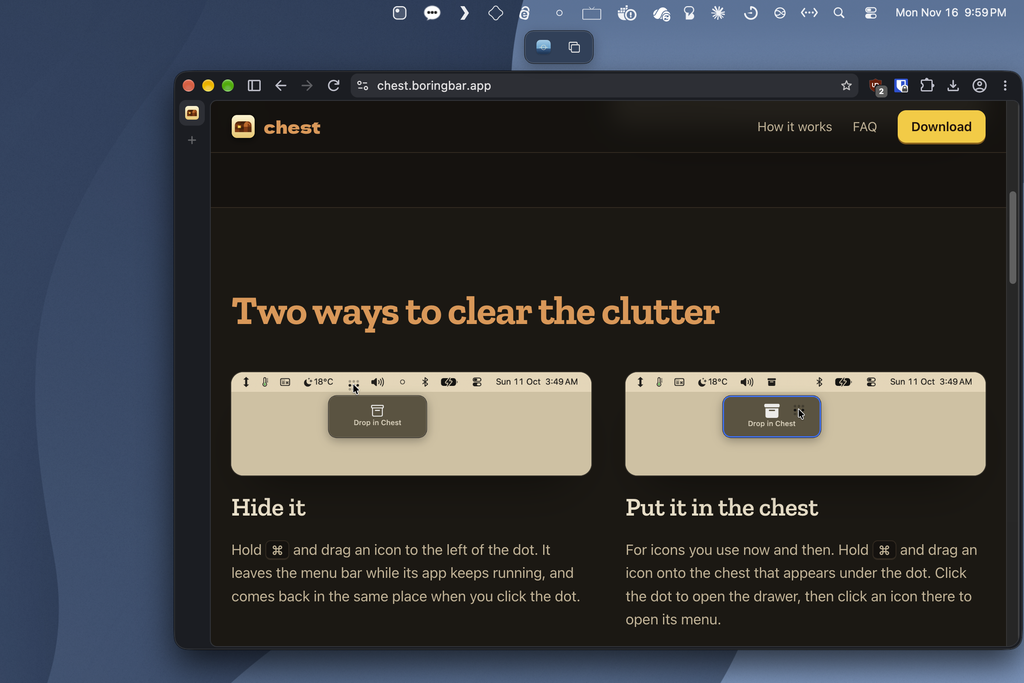
I’ve previously recommended an app called Ice for this purpose, but it’s no longer being maintained and doesn’t work with MacOS 27, which changes how menu bar icons work. Chest is free to use and serves as an ad of sorts for BoringBar, a Windows-style app dock from the same developer. (Via Lex Friedman)
Try some Windows tray apps: On Windows, the tray is roughly equivalent the MacOS menu bar, allowing apps to provide useful shortcuts along the right side of the taskbar.
While fun tray apps can be hard to find on Windows, developer Joe Finney has tried to change that by developing 31 new tray apps, one for each month of October. Highlights include a habit tracker, a pop-up calculator, and a miniature version of Solitaire. (Joe, who I interviewed for a FastCo story earlier this year, also develops Traydio, an excellent tray app for playing internet radio stations.)
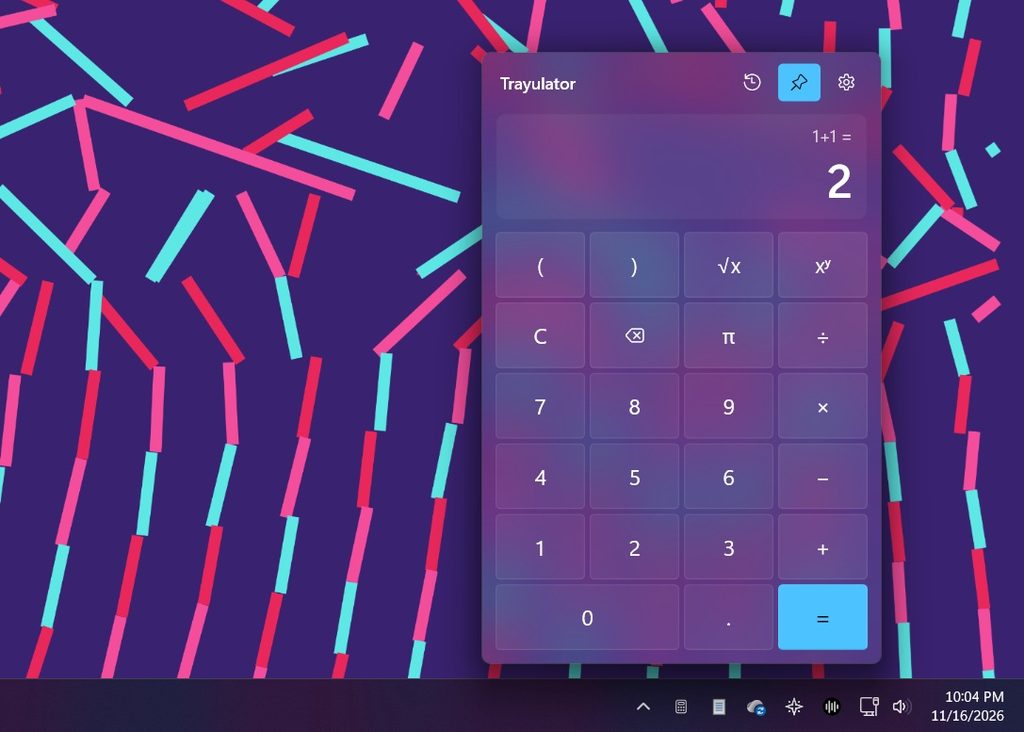
Unlike on MacOS, you don’t need a whole other app to manage your tray icons. Windows automatically relegates some apps to an overflow menu, which you can reach by clicking the ^ icon. Drag an icon from this menu down to the taskbar to make it always visible. (Via friend-of-the-newsletter Justin Pot)
Spend wisely
This section of the newsletter may include affiliate links, which earn me a commission if you wind up purchasing something.
Some notable deals today:
- Did you miss the last cheap rechargeable hand-warmer deal I linked to? These from the extremely normally-named AUIIAH are on sale for $7 with code JSL3WTS6. (Same disclaimer about possibly burning your house down applies.)
- CMF by Nothing earbuds: Buds Neo for $17, Buds 2a for $20, Buds 2 for $25, Buds 2 Pro for $35. (Compare the Neo and 2a here, or the entire 2 series here.)
- TP-Link Tapo energy-monitoring plugs: $15 for a two-pack.
- Get a full-size Amazon Echo 4th-gen speaker for $40. Requires a US power adapter which is sold separately.
- Amazon’s Alexa tablets (with the full Google Play Store) are already on sale: 8-inch for $150, 11-inch for $220, 12-inch “Pro” model for $400.
- AirPods Pro 3 drop to $179, $20 less than the usual sale price. (Includes 2 years of AppleCare+ at Costco.)
- New low for Apple Watch Series 12 at $329 (42mm) or $379 (46mm). Best Buy has open-box options for even less.
Consider an Advisorator membership!
I hope you’ve been enjoying the paywall-free version of Advisorator. Sign up to keep getting my weekly feature stories after this month is over. If you sign up by the end of this month, you can try another month for just $1:
Let me know if you have any questions. Thanks for reading!
– Jared
Did someone share this newsletter with you? Sign up to get it every Tuesday.