
Advisorator Free: Make the most of iOS 14.5

iOS 14.5 tricks to try

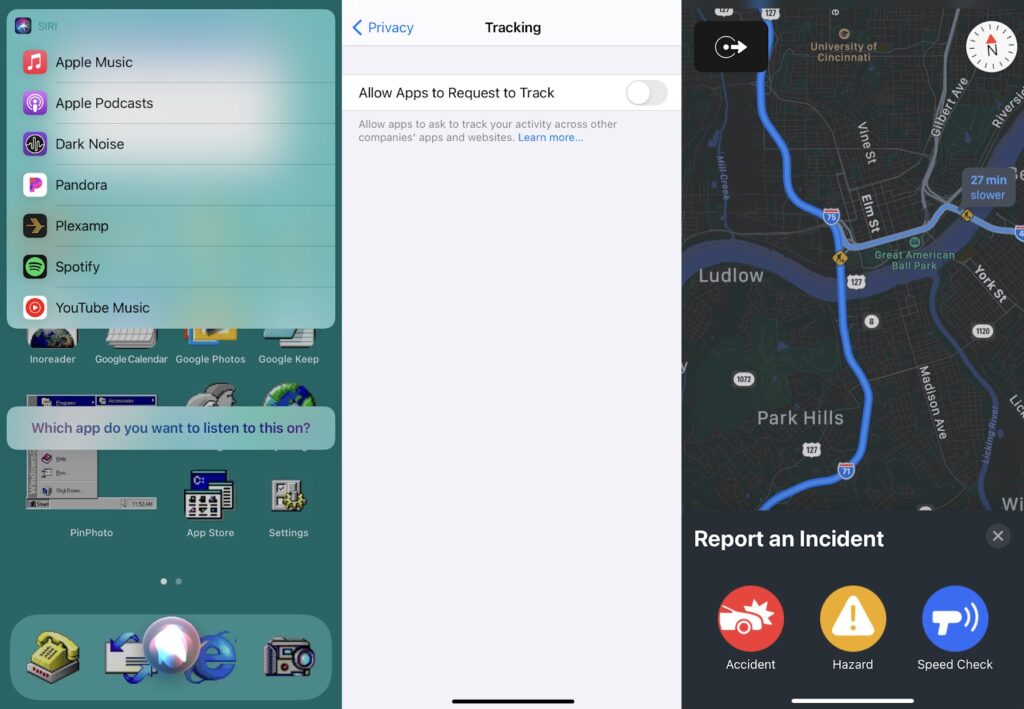
On Monday, Apple released iOS 14.5, which despite being a “point” release almost has the feel of the big updates that come out each fall. It’s been in beta testing since February, with a steady drip of features being revealed since then, and it even has its own press release now that it’s broadly available.
Here’s what to check out once you’ve got the update:
App Tracking Transparency: The headlining feature of iOS 14.5 makes apps get your permission to share personal data with other apps and services. For instance, if you’re playing a game that wants to hand over your behavior data to marketers, it’ll have to ask you first via a pop up. While this isn’t a catch-all way to protect your privacy—companies like Facebook and Google can still collect whatever they want about you through their own apps—it’s still a big step forward for controlling where your data ultimately goes.
You don’t have to wait for apps to ask for permission before saying “no,” either. Instead, just head to Settings > Privacy > Tracking, then uncheck “Allow Apps to Request to Track.” This will prevent apps from even asking if they can spread your data around.
Bypass FaceID with a mask on: If you’re wearing both an Apple Watch and a face mask, iOS 14.5 also lets you skip the lock screen without entering a PIN. Just make sure your watch is running WatchOS 7.5, then head to Settings > Face ID & Passcode > Unlock with Apple Watch on your phone. (I still hope Apple will drop the mask requirement for this feature someday.)
Apple Maps crash reports: Apple’s taking a page from Waze by adding traffic incident reporting to Mask. You’ll see icons for incidents that other users report, and while driving, you say things like “Hey Siri, there’s a crash ahead.”
Sort-of-default music apps: When you ask Siri to play music without specifying a source, it’ll ask which app you’d like to play it in. Sadly, you still can’t choose a default music app outright, but Apple says Siri will learn your preferences over time. (In the meantime, you can still say things like “play [artist] on Spotify” or “play [station] in Pandora.”)
New emoji: Check out the full list.
More Siri voices: Apple’s assistant no longer defaults to a female voice when you’re setting up a new iPhone, and it now has more English voices to choose from. Find them under Settings > Siri & Search > Siri Voice, but good luck not selecting “Irish, Voice 1” once you’re there.
The latest from PCWorld
When I was a kid, I’d absorb hints and cheat codes for the latest Nintendo games through a sort of osmosis. On playgrounds or at friends’ houses, we’d trade these bits of wisdom as if they were arcane secrets—even though most of us had simply picked them up by reading Nintendo Power.
Those days are long gone, of course, but if a grown-up version of this phenomenon existed, it might be the way we talk about keyboard shortcuts. Discovering a new way to save time in your work can feel like a superpower, even if it’s a little less thrilling than learning about the Konami Code.
Over at PCWorld this week, my latest syndicated Advisorator feature shares some of my favorite keyboard shortcuts for faster typing and web browsing. I sent out a version of this story in 2019 to paid Advisorator subscribers, and some of the shortcuts therein have profoundly changed the way I work. Check them out.
Spend wisely
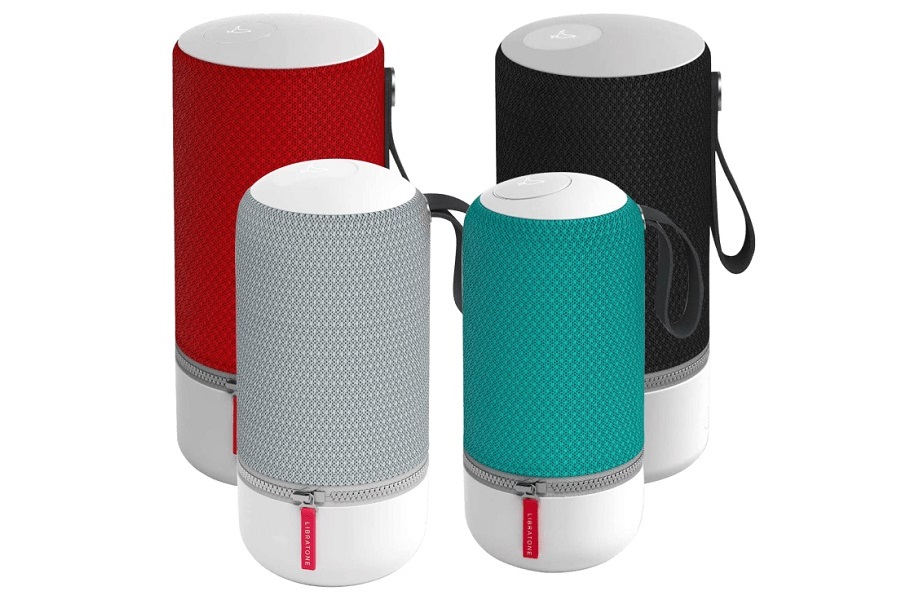
If you’re in need of more portable AirPlay 2 speakers for your multi-room music setup, MorningSave is selling Libratone’s Zipp speaker for $65. Just make sure to click “Got a coupon code?” on the order page and use the code LIBRAGONE. (You can also opt for the Zipp 2, which has hands-free Alexa voice control built in, for $80, but I’d skip the cheaper “Mini” variants.)
The Zipp and Zipp 2 originally sold for $299, and reviews praised the speakers’ style and sound quality while knocking the high price. They’ve got an advertised 10-hour battery life, and they also support Bluetooth connectivity in addition to Apple’s AirPlay 2. Libratone has since gone into bankruptcy, which may explain why MorningSave is clearing out inventory.
A word of caution, though: Don’t choose MorningSave’s $4.99 shipping option, or you’ll be on the hook for a monthly subscription at that price. (Flat shipping at $7.99 should be selected by default.)
Thanks for reading!
As a reminder, you’re reading the free version of Advisorator, which I’m currently sending out every two weeks. If you’re enjoying it, consider upgrading your subscription to a bunch of other benefits:
- Weekly newsletter with in-depth features, more tips, and perspective on the tech news that actually affects you.
- Deal alert emails, so you don’t miss out when the best stuff is worth buying.
- Personalized tech advice via email or live chat room.
Interested? Sign up here and get a four-week free trial, with transparent billing and hassle-free cancellation.
Until next time,
Jared