
What a free iPhone will cost you

Finding the best phone deals
Plus: New Apple gear, free file compressor, and how to remember where you put stuff
 Jared Newman |
 Hey there! I’m Jared Newman, a longtime tech journalist, and this is Advisorator, my weekly tech advice newsletter. Did someone share this newsletter with you? Sign up to get it every Tuesday.
Heads up: Next week’s newsletter will arrive on Wednesday instead of Tuesday, on account of Yom Kippur on Monday. Thanks for your patience!
Apple announced new iPhones this week, and if you’re in the United States, the cheapest way to get them is through one of the big three wireless carriers.
But while they love to yell about getting a new iPhone “on us,” they tend to bury important details in the fine print. To unlock their best deals, you’ll likely need one of their most expensive wireless plans, plus a phone to trade in that’s no more than a few years old.
To figure out what a free iPhone will actually cost you, check out my newly-updated Phone Deal Finder. Enter the name of the phone you have now, and you’ll see a list of wireless plans and the trade-in credit you’ll get with each one.
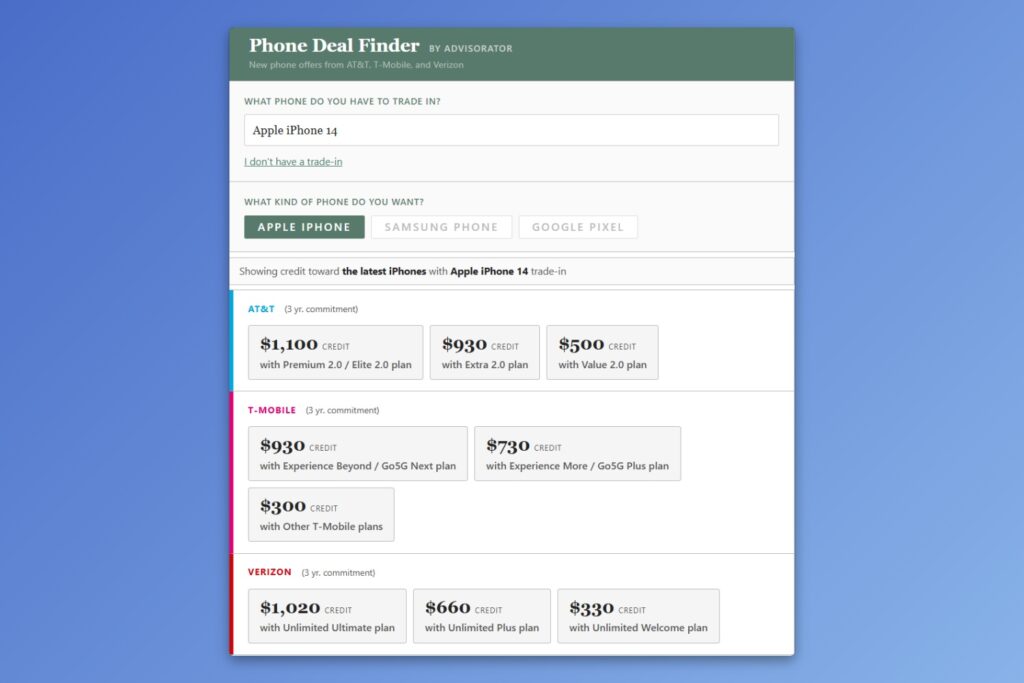
Android user? The Phone Deal Finder works for you, too. Just switch to the “Samsung” or “Google Pixel” tabs to see trade-in values toward their latest flagships.
A few other notes:
- When you’re ready to compare the cost of these wireless plans, consult my Wireless Plan Picker, which covers every plan from AT&T, T-Mobile, and Verizon (with more to come).
- For more context—including cheaper plans where you bring your own phone—check out my guide to picking a data plan.
- For more ways to save money, head to this collection of guides on the Advisorator site. My goal is for your Advisorator membership to pay for itself.
The resources above are for Advisorator’s paying members. Sign up to get in-depth advice from me every week. Get started here for as little as $5 for a month. The free newsletter continues below.
News in brief
New Apple gear
The past week’s biggest tech news came from Apple, which announced the iPhone 18 Pro and Pro Max, the foldable iPhone Duo, the Apple Watch Series 12 and Ultra 4, and AirPods 5.
As a foldable phone fan, I’m most intrigued by the Duo. While it’s not wildly different from Android-based foldables (particularly Samsung’s passport-shaped Fold8), Apple has tried to shave away some of those phones’ compromises. The crease is barely visible, it works with MagSafe accessories, and it’s waterproof. You can also use it with an Apple Pencil (which is pretty much the only reason I still have an iPad Mini) and I’ll wager that app makers will do a better job supporting the new format than they do on the Android side.
Still, every foldable phone has trade-offs, including the iPhone Duo: It’s thicker and heavier than every competing Android foldable, and the camera system is worse than Apple’s Pro-level iPhones. Also, it costs $1,999. If you’re still considering it, I wrote a piece for FastCo about what to expect from the Duo, based on my years of using other foldables.
Other Apple notes:
- The iPhone 18 Pro has the same design as last year’s models, but a smaller front camera cutout, bigger battery, and variable aperture camera lens, with new manual controls built into the Camera app. It’s also $100 more than the 17 Pro. Here’s a useful comparison.
- As rumored, Apple did not announce a new regular iPhone 18, and probably won’t until the spring.
- The new Apple Watches can persistently capture audio to recap earlier conversations, summarize what someone just said to you, and alert you to important sounds. Apple says it’s not a privacy nightmare because the watches won’t store any audio recordings or sensitive data, among other reasons. It doesn’t address the uncharted social territory we’ll be heading into when every offline conversation can become part of a permanent record.
- The fifth-gen AirPods—not the Pros—have better sound and noise-cancellation. The rumored AirPods Pro with cameras, which seem like an even bigger potential privacy nightmare, have thankfully not emerged yet.
- HomePods, Apple TV, and other smart home stuff could still happen later this year.
- iOS 27, MacOS 27, and their offshoots are available now. More on these once I’ve had more time with them.
Other news and reads unrelated to Apple:
- Google brings its Gemini desktop app to Windows. The Mac version arrived in April.
- Google discontinues its only Android tablet.
- Meta has a new AI agent it wants you to use, even though it targets ads based on your conversations.
- Meanwhile, Meta says it “missed the mark” after its Facebook AI suggested digging up users’ detailed personal information. Maybe just run in the opposite direction of anything AI-related from Meta.
- Friend-of-the-newsletter Justin Pot has advice on seeing just your Instagram friends’ activity, without the algorithmic slop.
- For Fast Company, I wrote a profile of Pangram, whose ability to detect AI writing has put it at the center of various scandals.
Tip of the week
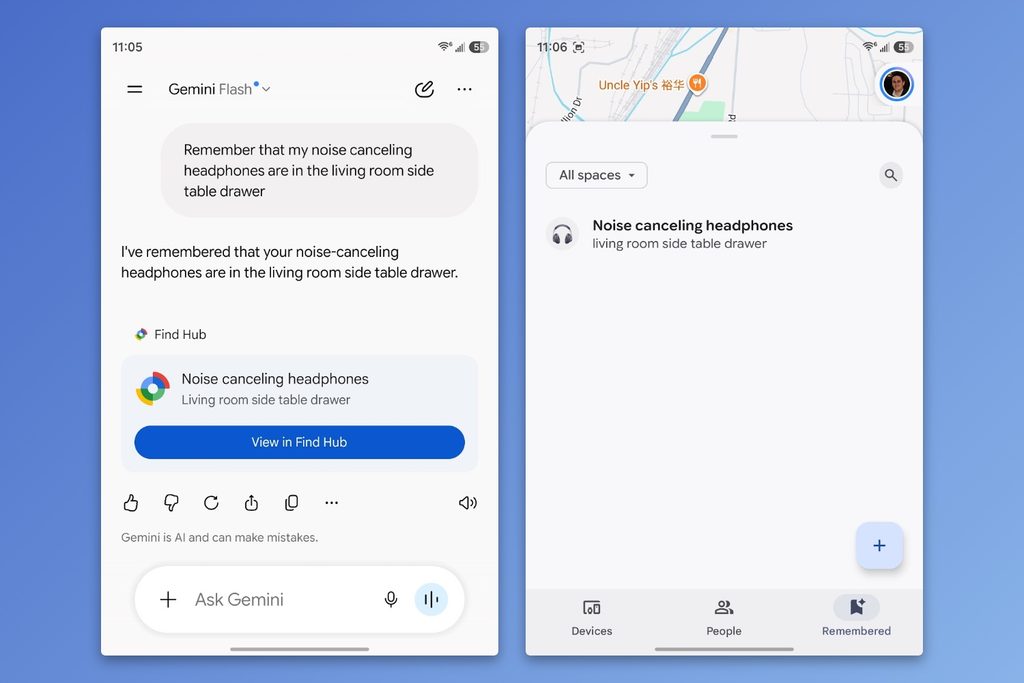
Remember where you put stuff (on Android): Got an Android phone? Now you can use Google’s Find Hub app to remember where you’ve stored important documents and belongings, with no pricey item trackers required.
Just look for the new “Remembered” tab, where you’ll be prompted to add items with Google’s Gemini assistant. (You can use prompts like “Remember that my headphones are in the living room side table drawer.”) After the initial setup, you can also just hit the + button to log item locations.
Apple’s Find My app doesn’t currently offer anything similar, but it should!
Try these apps
Remember to do stuff (on iPhone): Unforgetful is an iPhone app whose sole job is to keep pestering you about incomplete tasks that you’ve set in Apple’s Reminders app. The idea is that if you create reminders with Siri (“Hey Siri, book the concert tickets”), you don’t have to bother setting a time or date, as the app will periodically remind you on its own. The app requires a $20 per year subscription, but you can try it free for a month. Maybe it’s worthwhile if you’re constantly putting things off until you forget about them. (My wife will probably make me subscribe if she reads this.)
Free file compressors: For my pal JR Raphael’s Cool Tools newsletter, I wrote about Vidshift and Nanofile, two free websites for making files smaller. The former is for video, and the latter is for everything else, including pictures, PDFs, and audio recordings. Check out the full writeup for more details.
Spend wisely
This section of the newsletter may include affiliate links, which earn me a commission if you wind up purchasing something.
Again, it’s a bit slow on the deal front this morning, but here’s what I’ve got:
- Aukey 2-in-1 Qi2 magnetic charging stands (iPhone or Pixel 10/11, plus earbuds): $30 for a two-pack.
- Baseus 70W charger (2x USB-C, 1x USB-A) for $20 with promo code V3R6W2JA.
- Samsung Galaxy S25 Ultra for $675 refurbished with promo code A4CSEP10, $35 more than Labor Day but still a decent price.
- Apple’s refurbished M5 MacBook Air is $200 less than new. Refurb MacBook Neos are still available as well.
Thanks for reading!
If you enjoy what I’m doing here with Advisorator and want more in-depth advice from me, consider becoming a paying member. I typically publish one guide or feature story for members each week, such as the Phone Deal Finder and Wireless Plan Picker that I mentioned at the top of the newsletter. Hit the button below to get started.
That’s all for now. Catch you next week.
– Jared
Did someone share this newsletter with you? Sign up to get it every Tuesday.