

It’s no-paywall November!
Hey there. I’m Jared Newman, a longtime tech journalist, and this is Advisorator, my weekly tech advice newsletter.
You’re currently reading the free edition, and this month I want to try something different.
Usually, I put the top feature story in each newsletter behind a paywall. For the next four weeks, I’m not going to do that. Each issue of the newsletter will be paywall-free.
Of course, I’m hoping some of you will find enough value in my work to become paying members, but if not, that’s also fine. You’ll continue to receive the free newsletter when this little experiment is over.
For now, enjoy this week’s full newsletter!
A Fastmail follow-up
Plus: Why I’m blogging again, the first touchscreen Mac, and your phone’s file manager
 Jared Newman |
I’ve been trying to wean myself off Gmail for more than three years now.
As I wrote back in 2023, I’m tired of relying on Google’s opaque algorithms to determine which emails reach my inbox, and of worrying about Google Photos eating up my email’s storage space. I also want to become less dependent on Google overall, especially as it clutters everything with AI and starts mining your email for targeted ads. Leaving behind my Gmail address, which is overrun with bad PR pitches and marketing, sounds pretty appealing as well.
But quitting Gmail hasn’t been easy. I started with Skiff, but had to bail when it shut down in 2024. I spent a year with Proton Mail, but got fed up with its broken search, limited notifications, and performance hiccups. Then came Fastmail, which I started using in the middle of last year, and since then a bunch of you have asked how it’s been going. Here’s my overdue update.
Fastmail mostly just works
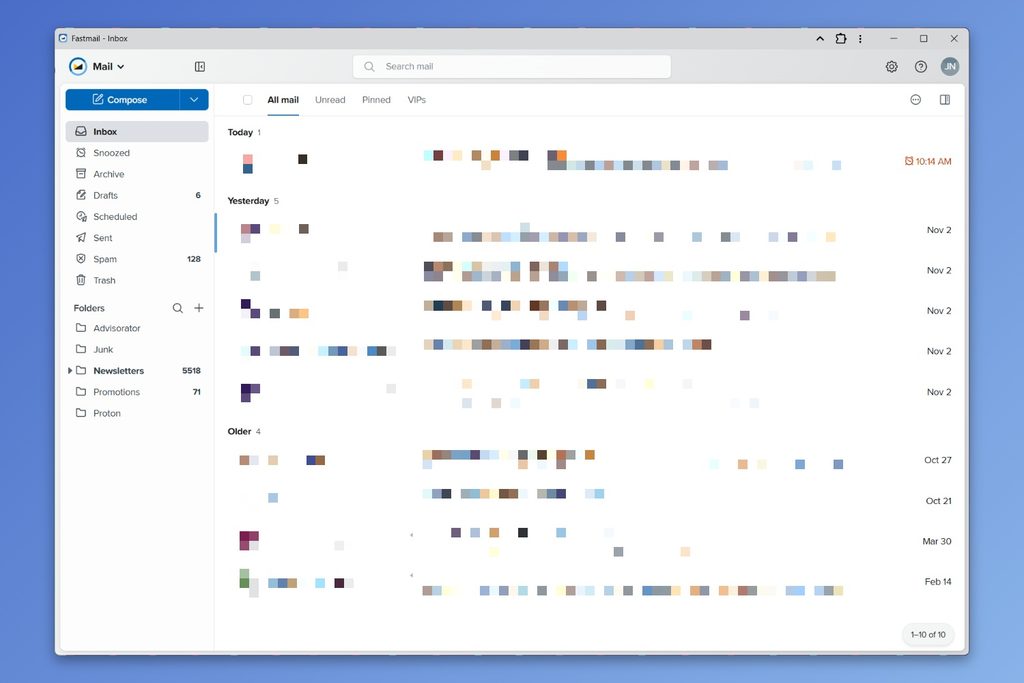
The reason I haven’t written much about Fastmail since the switch is that I don’t have much to say, in a good way. The website and mobile app load quickly, the search function works as expected, and the spam filter is excellent. It’s easy to use on the surface, but hides all kinds of useful tweaks under the hood.
Unlike Gmail, Fastmail isn’t free. It costs $6 per month or $60 per year for a plan with 60 GB of storage, with discounts for partners and families. Still, this is money I’d be spending anyway to receive emails via my @jarednewman.com addresses. Using a custom domain is one of the best email-related moves I’ve made, but most email providers charge for it, including Gmail. Fastmail includes this feature at no extra cost.
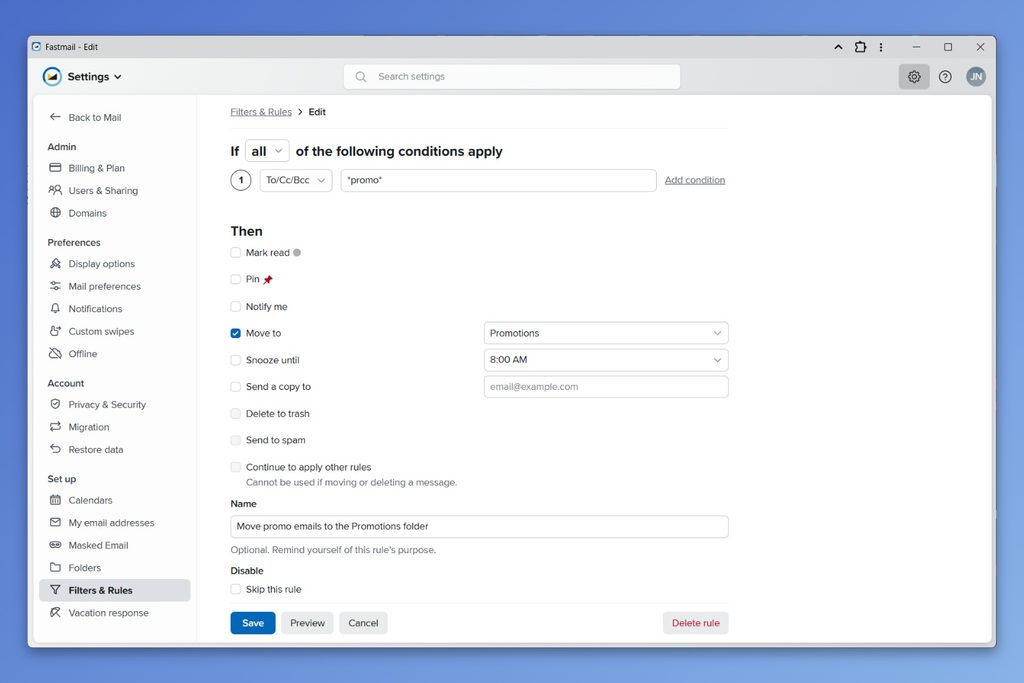
The custom domain makes it super easy to create special-purpose addresses, and Fastmail offers robust filtering tools to control where those emails go. The addresses that I reserve for readers (like advisorator@jarednewman.com) go straight to my inbox. A separate address for newsletters goes to its own folder and forwards a copy to my RSS reader. For marketing emails, I create a unique address for each sender with the word “promo” in it, and have a rule that sends those emails straight to a “Promotions” folder.
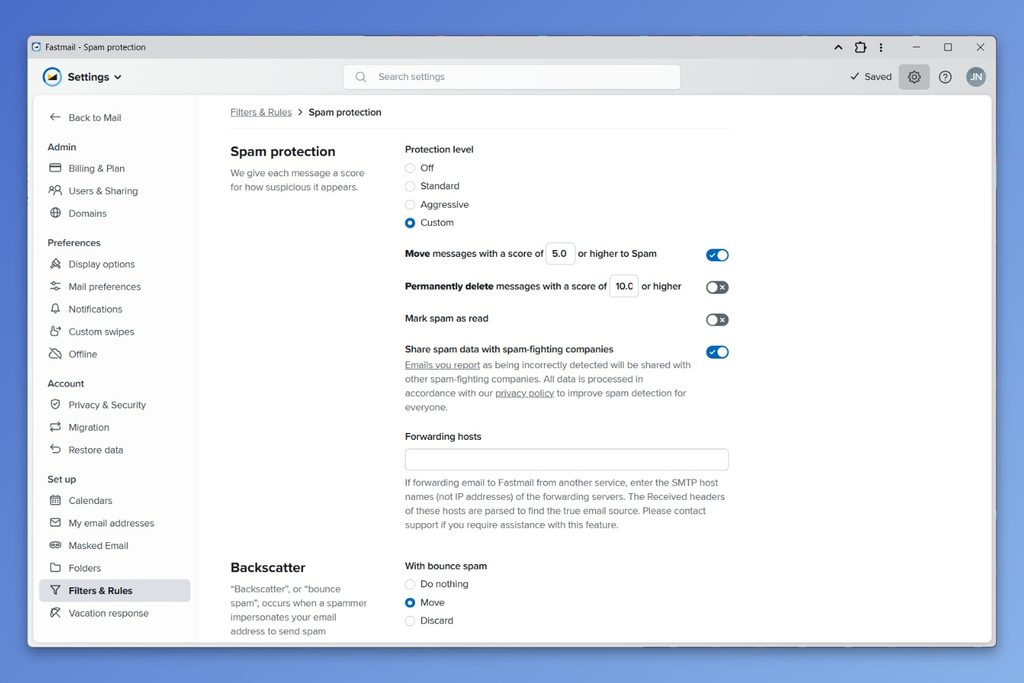
Again, spam protection is a standout. Using Fastmail’s default settings, I’ve only gotten 9 spam emails in my inbox since July 2025—this number is viewable in the web app’s settings—and marking those messages as spam has helped Fastmail’s filter get better. Fastmail also assigns a spam score to every message, letting you dial in a custom block level if you want to be more or less aggressive. If anything, the default settings are a little too eager to block legitimate messages, but training the filter has helped with that as well. Gmail’s spam blocker isn’t nearly as customizable or transparent.
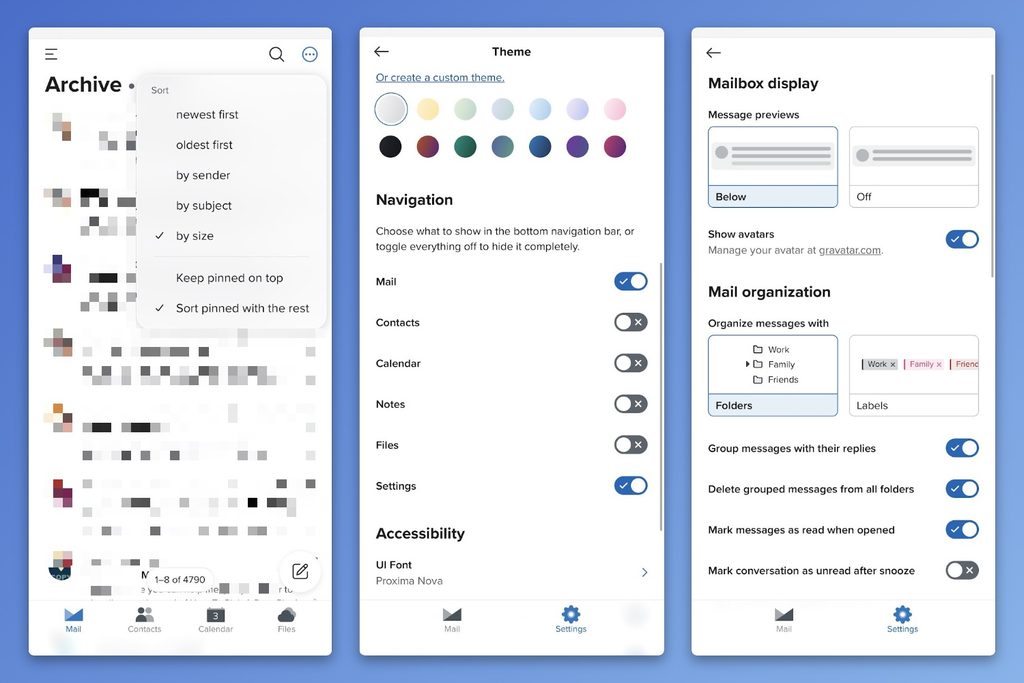
Fastmail also just does a bunch of nice things that Gmail doesn’t, like letting you sort emails by size and group them by date. Even now I’m still discovering neat customization options, like the ability to hide empty folders from the sidebar and auto-mark emails in a particular folder as not spam.
My Fastmail nitpicks
As with any app, I can think of a few things about Fastmail that annoy me.
Replying on desktop can get bit messy. Unlike Gmail, Fastmail doesn’t collapse quoted text behind a “…” button, so I often lose my place after scrolling up to reference a previous message. (There is a setting to turn off quoting the original message in replies, so I’m going to try that out.) And while Fastmail lets you pop-out replies into a separate window, I prefer Gmail’s pop-out box that stays within the current browser window.
Setting up filters can also get a bit confusing. For complicated filters, such as ones that look for a specific word inside of an email addresse, you must switch to an advanced “no preview” mode, which doesn’t let you see which existing messages the filter would catch. I got my filters set up in the end, but the process was unnecessarily convoluted.
The calendar/contact disclaimer
While I’m using Fastmail for all my reader mail, newsletters, and a growing number of logins, I’m still getting personal messages and PR pitches in Gmail. By extension, I’m still relying on Google for calendar and contact management.
Switching to Fastmail for these case will be a big hurdle. While Fastmail ties into iOS’s native contact and calendar system, Android integration requires a $5 third-party app. Before I even consider that leap, I’d have to get serious about moving more of my logins from Gmail to Fastmail, and to set up an auto-responder so that contacts start using my @jarednewman.com address. It’ll be a while before I can weigh in on Fastmail as a full email-calendar-contacts solution.
But at least on the email side, Fastmail has done everything necessary to prove itself as an adequate (or even superior) Gmail replacement. At this point, it’s entirely on me to make the switch.
Advisorator members to get stories like this every week. If you want to try out a full membership—including my in-depth guides and member forum—you can get started for $1.
I’m blogging again
Over at the Advisorator site, I’ve started experimenting with a blog. For me it’s a way to post things that may not fit neatly within this newsletter, like my social media cross-posting setup and some meta-commentary on the newsletter subscription business. I’ve also been posting more on Mastodon and syndicating those posts out to Bluesky, LinkedIn, Threads, and the blog itself.
As for why: I’ve been so heads-down with the newsletters and freelance work in recent years that I’ve felt a bit disconnected from other journalists and tech folks. Marco Arment’s recent post about finding online communities resonated with me, and made me want to come out of my shell a bit more. It’s also just a nice having an outlet for writing with no pressure or expectations.
I might use the blog to play around with some other things, like comments or a blogroll, but for now it’s just a little throwback to when blogs were fun and cool. I’ll probably start linking briefly to blog items here in the newsletter, but there’s also an RSS feed if you want to follow along via your feed reader of choice.
(And yes, I’ve turned this item into a blog post so I can reference back to it later.)
News in brief
Amazon’s new Echoes: Amazon’s updated smart speaker line includes an Echo Dot with louder bass and more accurate voice detection, a 16-inch version of the Echo Show smart display, and a somewhat-creepy Echo Studio speaker with a hidden security camera. (It does light up when the camera is on, at least.)
Most intriguing, though, is the Alexa Photo Frame. Prime members can store unlimited photos with Amazon for free, and the Frame cycles through those photos while making them searchable with voice comamands. Unlike Amazon’s other smart displays, The Verge reports that it has no ads, though it also doesn’t seem to perform any other Alexa functions. All smart displays should be photo frames first, everything else second, but I can see the appeal of something even more purpose-built.
The first touchscreen Mac: After 15 years of insisting that touchscreens had no place on Macs, Apple has changed its mind with the $2,900 MacBook Pro with PROLED XDR Display. Don’t expect some wildly innovative new take on the concept, though. While Apple’s added some touchscreen optimizations in MacOS—for instance, making window controls bigger when you tap on them—it’ll mostly work like every touch-enabled Windows laptop.
I’ve always viewed laptop touchscreens as nice-to-have, not essential, but Apple says people who grew up on iPhones and iPads are just expecting touch laptops now. If that’s the case, I would expect them to trickle down to more than just Apple’s most expensive model.
More notable news and reads:
- Proton’s CEO reportedly calls his employees “losers” for not using AI enough.
- Reddit will force visitors to log in, both to protect itself from AI scraping and to more easily build ad-targeting profiles of its users.
- The New York Times makes logging in more annoying, seemingly to prevent password sharing.
- ChatGPT is turning past conversations into detailed psychological profiles. How long until this factors into its ads?
- iOS 27.2 has a long list of security fixes, so consider updating now.
Tip of the week
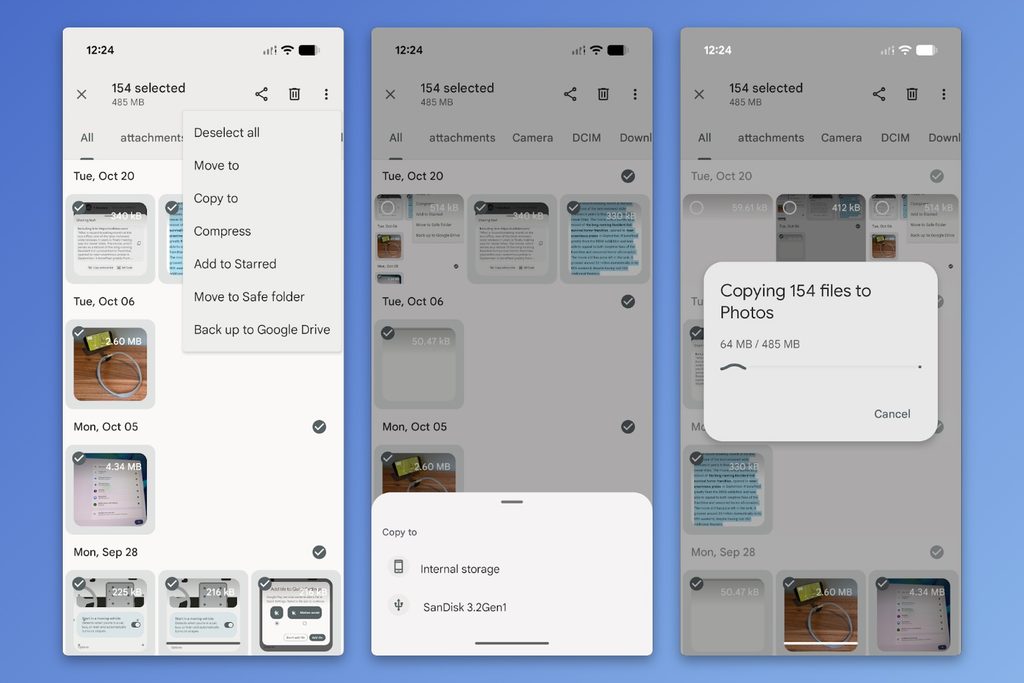
Move phone photos (or files) to a thumb drive: Longtime reader Ray W. asks what’s the best software for transferring photos from an Android phone to an external hard drive or USB-C thumb drive. Good news: No expensive software is necessary.
Just plug the storage drive into your phone, open the free Files by Google app, then go to your “Images” folder. Tap the vertical “…” button, choose “Select All,” then tap the “…” again and select “Copy to.” Choose your thumb drive and select “Copy here.” The same method will work with any kind of file, not just photos.
What about iPhone? Select all your photos in the Photos app, tap the Share button, then and select “Save to Files,” where you can choose your thumb drive as the destination. Fair warning: You won’t get a progress indicator and it can take a while. iOS just doesn’t really seem set up for this.
While an external drive backup isn’t a bad idea, consider automatic cloud backups if you’re serious about protecting your photos.
Try this app
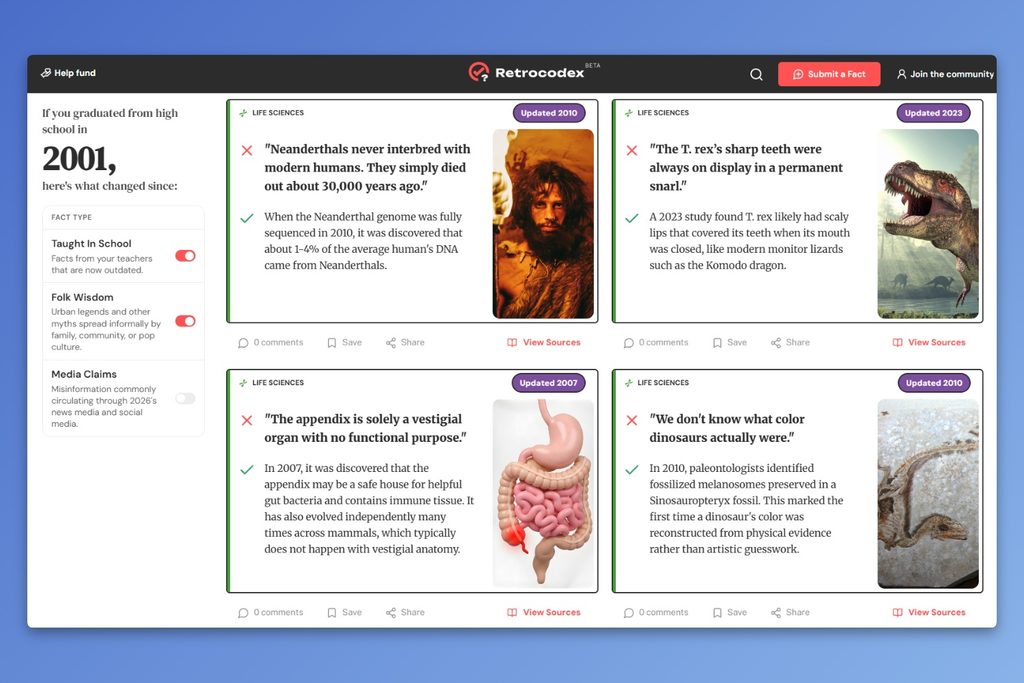
Unlearn wrong facts: Retrocodex is a free site that lists all the things you might’ve learned in school that aren’t true anymore. Type in the year you graduated high school, and you’ll get a list of commonly-taught facts (plus some popular urban legends) that have since been disproven or corrected. My main problem is that I’d already forgotten half of these facts to begin with. (Via Hiro)
Spend wisely
This section of the newsletter may include affiliate links, which earn me a commission if you wind up purchasing something.
After a somewhat sleepy season for tech deals, retailers seem to be gradually getting into Black Friday mode. Some notables this morning:
- This Popsocket that’s also an iPhone power bank drops to $21.
- AirPods 4 are on sale for $89.
- Google’s Pixel 11 hits a new low at $699 unlocked, or $799 for the Pro version.
- More Google gear: Pixel Watch 5 for $300, Pixel Buds Pro for $169.
- Bose QuietComfort headphones for $169, lowest price since last Black Friday.
- LG’s 48-inch B6 OLED hits its lowest price in a while at $600, or $552 open-box.
- Get into the weird world of Chinese retro gaming handhelds with the TrimUI Smart Pro for $50-ish with code DBDEAL8. I have one of these for N64/PlayStation-era stuff.
- Visible Wireless plans: $19/$29/$39 per month for a year of standard, Plus, or Pro, respectively with code HOLIDAYHACK.
- MacBook Neo falls to $670 in “Citrus,” or $599 Apple refurbished.
- Best Buy has various Microsoft Surface Laptops on sale. Check the open-box options too.
- Have I used these Taiofan rechargeable hand warmers? No. Will they set your house on fire? Couldn’t tell you. Are they worth a gamble at $7 with promo code Y3Q1KUXC? You decide.
Consider an Advisorator membership!
This month, you’re getting the full Advisorator newsletter, including the weekly feature column that I write for paying members. No action needed on your part.
But if you’re interested in a full Advisorator membership—including my in-depth guides and member forum—you can check it out for almost nothing:
- Pay $1 to become an Advisorator member for the next month, and choose either a monthly or annual plan.
- At the end of the month, you’ll renew at the regular price of $5 per month or $50 per year.
- You’ll get a reminder by email a week before your subscription renews. Cancel whenever you want.
Let me know if you have any questions. Thanks for reading!
– Jared
Did someone share this newsletter with you? Sign up to get it every Tuesday.