
A wild new way to protect your personal info

Here’s what happened when I used AI to wipe my personal info from the internet.
Plus: Get less junk mail, Apple’s Siri settlement, and a better way to record video
 Jared Newman |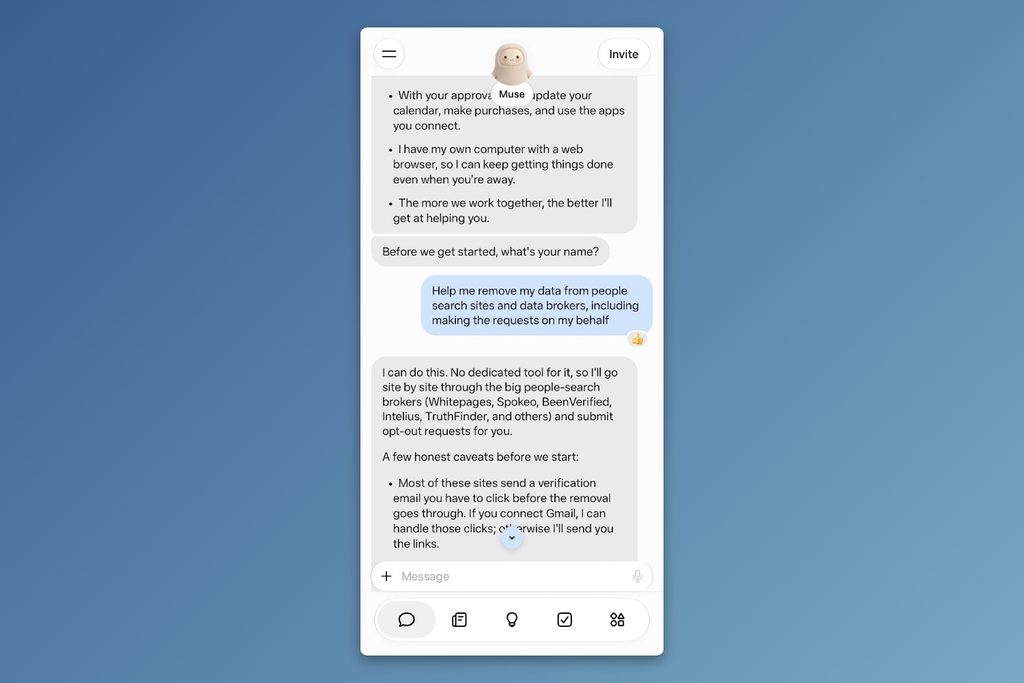
Hey there! I’m Jared Newman, a longtime tech journalist, and this is Advisorator, my weekly tech advice newsletter. Did someone share this newsletter with you? Sign up to get it every Tuesday.
You’re reading the free edition. Paying members get in-depth features each week, including this one:
While I’m not a fan of using AI for writing or other creative work, it does excel at automating tedium. And few tasks are quite as tedious as wiping your personal info from the internet.
This is by design. Every data broker and people search site has its own process for delisting your data, and there are so many to deal with that most people don’t bother. Services like DeleteMe and Incogni get away with charging upwards of $100 per year to handle these requests simply because doing them yourself is a pain.
Over the past week, I’ve used AI to automate the process, from finding my personal info on people search sites to submitting the necessary opt-out requests. My inbox is now full of confirmation emails from companies promising not to list or sell my personal data anymore.
But while the experiment saved me a lot of time and money, it still required a healthy amount of human supervision and awareness …
Keep reading this story with a paid membership. The free newsletter continues below.
News in brief
iPhone Siri settlement: If you bought an iPhone with Apple Intelligence support in the United States between June 10, 2024 and March 29, 2025, you can get some money back for the Siri features that Apple advertised but failed to deliver.
In product announcements and TV commercials from that time period, Apple showed how Siri could dig through calendar events, emails, and notes to answer questions like “What’s the name of the guy I had a meeting with a couple months ago at Cafe Grenel?” Apple is only now getting around to shipping those features, which are admittedly quite useful.
Settlements will max out at $95 per device, but the actual payout will almost certainly be a lot lower. While you may get an email about the settlement, you can also file a claim using your phone’s serial number.
More notable news and reads:
- Microsoft refreshes its smaller Surface laptop and tablet with faster processors and brighter screens.
- Also, Microsoft ditches its “Copilot+ PC” branding for laptops with extra AI features. (By me: Most folks don’t care about AI PCs.)
- Google says “many” existing Chromebooks will have a path to becoming GoogleBooks as it plans to phase out ChromeOS by 2034.
- The next iPad Mini could be a big improvement.
- Adobe Premiere arrives on Android, roughly a year after the iPhone version.
- Do you care at all about Meta’s AI and VR glasses? Here’s a report on what’s new.
- Google’s zeal to answer every question with AI can sometimes get pretty weird.
Tip of the week
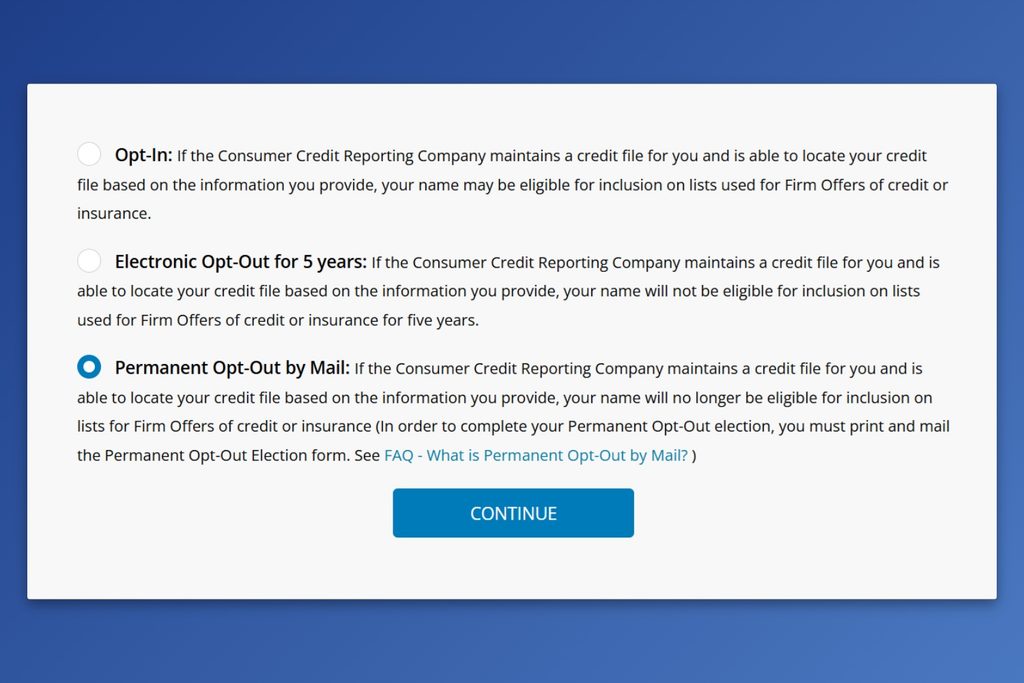
Get less junk in the mail: During my data removal experiment, I also learned about OptOutPreScreen.com, a free service from the credit bureaus for opting out of credit card and insurance offers in the mail. It is a legitimate service that is mandated by federal law, and it only takes a few minutes to set up:
- Head to the OptOutPreScreen website.
- Tap the “Click here to Opt-In or Opt-Out” button at the bottom of the page.
- Choose to opt out for the next five years, or permanently.
- Enter your contact info and confirm your request.
- If you opted out permanently, print out the form on the next page, sign it, and mail it to the address on the form. (The five-year option takes effect without mailing anything.)
To target folks in the mail, credit card and insurance companies buy lists of pre-qualified candidates from the credit bureaus. Opting out prevents the bureaus from including your name in those lists, resulting in less junk mail. If you somehow find yourself missing those offers, you can always opt back in from the same site.
Try this app
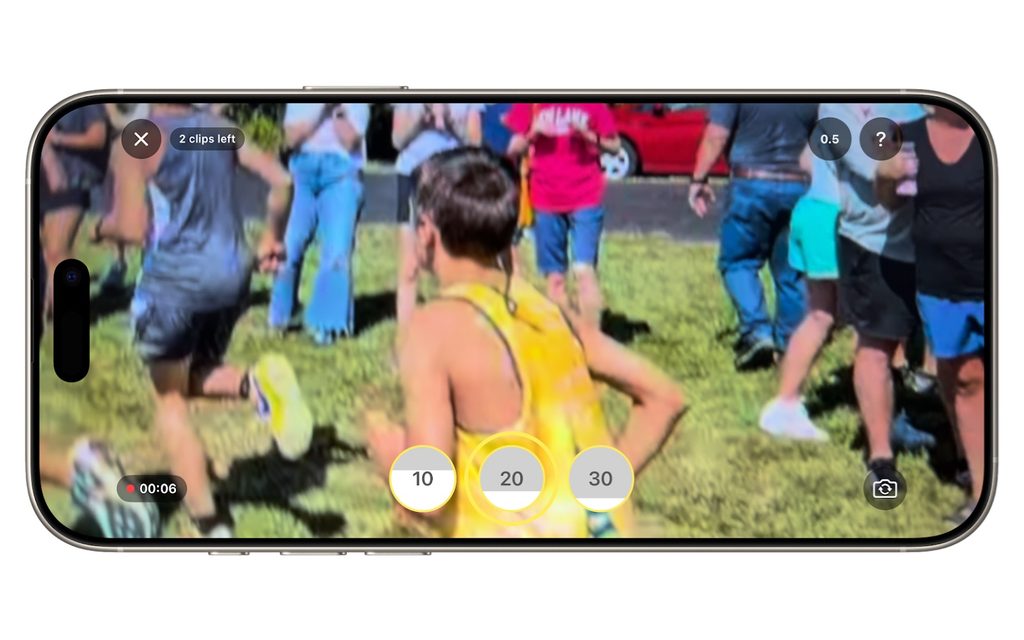
A better way to record video: Whenever I try to get video of my kids’ sporting events, I usually wind up with about 10 minutes of mostly-worthless footage, which I then have to spend another 10 minutes editing down to a 10-second highlight. Either that, or I only bother capturing video sporadically and wind up missing the best moments altogether.
Videotapr is a brilliant new iPhone and Android app that solves this problem. Instead of recording a huge video, the app lets you go back in time to save just the last 10, 20, or 30 seconds of footage. That way you can point your camera at the action and save the highlights after they’ve happened. The free version lets you save up to three highlights per day at 720p resolution, and a $6 one-time purchase unlocks unlimited saves and 1080p video.
Spend wisely
This section of the newsletter may include affiliate links, which earn me a commission if you wind up purchasing something.
Some notable deals today:
- Get a remote page turner for Kindles and tablets for $4 with promo code B8D7L2WD.
- There’s also a version whose remote wraps around your finger for $4 with code ZMX51J74.
- Mount an iPhone (or Pixel 10/11) to any metal service with this magnetic stand, on sale for $11 with code WT7OFL8O.
- Best Buy’s 45W Insignia USB-C charger with six-foot 240W cable drops to $15 on clearance, or $13 open-box.
- Amazon’s Blink 2K doorbell camera and outdoor camera combo returns to $28, or $41 for a model that can save footage to a MicroSD card without a subscription.
- New low for Ring’s battery-powered doorbell cam at $40, or wired for the same price.
- Amazon’s 55-inch art frame TV hits a new low at $500.
Consider an Advisorator membership!
You’ll get weekly feature stories, like the one I wrote this week on removing personal info from the internet, plus access to all my online tech tutorials. I’ll help you become a more confident tech user and hopefully save you some money along the way. Join us!
That’s all for now. Catch you next week.
– Jared
Did someone share this newsletter with you? Sign up to get it every Tuesday.