
Big changes for Siri

What to know about the new Siri
Plus: Google’s laptops, listening to documents, and a new (old) Windows taskbar trick
 Jared Newman |
 Hey there! I’m Jared Newman, a longtime tech journalist, and this is Advisorator, my weekly tech advice newsletter. Did someone share this newsletter with you? Sign up to get it every Tuesday.
You’re reading the free edition. Paying members get in-depth features and guides each week, plus access to my community forum. Learn more here.
News in brief
Googlebooks arrive soon: The first wave of laptops running Google’s new Android-based operating system are now up for pre-order. They’re all higher-end machines, ranging from $899 for an Acer laptop to $1,299 for models from Asus, HP, and Lenovo.
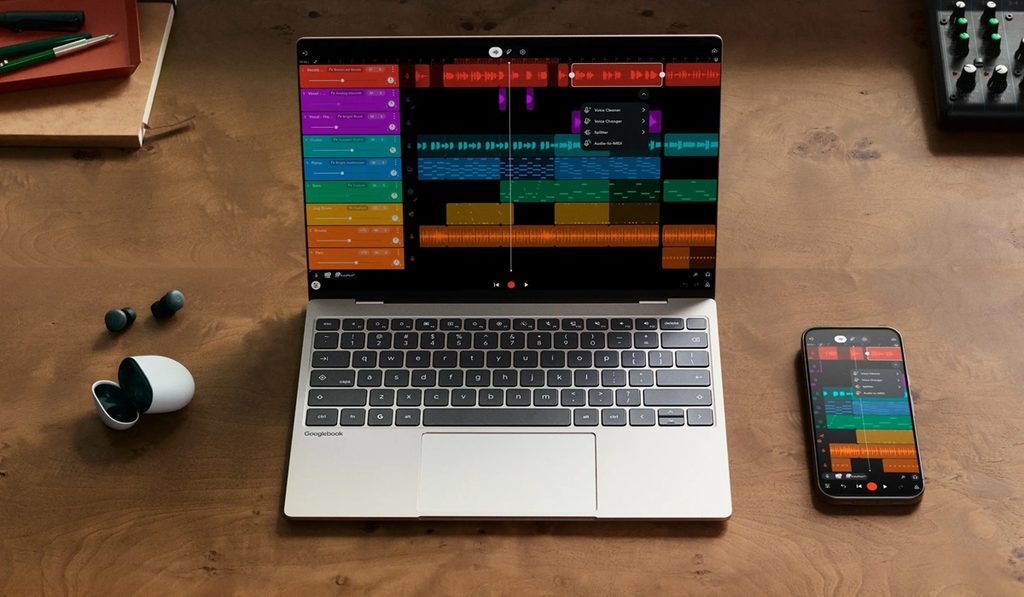
While they’re overall similar to Google’s previous Chromebooks, Google is pitching them as premium devices for Android enthusiasts, letting you do things like browse your phone’s file system and pick up where your phone apps left off. There’s of course a healthy dose of AI as well, including a way to bring up Google’s Gemini assistant by wiggling the cursor. GoogleBooks still can’t run full desktop software, though—just Android apps and whatever you can load in Google’s Chrome browser—which may be a pro or a con depending your needs.
What this means for Chromebooks is still a bit murky. Google says new ones are still in the pipeline, and it will support existing models for up to 10 years from their original release date. Long-term, though, Google intends to phase out the underlying ChromeOS platform, possibly by 2034. I imagine we’ll stop seeing new Chromebooks for consumers within the next few years as cheaper Googlebooks arrive, while the education market’s wind down will likely take longer.
More notable news and reads:
- Arguably the best feature of iOS 27: Making your iPhone feel faster.
- The worst feature? An early bug that freezes your phone.
- Apple’s new HomeKit camera features, which describe what’s happening in motion alerts, can cost you up to $60 per month.
- Claude adds a built-in document and spreadsheet editor.
- Lots of folks love Onyx’s pocket-sized Boox Palma e-readers. The new third-gen version has a slicker design and a more recent version of Android, but also a higher price.
- Good read from The Verge’s Victoria Song on the “health age” craze in fitness trackers. (Standout reader comment: “People love a fake feel-good number.”)
Tip(s) of the week
Move the Windows taskbar (or Mac dock)
Five years after ditching the movable taskbar in Windows, Microsoft has brought it back. That means you can reposition the bottom bar to the left, right, or top of the screen.
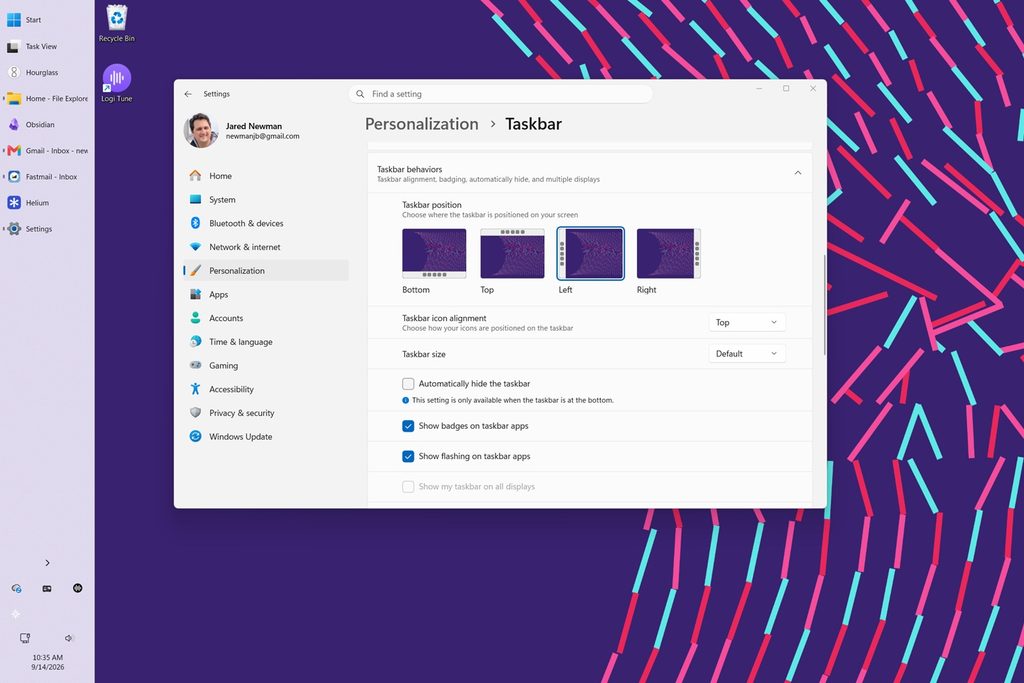
To move the taskbar, right-click on it and head to Taskbar Settings. Expand the “Taskbar behaviors” menu and look for the “Taskbar position” setting.
Microsoft is rolling out the corresponding Windows update gradually, so you might not see this option right away. If you want the movable taskbar right now (at the possible risk of some early update bugginess), head to Settings > Windows Update, then turn on “Get the latest updates as soon as they’re available.”
What about Macs? The MacOS Dock has been movable to the left or right edge of the screen since 2001. You’ll find that option under System Settings > Display & Dock.
Keep kid songs out of your Spotify playlists
Spotify has added a new setting that automatically filters kids and family music out of your recommendations, perfect for families who want to share a single Spotify account instead of paying for a pricey family plan.
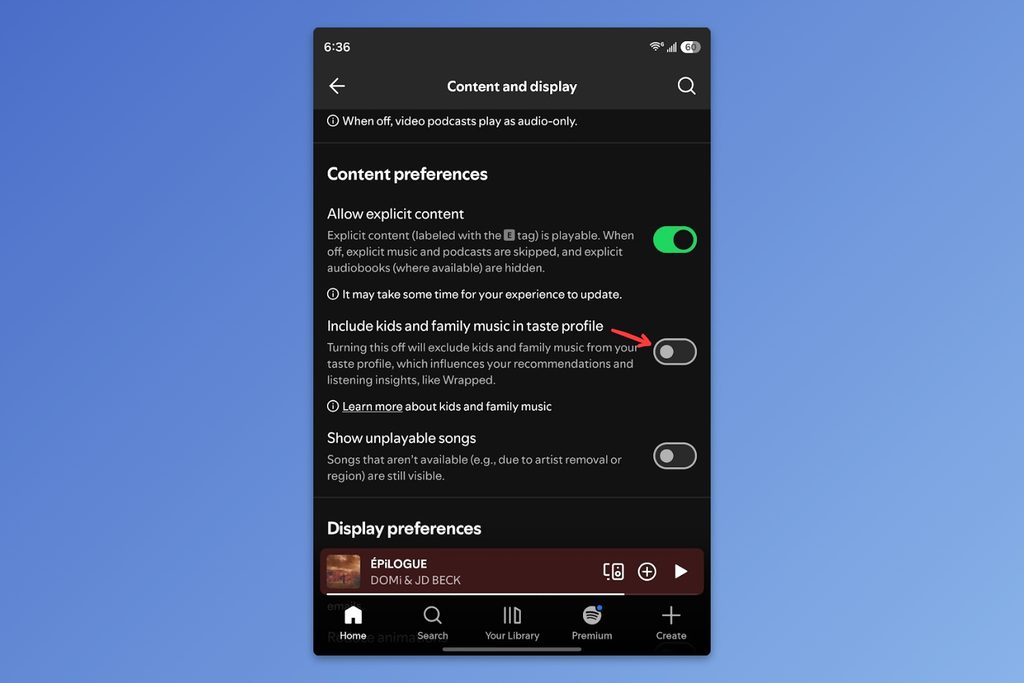
To use the new setting, tap your profile icon and head to Settings and privacy > Content and display, then turn off “Include kids and family music in taste profile.”
If you dig Spotify tips like this, I’ve got a big list of my favorites for Advisorator members.
Try this app
Listen to any document: Paper2Audio converts web articles, PDFs, Word documents, and even blocks of plain text into audio that you can listen to. Beyond the versatility in document support, I especially like the automated image summaries. You can also adjust the playback speed and choose from a variety of natural-sounding voices. Sign-up is free, and you can generate up to 56 hours of audio per week without a subscription. (Via Recomendo)
Spend wisely
This section of the newsletter may include affiliate links, which earn me a commission if you wind up purchasing something.
Given the escalating costs of storage and RAM, this $850 Yoga 7i laptop from Lenovo looks like a pretty good deal. It has a 14-inch OLED screen with 1920×1200 resolution, Intel’s latest Core Ultra 5 Series 3 processor, 16 GB of RAM, and 512 GB of storage. If you’re willing to do open-box “excellent” condition, the price drops to $719.
I have not used this laptop but have always enjoyed Lenovo’s Yoga models (with screens that flip around into tablet mode). The same laptop sells for $1,100 on Amazon.
Other notable deals:
- Otterbox 20W USB-C chargers: $6 for one, $10 for two, $12 for three.
- Turn one HDMI port into two with this $10 Anker switch.
- Hisense’s entry-level 65-inch Mini-LED TV drops to $374.
- Apple Watch Ultra 3 hits a new low at $600 as the Ultra 4 arrives.
- New Google Fi wireless customers can get a free Pixel 11 or Pixel 11 Pro with a two-year commitment. (The phone is financed and paid off via 24 monthly bill credits.)
Big changes for Siri

Apple’s big annual software updates started rolling out last week, and the biggest changes in involve Siri.
The short version: Siri is good now. It offers more comprehensive and helpful answers to your questions, and it can accomplish tasks that previously required lots of tedious searching and tapping. But it’ll also take some getting used to …
The rest of this week’s feature story is for Advisorator’s paying members. Sign up to get in-depth articles and guides from me every week, plus access to my friendly community forum for getting your tech questions answered.
That’s all for now. Catch you next week.
– Jared
Did someone share this newsletter with you? Sign up to get it every Tuesday.