

A message from Jared
Hey folks, quick note before we get to the newsletter: I’m running a rare sale on Advisorator memberships. Use this link to get your first year for $37.50, which is 25% off the regular price.
If you’re feeling overwhelmed by the state of technology, I think you’ll appreciate the in-depth advice I provide just for members. Recently, for instance, I’ve written about cutting down on unwanted email, easy ways to free up phone storage, how to prevent AI from lying to you, and more.
I also run a discussion forum for Advisorator members, including monthly Q&A threads where I try to solve folks’ everyday tech problems. As AI slop overruns the web, it’s my way of providing a welcoming outlet for human expertise.
Advisorator wouldn’t exist without the support of paying members. I don’t run ads or accept sponsorships, as I’d rather put that time and energy into the newsletter itself. So, if you value what I’m doing and want to see it grow while sharpening your own tech skills, now’s a great time to get aboard. Learn more here, or head straight to the sign-up page:
Thanks for hearing me out. Now, onto this week’s newsletter.
Apple’s new upgrade program is full of gotchas
Plus: Robot vacuum ban, free PDF tools, and a cheap portable power bank
 Jared Newman |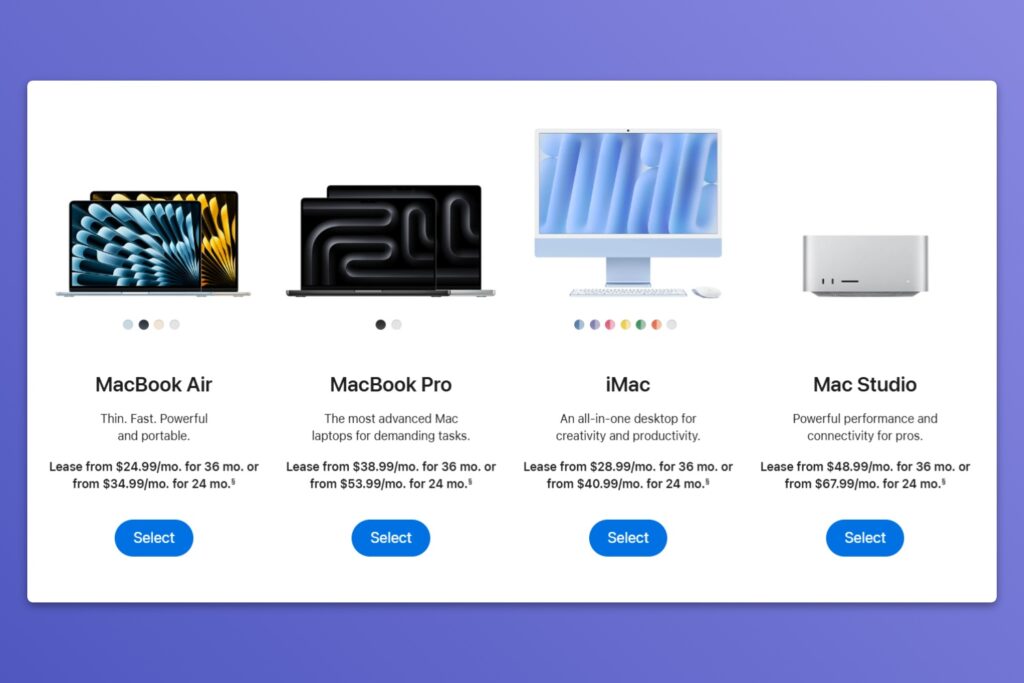
No paywall on this week’s feature story. Enjoy, and consider an Advisorator membership if you find columns like these helpful.
Apple has a new way to buy its products, and it looks a bit like leasing a car.
Instead of having you pay the full cost up front, the new Apple Upgrade program sets you up with monthly payments for a new iPhone, iPad, Mac, or Apple Watch. Apple’s partnering with Klarna to lease out its products, with zero-interest loans followed by an option to trade up to a newer device.
I am instinctively skeptical of any program that promises to ease the pain of buying something expensive, so I started looking for the trade-offs. Sure enough, Apple Upgrade is full of them. While spreading out the cost of Apple hardware may look attractive, it’ll likely cost you more in the long run.
It’s another kind of lock-in
Because Apple Upgrade’s monthly payments don’t cover the full device cost, you don’t actually own the device when the loan period is up. With an iPhone 17 Pro, for instance, you’ll pay either $46 per month over one year ($552 total), or $32 per month over two years ($768 total), leaving you with an unpaid balance of $547 or $331 toward the full $1,099 purchase price.
At that point, you can either pay the balance to avoid further monthly payments or trade in for a new phone to start the cycle over again. If you do nothing, you’ll pay toward the total cost for another six months, followed by one final payment to cover whatever’s left. While the total cost isn’t any higher than paying full price up front, it also encourages you to stay on a perpetual upgrade cycle, regardless of how much the products improve year-over-year.
Correction: This article originally said that the monthly payment increases for six months after the loan period. This is only the case if you trade in a phone to reduce the amount of the loan, as the additional payments do not include any trade-in credit.
Cheap wireless isn’t allowed
Apple Upgrade is only available for iPhones serviced by AT&T, T-Mobile, or Verizon. If you’re using a lower-cost provider or bundling cellular with home internet from Comcast or Spectrum, Apple won’t lease you a phone. (Here’s an explanation.)
I’ve done the math on my US Mobile plan, and it’s about $40 per month cheaper than a comparable plan from T-Mobile. You’ll find similar savings from other alternative providers like Mint Mobile, Tello, or Visible.
With Apple Upgrade, you’ll be locking yourself into higher prices for wireless service until the loan period is over, and again, the point of the program is to keep you on an endless upgrade cycle. Each time you spin up a new lease with Apple, you’ll also be recommitting to the big carriers that charge more for monthly service.
Correction: Apple’s fine print notes that leased phones are unlocked, so you are technically free to switch carriers at any time. Still, you do need a major carrier plan to start the lease in the first place. If you’re already using a prepaid provider, this would mean switching to a major carrier, then switching back again.
You’ll pay more for the hardware, too
Apple Upgrade’s lease payments are based on full retail prices at the Apple Store, which are often higher than what you’d pay at third-party stores like Amazon and Best Buy.
As I write this, Amazon is selling the M5 MacBook Pro with 2 TB of storage for $2,499 ($500 off the list price), while Apple Watches are $100 off. That doesn’t even account for additional savings from buying refurbished or open-box devices. On a monthly lease program, you’ll never see those savings.
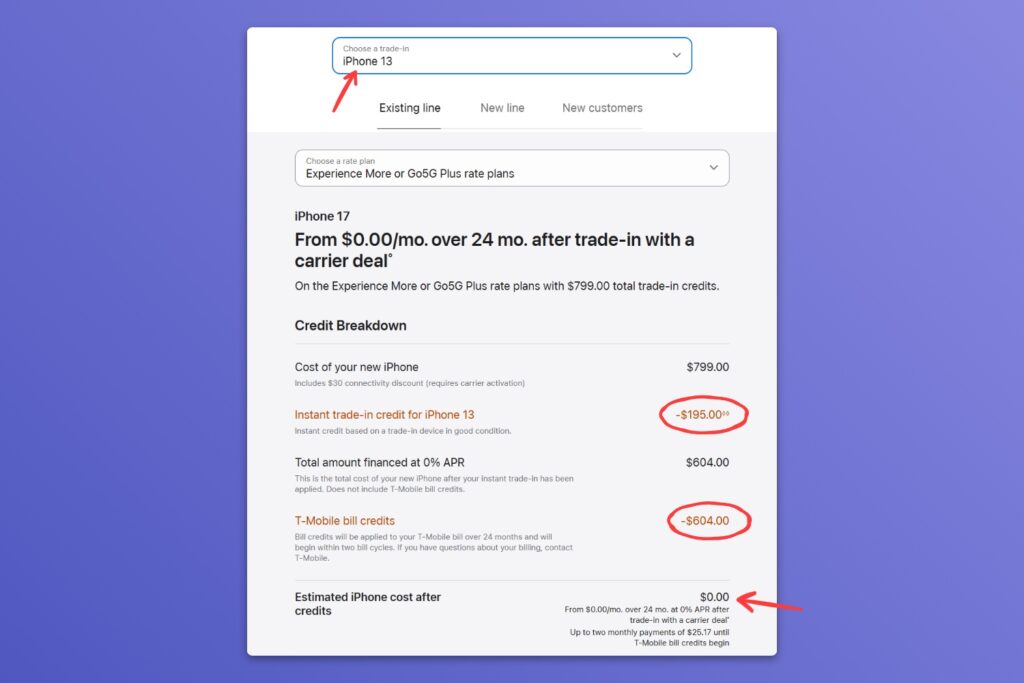
You’ll also miss out on subsidies toward a new iPhone from the major wireless carriers. As Apple’s own website points out, AT&T, T-Mobile, and Verizon will all give you a free iPhone 17 in exchange for a trade-in and multi-year service agreement (two years for T-Mobile, three years for the others). They also offer early upgrade programs for an extra fee if you insist on having a new phone every year. If you’re committing to a major carrier, you might as well have them pay for your phone instead of funneling that money to Apple.
So who’s it for?
Apple Upgrade can seem appealing for the same reason as any other loan: A big up-front payment could put too much of a strain on your finances compared a monthly bill, even if that bill adds up to more in the long run. (I’ll note, though, that Amazon’s fee-free Prime Visa lets you pay off large purchases in 12 monthly payments without the perpetual upgrade cycle.)
But more than anything else, Apple is selling a kind of simplicity. Instead of figuring out when to upgrade, what your old device is worth, and whether to reevaluate your wireless carrier in the process, you just put the cost of hardware on your monthly tab and forget about it. Just be aware that this convenience comes at a cost.
News in brief
Robot vacuum ban (sort of): Citing security concerns, the FCC is banning new foreign-made robotic devices in the United States, a move that will primarily affect robot vacuums in the near-term. But as with the FCC’s router ban earlier this year, the impact is being a bit overblown.
Robot vacuum makers can keep importing and selling products that are already on the market, and they can launch new products by getting the government’s approval. (Like with routers, this requires a commitment to U.S. manufacturing investments, but no extra security promises despite the ostensible reasons behind the ban.) It’s a hassle for robot vacuum makers, but not something that should prompt you to panic-buy a Roomba.
More notable news and reads:
- By me: Amazon limits how many product reviews some customers can see, because it thinks they’re AI.
- Also by me: I tried Ozlo’s second-gen Sleepbuds, but I’m not sure they can replace my AirPods Pro at night.
- Google’s Gemini app for Mac now lets you dictate into any text field.
- If you’ve never used the Temu app, it’s more absurd than you could possibly guess.
- Anti-distraction phone maker Light Phone makes a slick-looking flip phone now. I still like this idea more in theory than in practice.
Question of the week
Longtime reader Tim C. wants to know why one of his Mac apps now shows a “Support Ending for Intel-Based Apps” message, warning that it won’t work in future versions of MacOS.
Here’s the Apple support page on the matter. When you see this message, it means the software maker only offers a version for Macs with Intel chips, not the Apple silicon that’s been shipping in new Macs since 2020.
Apple’s been supporting these apps with a translation layer called Rosetta, but it plans to discontinue that support in MacOS 28, due out next year. At that point, any apps that still depend on Intel processors will stop working on newer M-series or A-series Macs.
What can you do about it? Not much, other than to contact the developer or see if they’ve made a separate Apple silicon version available. Sometimes you’ll see distinct Apple and Intel options on an app’s download page, but this is presumably the kind of confusion Apple wants to move away from.
If you’re still using an Intel-based Mac, the end of Rosetta won’t affect your apps, though your operating system itself is about to be outdated. The MacOS 27 update coming this fall won’t support Intel processors at all.
Try these apps
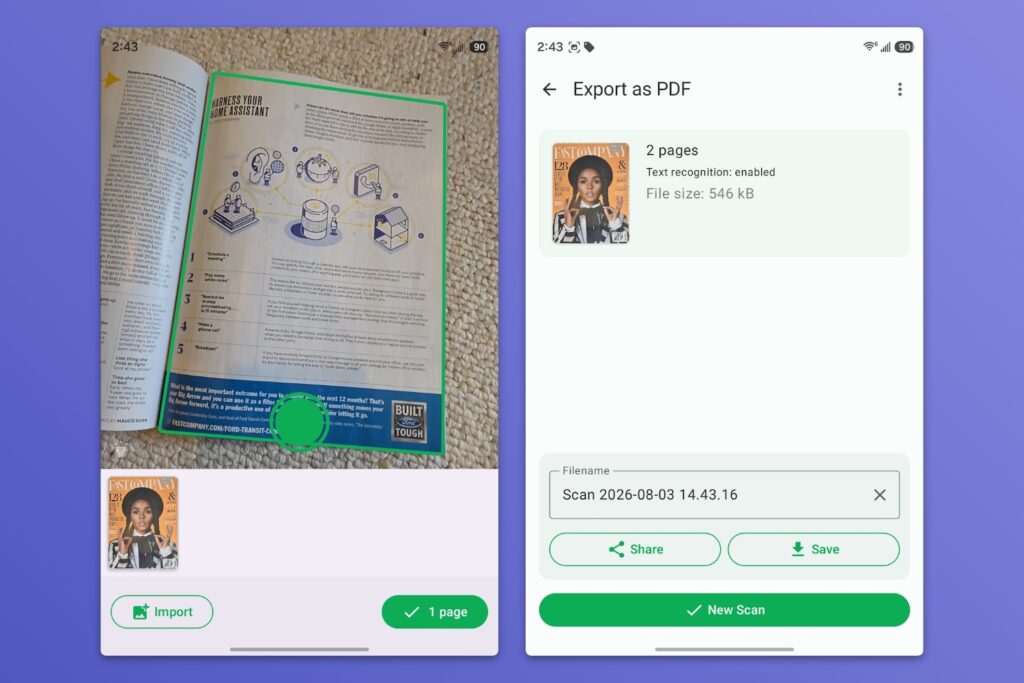
Free Android document scanner: While I’ve previously recommended the Files by Google app for document scanning on Android (and Apple’s equivalent Files app on iOS), I also get the appeal of a dedicated scanner app that doesn’t require digging through any menus. For that, check out Fairscan, a free and simple scanner with no ads or in-app purchases. You can save documents to any folder on your phone or use the Share button to send them elsewhere (including Wi-Fi printers). There’s also an option to download language packs for making PDFs with selectable text.
Free PDF manager: Stirling PDF is a free desktop app for editing PDF files, including text editing, merging, and compression. The app will prompt you to create an account, but you can skip it and do all your PDF editing offline.
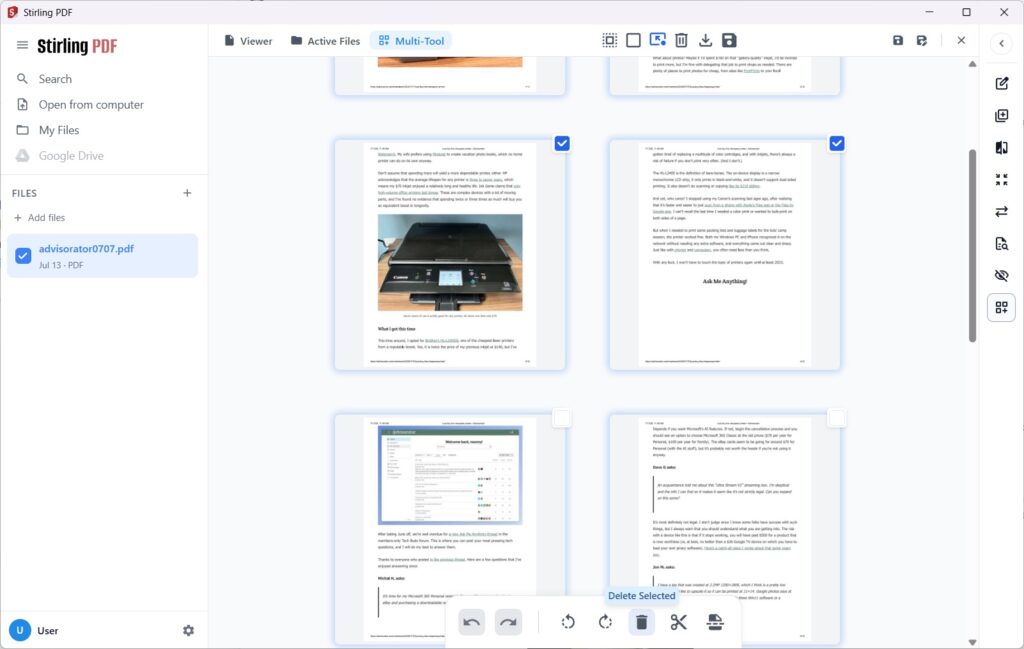
It’s a useful alternative to web-based tools like ILovePDF that require an internet connection. Grab the Windows, Mac, or Linux versions from Stirling’s download page.
Spend wisely
This section of the newsletter may include affiliate links, which earn me a commission if you wind up purchasing something.
If you didn’t grab a MacBook Neo before Apple raised prices by $100, now you can get refurbished models at the old $599 price. There’s an even bigger discount on the 512 GB models with TouchID, which are selling for $679 refurbished instead of the usual $799. I expect these will sell pretty quickly. (No, they’re not eligible for Apple Upgrade.)
Other notable deals:
- Baseus 5,000 mAh magnetic iPhone power bank drops to $13 with code TTJT4NIQ.
- Amazon’s extra-large Kindle Scribe e-reader (first-gen) for $150 with code KINDLE25.
- Visible wireless plans are $6 per month off for a year with code SAVE6.
- Vizio’s 55-inch Mini LED gets its first price drop to $248 (saves $30).
- Lenovo’s Legion Go S handheld with SteamOS drops to $636. I recently replaced my Steam Deck with this.
- M5 MacBook Pro (2 TB storage, 2 TB RAM) is selling for $2,499, the lowest since Apple’s big round of price hikes.
- A bunch of useful Mac apps are on sale including TextSniper, which quickly extracts text from images with a keyboard shortcut.
Advisorator membership sale
As I mentioned at the top, I’m running a rare sale on Advisorator memberships. Use this link to get your first year for $37.50, which is 25% off the regular price.
You’re currently reading the free edition of Advisorator, and I do try to make as much available for free while still running a sustainable business. As a paying member, you’ll get my weekly feature column (like this week’s on Apple Upgrade), helpful online guides, and access to my friendly Tech Buds forum.
Learn more here, or head straight to the sign-up page:
Thanks so much for hearing me out, and thanks for reading. Catch you next week.
– Jared
Did someone share this newsletter with you? Sign up to get it every Tuesday.