
Try this instead of Google Chrome (maybe)

A great Chrome alternative that I’m nonetheless conflicted about
Plus: The plan to fix Windows, Mac menu bar apps galore, and baseball on your calendar
 Jared Newman |
Hey there! I’m Jared Newman, a longtime tech journalist, and you’re reading the free edition of Advisorator, my weekly tech advice newsletter. Did someone share this newsletter with you? Sign up to get it every Tuesday.
Over the past week, I’ve been using a new desktop web browser that at first glance seems too good to be true:
- Fast and simple to use.
- Blocks ads and trackers by default.
- Doesn’t collect any data about your browsing habits.
- Completely free, with no ads, subscriptions, or ham-fisted AI upsells.
In other words, it’s like Chrome, but without all the things you might hate about Chrome.
Keep reading this week’s feature story with an Advisorator membership. In addition to the full weekly newsletter, you’ll get helpful online guides like the cell phone plan picker I released last week. You’ll learn a lot and hopefully save some money along the way.
News in brief
The plan to fix Windows: Last week, Microsoft published a lengthy memo about its plan to “raise the bar on Windows 11 quality” this year. The subtext is that Windows has become a buggy, bloated mess, with AI features no one asked for at the expense of improvements people actually want. Among the things Microsoft now says it’s working on:
- Bringing back options to place the taskbar at the top or sides of the screen without third-party workarounds.
- Making File Explorer faster and less buggy.
- Removing Copilot AI features from basic apps like Notepad, Photos, and the Snipping Tool.
- More control over system updates to prevent surprise automatic restarts.
We’ll see if Microsoft delivers, but I’d love it if more tech companies committed to fixing fundamentals instead of larding on useless features.
Old iPhone security updates: Kudos to Apple for continuing to patch major security holes on older iPhones running out-of-date versions of iOS. After learning of an attack that could steal users’ data just from visiting a malicious webpage, Apple started delivering a fix on devices running iOS 15 and newer, meaning the iPhone 6s (and first-gen iPhone SE) onward. Running outdated software is never a great idea, but at least Apple’s delivering some basic protection for those who do.
Related: Apple’s also started delivering background security updates in between its regular iOS and MacOS releases.
More notable news and reads:
- Read about a sneaky phishing scheme involving legitimate emails from Apple support.
- Google tests poorly-rewritten AI headlines in search results—another reason to stop using Google Search.
- Android devices will soon make you wait 24 hours before you can sideload certain apps from outside the Google Play Store.
- Samsung has already discontinued its tri-folding phone. (I liked playing with it at CES, but not enough to spend $2,900 on it.)
- ChatGPT’s Atlas browser must not have been a hit, because OpenAI is folding it into the main ChatGPT desktop app.
- Spotify adds a “bit-perfect” audiophile mode to its Windows app.
- Rumor mill: Amazon might try to make another phone.
Tip of the week
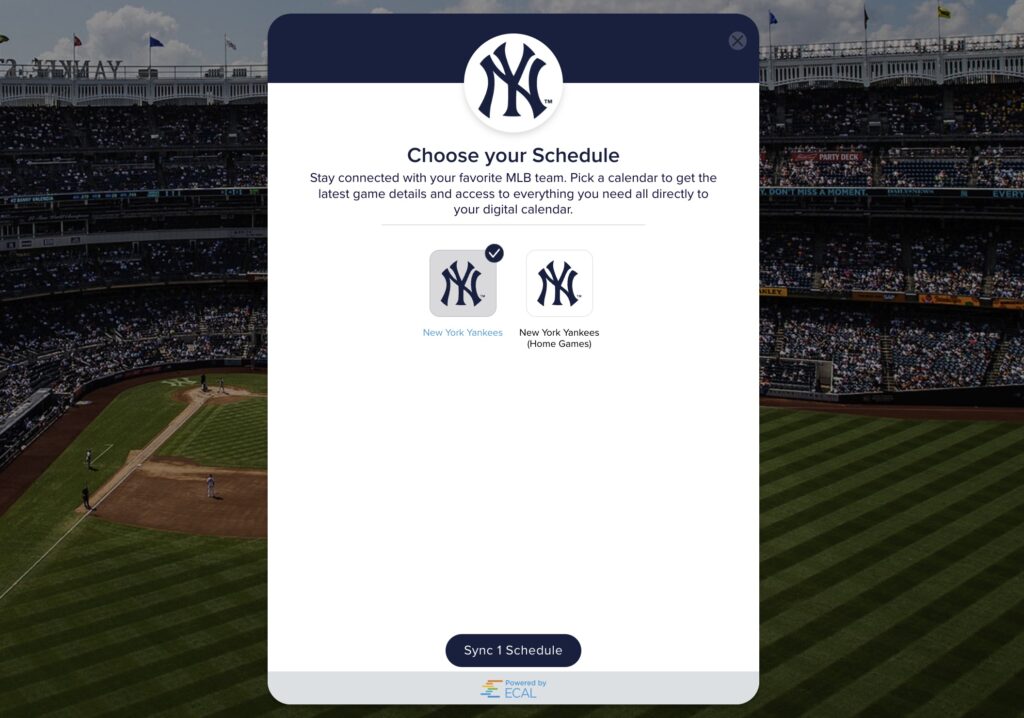
Put baseball on your calendar: If you’re as excited for baseball season as I am, you should know that MLB offers digital schedules for your calendar app, so you can glance at your own calendar to see game times.
Find your team on this page and click “Downloadable schedule.” From here you’ll have two options:
- Use the “Sync Schedule” option at the top to directly connect the live schedule to your calendar.
- Use the “Download Full Season Schedule” button at the bottom to get a .CSV file that you can import into your calendar app.
The first option is easier and will automatically update during the year with any schedule changes, but also requires granting calendar access to a third party. Use the .CSV import if you’re not comfortable with that.
Google Calendar users: An easier option is visit Google’s “calendars of interest” page and add your team under the “Sports” heading.
Try these apps

Discover Mac menu bar apps: Macmenubar.com is, as the name implies, a catalog of Mac apps that live in the top menu bar. You can browse by category, search for something specific, or peruse only the apps that are free. I’m having fun with Skreen for screenshots and Radiola for internet radio.
Read some blogs: Kagi’s Small Web app (for iOS, Android, and the web) is a fun way to discover independent websites and blogs. It reminds me of browsing the internet before huge sites like YouTube, Instagram, and TikTok came to dominate self-expression online. Just swipe right to flip between sites, and use the “Topics” header at the top to narrow things down.

(I was tickled to see my own site pop up here.)
Spend wisely
This section of the newsletter may include affiliate links, which earn me a commission if you wind up purchasing something.
Here are some notable deals I’m looking at this morning:
- Baseus charging station (3 AC ports, 3 USB-C ports, 1 USB-A port, wireless charging pad) for $34 with code W2CBVG56. Or, add any of these items for $6 more.
- Best Buy Essentials 100W wall charger with USB-C and USB-A ports for $18.
- Logitech’s M720 Triathlon mouse is back in stock at $22.50.
- Aukey’s 27,600 mAh power bank with dual 65W outputs drops to $50 at Meh.
- First-gen AirTags return to record-low $60 for a four-pack.
- Pre-order the Nothing Phone 4a Pro phone and get a $100 Amazon gift card. (Here’s a review.)
- Open-box Pixel deals: Pixel 10 Pro for $671, Pixel 10 Pro XL for $792,
- Panasonic’s 77-inch OLED Fire TV drops to $1,349 with code 150OFFPAN77.
- 15-inch M4 MacBook Air (256 GB storage, 16 GB RAM) returns to record-low $949.
Think about an Advisorator membership!
Get the full newsletter with in-depth features every week, plus helpful online resources like my wireless plan picking tools and my just-updated list of web browsers to try. Hit the button below to get started.
Thanks for reading! Catch you next week.
Until then,
Jared
Did someone share this newsletter with you? Sign up to get it every Tuesday.