
The Advisorator guide to Prime Day 2026


Amazon Prime Day is here, and it feels a bit more muted than usual.
Maybe it’s the AI-driven memory shortages, or maybe it’s oversaturation from all the other sale events that Amazon and other retailers prop up throughout the year. Whatever the case, a lot of the Prime Day deals I’m used to seeing every year are now popping up at higher prices if they’re even available at all.
But, I’ve found some notable discounts anyway. Below are some deals on quality tech products with prices that are actually better than usual. I’ve also got some advice on finding your own deals and not getting ripped off in the process.
The deals
This post includes affiliate links, which earn me a commission if you wind up purchasing something.
Batteries and chargers
- Apple’s latest 2-meter MagSafe charger with 25W wireless charging hits a record-low $28.
- Anker Nano 5,000 mAh power bank with foldable USB-C connector for $10.
- Belkin 45W compact USB-C charger for $13.
Smartphones
- iPhone 17 with 512 GB of storage for $770 refurbished with code SUNSHINE20 ($29 less than the base version).
- Samsung Galaxy S23 Ultra for $326 unlocked with code SUNSHINE20.
Smartwatches
- Apple Watch Series 11 hits a record-low $279 (42mm), or $309 (46mm).
- Apple Watch Ultra 3 hits a record-low $649, or $604 open-box.
Speakers and headphones
- Apple AirPods Max 2 reach a record-low $399.
- JBL’s excellent Flip 7 Bluetooth speaker for $69 refurbished in red with code SUNSHINE20.
- Marshall Stanmore III Bluetooth speaker for $200 with code SUNSHINE20.
- Sonys WH-1000XM5 noise-cancelling headphones reach a record-low $198.
- Anker’s Sleep A30 noise-cancelling sleep earbuds drop to $110 refurbished with code SUNSHINE20.
- Nothing CMF Buds 2 wireless earbuds drop to record-low $23 (or $24.50 in green or orange).
- The neat-looking Nothing Ear wireless buds are also down to a new low at $73.
- Great price on Samsung’s HW-Q990F 11.4.4-channel surround sound system, at $780 refurbished with code SUNSHINE20.
Tablets and e-readers
- Kindle Colorsoft e-reader hits a new low at $160, or $173 with a cover and power adapter.
- Kindle Paperwhite returns to record-low $125.
Smart home
- Record-lows on Amazon’s Echo Dot Max ($65), Echo Show 8 ($124), and Echo Studio ($174).
Computer stuff
- TCL 25-inch 1080p monitor with ultra-bright Mini-LED panel drops to $133.
TVs
- TCL’s entry-level Mini-LED TV drops to $530 (65-inches).
- The step-up QM7K model with brighter and more colorful screen drops to $750 (65 inches).
- Vizio 75-inch QLED TV with Dolby Vision for $428.
Miscellaneous
- Finally a price drop on Apple’s 2nd-gen AirTag, down to $24 for one or $89 for four.
- Theragun Therabody massage gun for a record-low $97 (6/23 only).
Buying advice
As always, many of these deals are no better than the standard sale prices that I track throughout the year. Filtering out the noise can be exhausting, especially with so many websites just angling for sales commissions on offerings that won’t really save you money.
How to avoid getting ripped off
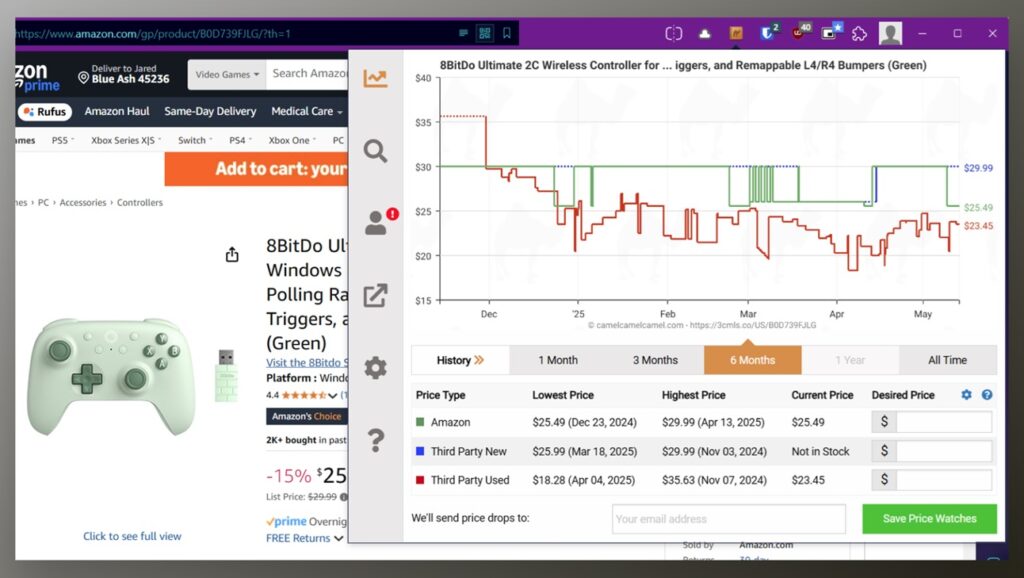
Check price histories: List prices hardly ever apply in tech, so the advertised savings can be deceptive. Here’s how you can vet deals with real historical data:
- Copy the Amazon link, head to CamelCamelCamel.com, and paste the link into the search bar to see its price history. Or, use Camelmart.com for Walmart links.
- Using a computer? Install CamelCamelCamel’s extension for your browser. Then, click the extension icon while viewing any Amazon listing to see the price history.
- On your phone? Install Keepa, then hit the Share button on any Amazon product page and share it with the app to see the price history.
- Shopping on another site? Checking the Amazon price trends can still help you determine a deal’s value.
- Still not sure? Look up the product on Slickdeals to see what previous sales have looked like, or search the web for the product name along with terms like “record-low” or “all-time low” for previous deal posts on sites like 9to5Toys.
Check the second-hand market: Used and refurbished gear can save you money year-round, but it can also help determine whether the price of a new product is remarkable by comparison.
- eBay and Back Market sell lots of certified refurbished gear with warranty coverage.
- Swappa lets you buy tech products directly from other users, which is cheaper but lacks warranty coverage.
- Best Buy often sells open-box products at discounts that reflect current sale pricing. Buying in “excellent” condition will get you a like-new product for less.
Read real reviews: Don’t let sale prices alone be your guide, especially for TVs, soundbars, and other products with endless model options to sift through.
- I like RTings for home entertainment, Soundguys for audio gear, and my pals at PCWorld for laptop reviews.
- Use specific model numbers, such as “OLED65B3PUA” instead of “LG OLED TV.” Especially for laptops, make sure the review matches the specific configuration of what you’re looking to buy.
- I also like browsing deal pages on sites that link to their own in-depth reviews, like Wirecutter and Engadget.
- If no reviews exist, consider that a red flag.
Resist FOMO: A lot of the deals that emerge around Prime Day wind up coming back later in the year. Avoid impulse-buying products for the savings alone, and always have a clear idea of how you’ll use whatever you buy.
Need help vetting deals? Advisorator members can drop into my Tech Buds forum for further discussion.