
6/19/2024: Search with your camera

Tip of the moment: How to search with your camera
Plus: Windows Recall delay, how to search with your camera, and another Mac menu bar manager
 Jared Newman |
 Hey there! I’m Jared Newman, a veteran tech journalist, and this is the free edition of Advisorator, my weekly tech advice newsletter. If someone shared this newsletter with you, consider signing up to get it every Tuesday. Thanks for reading!
During last week’s vacation, it finally happened: I successfully impressed friends and family with Google’s new “Circle to Search” feature.
Invoked by long-pressing the bottom bar on newer Samsung flagships and Pixel phones, Circle to Search lets you highlight anything on your phone’s screen—either text or visual—to look up information about it. You can even use Circle to Search while pointing at things with your phone’s camera. I briefly became the poster child for this feature after coming across an unusual flower, focusing it in my camera’s viewfinder, then launching Circle to Search to look up the name.

While Circle to Search is not officially available on iOS, the “Search Your Screenshot” Shortcut comes pretty close. Once installed, you can say “Hey Siri, search my screenshot” to look up whatever’s on your screen, or assign the Shortcut to a double- or triple-tap on your phone’s backside.
What about other Android phones? As JR Raphael notes, the closest workaround is to bring up Google Assistant, then tap the “Search Screen” button.
The hardest part of using Circle to Search is remembering that it exists in the first place. But with a bit of practice, you too may be able to impress friends and family with it.
News in brief
Last week, I experimented with a consolidated news roundup format, replacing the usual “Need to Know” and “Further Reading” sections. I found it more enjoyable to read and write, so I’m sticking with it for now. Let me know what you think!
- Microsoft has indefinitely delayed Windows Recall, the AI feature that would record all your computing activity and make it searchable, after security researchers warned about how hackers could steal sensitive info from it.
- Just a rumor for now, but Spotify’s hi-fi audio tier will cost $5 per month extra according to Bloomberg, equating to $17 per month after next month’s price hike. Apple Music, Amazon Music, Tidal, and Deezer still include lossless audio at no extra charge.
- Jabra was a wireless earbud pioneer back when few AirPods alternatives existed. Now it’s getting out of the business.
- The Galaxy Watch FE is a cheaper Samsung smartwatch at $200, but you can usually find refurbished Samsung watches for even less.
- New Pixel phone features arrive, including external display support via a USB-C cable and the ability to find a lost phone even after the battery dies.
- Yahoo Mail is adding AI-generated email summaries.
- The Light Phone III is a minimalist smartphone that still has a camera and tap-to-pay.
Now try this
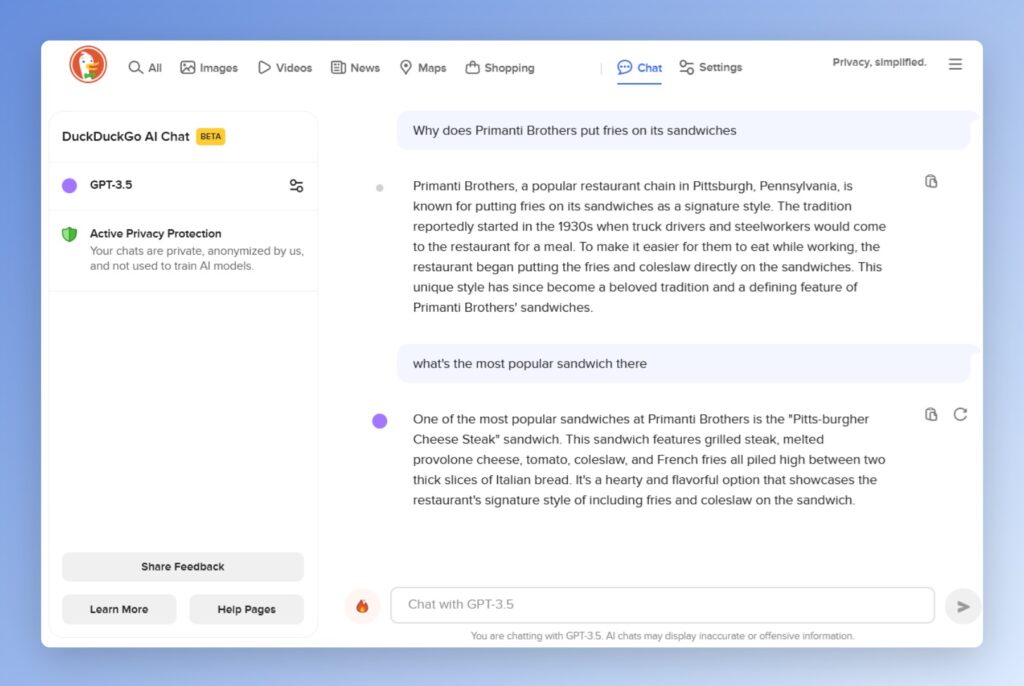
Incognito AI chat: If you’re skittish about using AI tools such as ChatGPT because of their data collection policies, DuckDuckGo has a solution: Visit duck.ai, and you can chat privately using GPT 3.5, Claude 3, and other large language models. DuckDuckGo says it prevents personally-identifying information from reaching AI providers, who’ve also agreed not to use your chats for AI training and will delete chat data within 30 days. (If you use DuckDuckGo’s search engine, you can quickly open an AI chat by adding !ai to any query.)
Another Mac Menu Bar manager: Ice is a free app that declutters your Mac menu bar by hiding the icons you seldom use. After installing the app, click the dot icon to see all of your menu bar items. For the ones you want visible at all times, hold Cmd and drag them to the right of the dot.
Ice is clearly inspired by Bartender, another menu bar manager that was recently acquired under mysterious circumstances. I’ve previously used a similar free alternative called Hidden Bar, but that one’s no longer in active development. Download Ice by choosing the Ice.zip file on the Releases page.
Spend wisely

Anker’s Soundcore Space A40 earbuds have returned to record-low pricing of $49 in black, with white or blue options for a buck more. These are Wirecutter’s pick for best wireless earbuds, with solid sound quality, decent noise cancellation, and Bluetooth Multipoint support (and I enjoyed owning them myself before they disappeared on me during CES in January).
Thanks for reading!
I’m back from vacation, the kids are out of the house at day camp, and I’m ready to get back to work. We’ll return to the usual Tuesday publishing schedule next week.
Got tech questions for me in the meantime? Just reply to this email to get in touch.
Want to support the work that went into this newsletter? Become a paid subscriber.
Until next week,
Jared