
The AI software slop invasion

We’re not ready for all these AI-generated apps
Plus: Amazon fixes its tablets, my favorite handwriting app, and how not to get carsick
 Jared Newman |
Hey there! I’m Jared Newman, a longtime tech journalist, and this is Advisorator, my weekly tech advice newsletter. Did someone share this newsletter with you? Sign up to get it every Tuesday.
Every week in this newsletter, I like to recommend a cool app or two that are worth trying. Lately that job’s gotten harder.
It’s not due to a shortage of apps, but rather the opposite: AI has made it so easy for anyone to generate an app that it’s led to a glut of new software, thrown together with minimal effort or care by people with little or no coding experience.
We’re not ready for what’s going to happen next. As the future of software becomes and endless stream of unvetted AI slop, you’ll have to become more discerning about which tools you use. Otherwise you could wind up wasting your time, harming your computer, or even putting your security at risk …
Keep reading this story with a paid membership. The free newsletter continues below.
News in brief
Amazon’s Alexa tablets: Amazon is no longer hamstringing its tablets with its own limited app store. Its new line of “Alexa” tablets ship with the full Google Play Store instead, just like any other Android device.
Amazon’s putting out three versions: An 8-incher for $230, an 11-inch model for $330, and a 12-inch “Pro” tablet for $500, or $600 with an attachable keyboard. They’re clearly trying to undercut Apple’s iPads, while still offering premium-feeling aluminum bodies. It’s an easier argument to make when there aren’t huge holes in the app selection.
Other notable news and reads:
- Apple’s announcing a slew of smart home devices right now. I’ll loop back with more details in next week’s newsletter.
- The free version of Google Gemini just got worse.
- Apple is replacing some AT&T iPhone 18 Pro Maxes after they lost cellular service.
- Microsoft starts testing a Windows search overhaul.
- Ring’s first smart lock has an emergency crank to recharge the battery if it dies.
- Hulry has some helpful tips for Apple Notes.
- By me: GoogleBook laptops mark the end of the Google we once knew.
- Also by me: “Describe a Shortcut” is one of my favorite new iOS 27 features.
Tip of the week
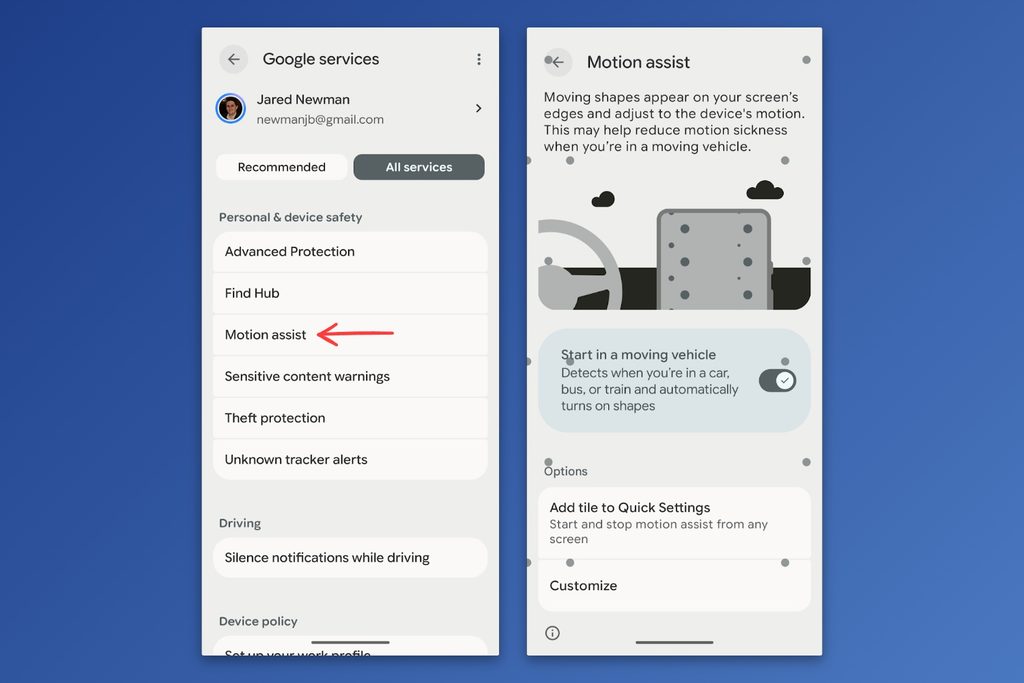
How not to get carsick: If looking at your phone in a moving vehicle makes you queasy, a new Android 17 feature (and similar two-year-old iPhone feature) can help:
- iPhone: Head to Settings > Accessibility > Motion > Show Vehicle Motion Cues, then select “Automatic.”
- Android (requires a phone running Android 17): Head to Settings, tap your name at the top, select the “All services” tab, then look under “Personal & device safety” for the “Motion assist” menu. Turn on the “Start in a moving vehicle” option.
- Other Android phones: Check out the third-party Kinestop app, which provides a similar service.
When your phone detects vehicle motion, it’ll display a series of dots that sync with the movement, potentially resolving the conflict between what you see and what you feel.
Try these apps
Override the Windows Copilot button: By default, pressing Win+C on a Windows PC (or the Copilot key on some newer laptops) launches Microsoft’s Copilot AI. With a free app called Antipilot, you can make Win+C do something different, like launching a favorite app or frequently-used folder.
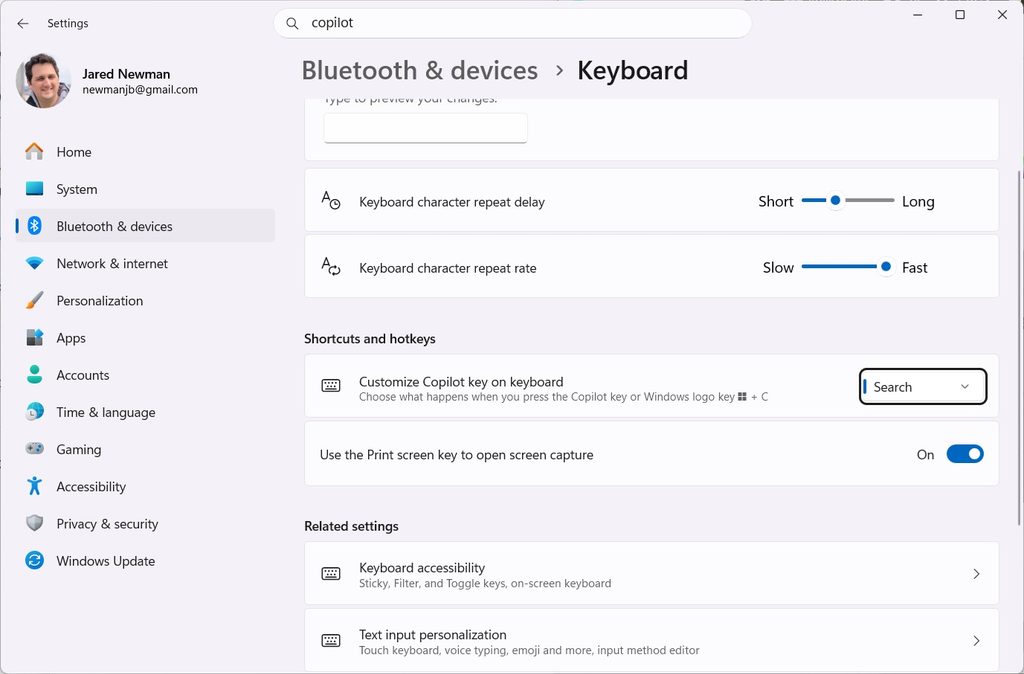
After installing the app, head to Settings > Bluetooth & Devices > Keyboard. Look next to “Customize Copilot Key” and use the drop-down to select “Open an app,” then choose Antipilot.
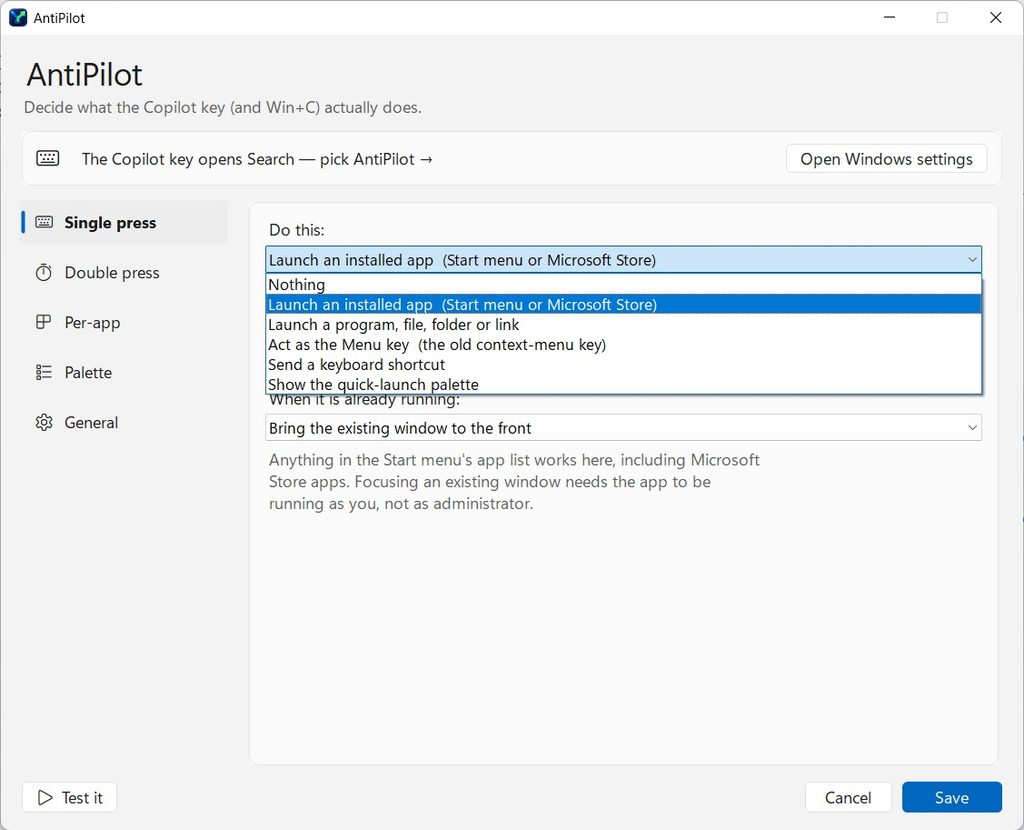
Now, open the “Antipilot Settings” app to decide what Win+C should do instead. You can map separate actions for a single- and double-press, and set up extra rules if an app is already open.
Handwritten notes with audio: I’ve recently neglected to mention that Notability is now available on Android. I’ve used the iPad version for years, primarily to take handwritten notes during interviews while also recording the audio. Notability lets you tap on your notes to play back what you recorded at that exact moment; I use it to flag important notes or conversation topics that I might want to hear again later. The free version supports up to five notes, with paid plans starting at $12 per year.
Spend wisely
This section of the newsletter may include affiliate links, which earn me a commission if you wind up purchasing something.
- Amazon Basics 20,000 mAh 20W power bank for $13.
- TwelveSouth’s keychain-friendly 2,000 mAh power bank with built-in USB-C cables drops to $34.
- Best Buy 65W charger (USB-C and USB-A) for $12.
- New Mint mobile customers: Six-month unlimited plan for $60 total.
- iPad Magic Keyboard Folio is $100 off at $150.
- You can still get the Apple Watch SE for $200.
- LG B6 65-inch OLED for $1,000. (Extra $300 discount appears at checkout.)
- Fosi’s new MP3 players with iPod-style scroll wheels look neat. They’re 15% off with promo code EBDAP15.
Consider an Advisorator membership!
You’ll get weekly feature stories, like the one I wrote this week on AI software slop, plus access to all my online tech tutorials. I’ll help you become a more confident tech user and hopefully save you some money along the way. Join us!
That’s all for now. Catch you next week.
– Jared
Did someone share this newsletter with you? Sign up to get it every Tuesday.