
Should you be using built-in password managers?

Apple and Google password managers revisited
Plus: The big router ban, a new way to protect your iPhone battery, and temptingly-cheap mechanical keyboards
 Jared Newman |
Hey there! I’m Jared Newman, a longtime tech journalist, and you’re reading the free edition of Advisorator, my weekly tech advice newsletter. Did someone share this newsletter with you? Sign up to get it every Tuesday.
If you’ve been meaning to get your passwords and online security in order, I’ve got a bunch of resources that can help:
- Making sense of passkeys and passwordless logins.
- How you can use a password manager for more than just passwords.
- The best ways to properly lock down your accounts with two-factor authentication.
- New this week: Improvements to Apple’s and Google’s built-in password managers—and why I’m still not using them.
Please consider an Advisorator membership to access these resources and get more helpful tech advice from me each week. This newsletter depends on direct support from readers, and more support means more time and energy I can put into creating these helpful resources. Thank you!
News in brief
The big router ban: Last week, the FCC banned all new models of Wi-Fi routers not made in the United States—that is, pretty much all of them—unless the vendor applies for an exemption.
While the ostensible goal is to prevent foreign actors from exploiting vulnerabilities in router firmware—a real problem—the ban is a strange way of accomplishing it. There’s little evidence that banning specific routers or vendors will help curb security vulnerabilities. and the ban only affects future products, not anything on the market today. Meanwhile, the exemption process doesn’t ask any security-related questions and is largely concerned with U.S. manufacturing plans.
So what does all this mean for you? Not much. No routers are being recalled, nothing’s being pulled from store shelves, and router makers can keep making more of what they’re already selling. The ban just gives the FCC more say over which new routers can hit the market down the road—for security reasons or otherwise.
More notable news and reads:
- Did you recently get an email about a class action settlement from LastPass? The settlement is legit, and stems from a 2022 data breach. Here’s the official claim site.
- The Sonos Play is a $299 portable speaker that sits between the smaller Roam and bulkier Move. Reviewers are loving it.
- Get ready for ads in Apple Maps.
- Google Gemini now lets you import your ChatGPT and Claude chat histories.
- OpenAI discontinues the creepy Sora app that let people make AI-generated videos of each other.
- Samsung’s new midrange phones are $50 pricier than its last ones.
- Apple discontinues the Mac Pro desktop and has no plans for a new one.
A couple Fast Company stories I’ve written lately
I had fun writing these pieces and hope you enjoy reading them:
- Manus AI cleaned up my computer, for a price: This AI app, which Meta acquired last year, can do things like clean up your downloads folder, sort your photo folders, and write new documents in the style of your existing ones. But it gets expensive fast.
- The miracle of PowerToys, Microsoft’s last great Windows app: A completely free app, full of awesome utilities, which keeps getting better, yet has no ads, subscription upsells, or ham-fisted AI integrations. I talked to folks at Microsoft about how this is possible. (This is a free gift link, as the story is normally paywalled for Fast Company’s Premium subscribers.)
Tip of the week
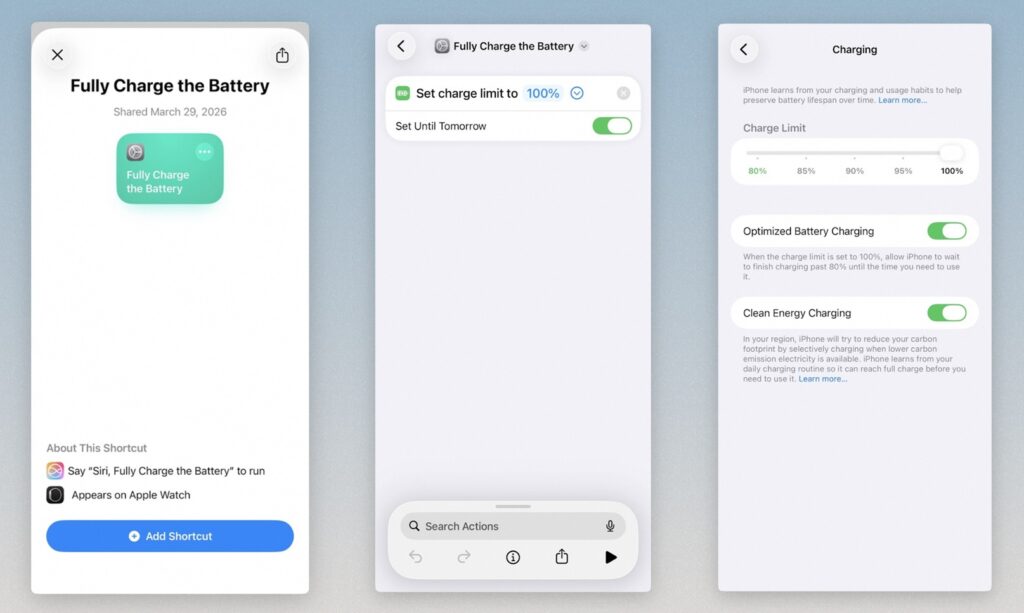
A new way to protect your iPhone battery: With the newly-launched iOS 26.4, you can now control your iPhone or iPad’s maximum battery charge using Shortcuts. If you prefer to limit your iPhone’s charge to preserve long-term battery health, this feature will make it easier to give yourself a full charge when you really need it. Here’s how:
- Under Settings > Battery > Charging, reduce the Charge Limit.
- Install this simple “Fully Charge the Battery” Shortcut.
- Next time you anticipate needing a full charge, open the Shortcuts app and tap the “Fully Charge the Battery” Shortcut, or add the Shortcut to Control Center for faster access.
- Your phone will charge to 100% while plugged in overnight, and will return to your previously-set charge limit the next day.
(In theory, you should also be able to activate the shortcut by saying “Hey Siri, Fully Charge the Battery,” but I keep running into errors with this.)
You can also set a schedule for full charging through the Automations tab in the Shortcut app. Automatically running the Shortcut on Friday and Saturday nights, for instance, would give you a full charge for the weekends and a reduced charge on weekdays.
Do you really need to limit your charging this way? It largely depends on where you bought your phone and how long you plan to keep it. But if long-term battery health is a concern, it’s nice to have more control.
(Most Android phones don’t let you manage charge levels like this, but on Samsung phones you can head to Settings > Modes & Routines > Routines to schedule when battery protection is running.)
Try these apps
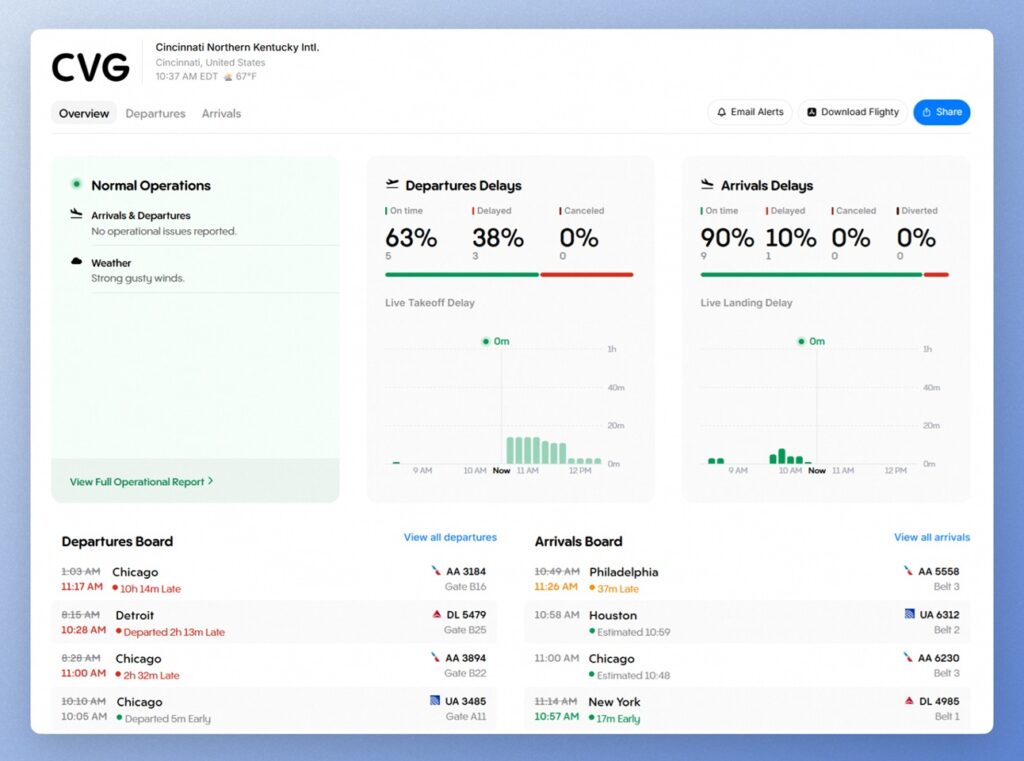
Online flight board: The popular flight-tracking app Flighty just launched a free online dashboard showing delays and disruptions at airports around the world. Click into any individual airport (or use the search bar at the top) to see detailed departure and arrival info for any flight. It’s a useful tool on its own, but also a clever way to advertise Flighty itself. (Via Rich DeMuro and Installer)
Cartographic poster maker: Terraink is a free site for turning city maps into stylized printable posters or downloadable wallpapers. Type in a location, fiddle with the settings until the map looks the way you want it, then hit the Download button to save it as an .SVG or .PNG file. Set it as the background on your phone or computer, or get it blown up to poster size at your nearest print shop.
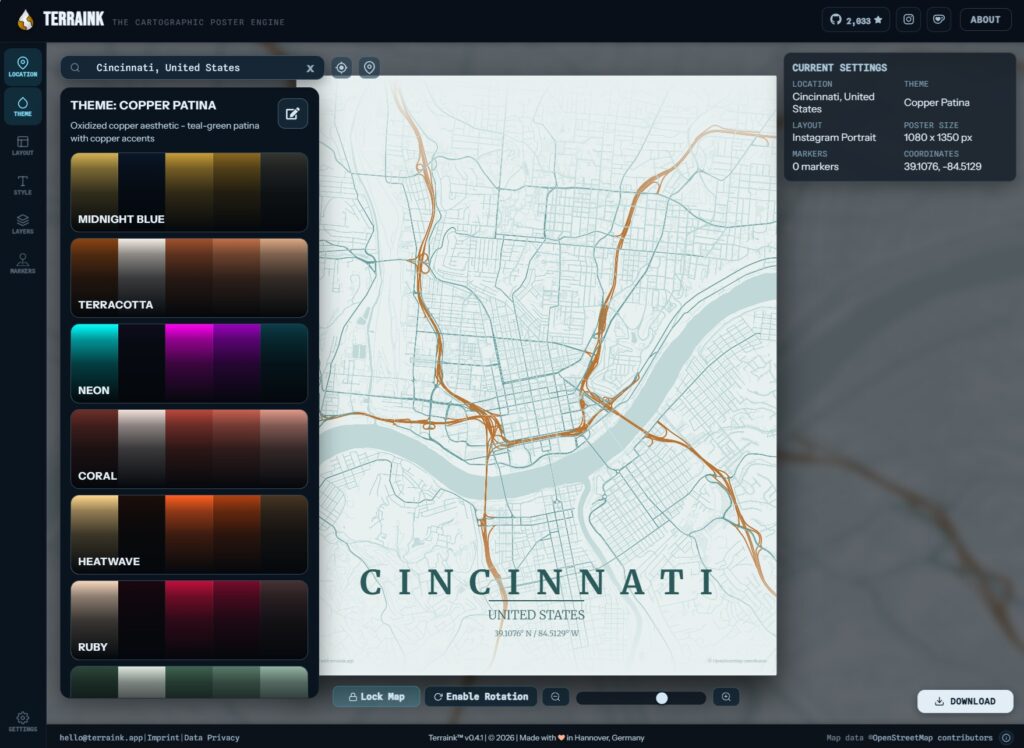
My only gripe: You can’t modify the text for city, country, and coordinates, though you could always hide the text entirely and use some image editing software to overlay your own. (Via Hulry)
Spend wisely
This section of the newsletter may include affiliate links, which earn me a commission if you wind up purchasing something.
Some notable deals I’m seeing this morning:
- The glowingly-reviewed JBL Flip 7 Bluetooth speaker returns to a record-low $85.
- The Anker 633, Wirecutter’s pick for best snap-on iPhone power bank, drops to $37, a buck more than the record low. (Requires a free Anker login and auto-applied promo code.)
- New low for Nothing’s CMF 2 noise-cancelling earbuds at $29.
- Woot has an assortment of Keychron mechanical keyboards on clearance. (The ultra-slim one is tempting for $45.)
- Fitbit Inspire 3 returns to record-low $70.
- Buy a $50 Apple Gift card, get a $5 Best Buy gift card. (Or $100 for $10.)
- 15-inch M4 MacBook Air (512 GB storage, 16 GB RAM) drops to $1,099, $200 less than the M5 model.
- The M5 MacBook Air is already $50 off.
Think about an Advisorator membership!
Become a paying member to support my work and get in-depth advice not included in the free newsletter. Learn to protect your passwords, find the best wireless plan, stop spam, and more. Hit the button below to get started.
Thanks for reading! Catch you next week.
Until then,
Jared
Did someone share this newsletter with you? Sign up to get it every Tuesday.