
Put your gadgets in their place

5 ideas to tidy up your tech
Plus: An Evite scam to avoid, Obsidian’s Reader mode, and Logitech’s accessory sale
 Jared Newman |
 Hey there! I’m Jared Newman, a longtime tech journalist, and you’re reading the free edition of Advisorator, my weekly tech advice newsletter. Did someone share this newsletter with you? Sign up to get it every Tuesday.
One of the greatest tech-related purchases I’ve made of late is a product with no technology in it.
I was feeling overwhelmed by the assortment of laptops, tablets, and other gadgets accumulating around the house and finally decided to do something about it.
The rest of this week’s feature story is for Advisorator’s paying members. Sign up to get weekly features, online resources, and access to my friendly Tech Buds forum. Get started here →
News in brief
Apple’s age verification push: Last fall, I wrote about why Apple and Google really want to scan your license and passport. Initially pitched as a more convenient way to get through airport security, they’ve also hinted at using digital IDs to verify your age online.
Now, Apple’s taking the first step toward doing that with age verification for its own apps and services. For instance, you may be asked to confirm your adulthood during Apple account setup, with digital ID as an option. Applying digital ID to third-party apps and services is likely the next step, especially as more state passing age verification laws.
More notable news and reads:
- Google’s hotel search adds a price tracker with email alerts.
- You don’t need to pay for Windows antivirus software, Microsoft says. (I’ve been saying this myself for years.)
- Scientists tricked ChatGPT into warning people about a fake disease.
- Comcast’s new wireless plans include overseas data, but no family plan discounts.
- Framework announces a “Pro” version of its highly repairable laptop , with much better battery life than the standard version. Looks great to me.
Tip of the week
An Evite scam to avoid: Over the weekend, my wife and father-and-law both received event invitations that purported to be from Evite, except they weren’t:
- In my wife’s case, the sender was a random Gmail address.
- Instead of linking to Evite.com, the invite led to a web address that I did not recognize.
- That site then presented options to log in with Gmail, Outlook, or other accounts, supposedly to see the invitation.
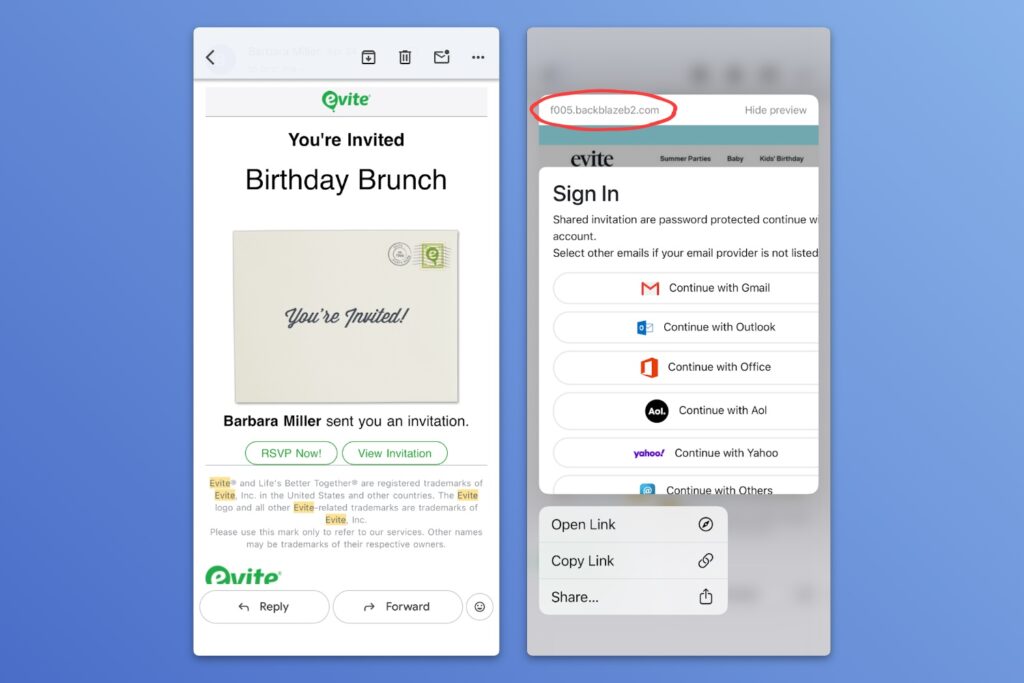
Of course, the goal here is to trick the victim into signing in so the attacker can steal their email login. It’s the kind of thing that should get flagged by Gmail’s spam filters, but didn’t.
What can you do about it?
- Don’t trust any unsolicited email that leads to a sign in page. You can always just visit the site directly to sign in instead.
- Don’t click on suspicious email links, or at the very least check the site address to see if it matches who the sender claims to be. (Using web mail on a computer, you may be able to hover over a link to view the address without clicking on it.)
- Use a password manager and be alert for any website that doesn’t autofill your credentials. (Password managers won’t autofill on fake websites.)
- Set up two-factor authentication when possible, especially for your email.
Even if you know all this already, it’s easy to get caught off guard by phishing schemes when you’re busy or distracted, so consider this a reminder to stay alert.
Try these apps
Easier online reading: Obsidian Web Clipper is a free browser extension that’s mainly used to save offline copies of web pages, but it recently added a “Reader” mode that conveniently unclutters online articles. While using the extension, click the book icon at the top to open your current web page page in a reader-friendly view, with no ads, unwanted videos, or pop-ups:
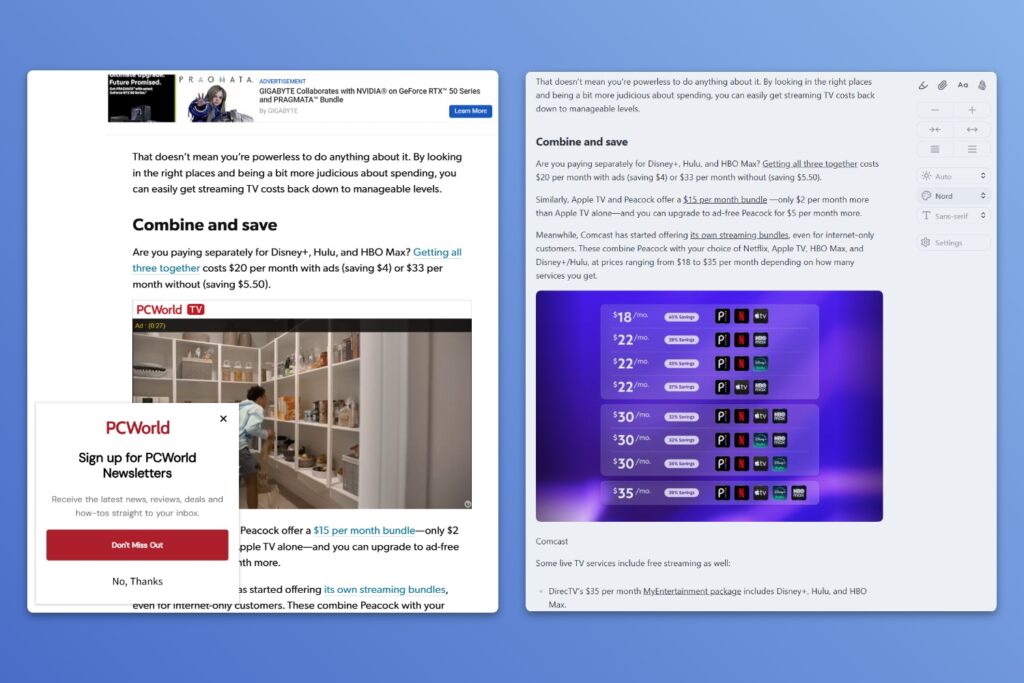
Even cooler: Reader mode works with YouTube, showing a transcript that auto-scrolls with the video and lets you click on text to skip around.

You can use Obsidian’s Reader mode without installing the desktop app. The latter is only necessary if you want to save copies of articles for offline reading. (From the archives: Why I’m using Obsidian for writing and notetaking.)
Rhyme time: For the aspiring poets out there, rhymeit.org (via WebCurios) looks up rhymes for any word, grouped by syllable, along with options for near-rhymes. Tap on a word (on your phone) or hover (with a mouse cursor) to see its definition. There hid Jared, in the arid Sahara.
Spend wisely

This section of the newsletter may include affiliate links, which earn me a commission if you wind up purchasing something.
Woot is holding a big sale on Logitech keyboards, mouses, and other accessories, with an extra 20% off for Prime members. Some highlights (prices shown for Prime members):
- The mouse I use everyday, Logitech’s MX Master 3S, is down to $60 refurbished.
- Logitech MX Keys Mini for $60 new (versus $100 on Amazon), or full-sized for $56 refurbished.
- Logitech MX Vertical ergonomic mouse for $52 new.
- Logitech Litra Beam video conference/streaming light for $60 refurbished, half-off Amazon’s price.
- Logitech Blue Yeti desktop microphone for $54 open-box.
Note that the 20% discount will only apply on the final checkout page, after you’ve signed into your Amazon account and set a payment method. Peruse the full deal list here.
Other notable deals:
- Roll the dice on a three-pack of Verbatim AirTag knock-offs (Apple Find My-compatible) for $9.
- Get an Aukey 27,600 mAh power bank with 140W total charge speed for $50.
- The MacBook Neo gets a modest $10 discount from Amazon, but keep an eye on “Like New” buying options for less.
- You can still save $150 on the new MacBook Air, or take $200 off the M5 Pro MacBook Pro.
Vibe coding updates
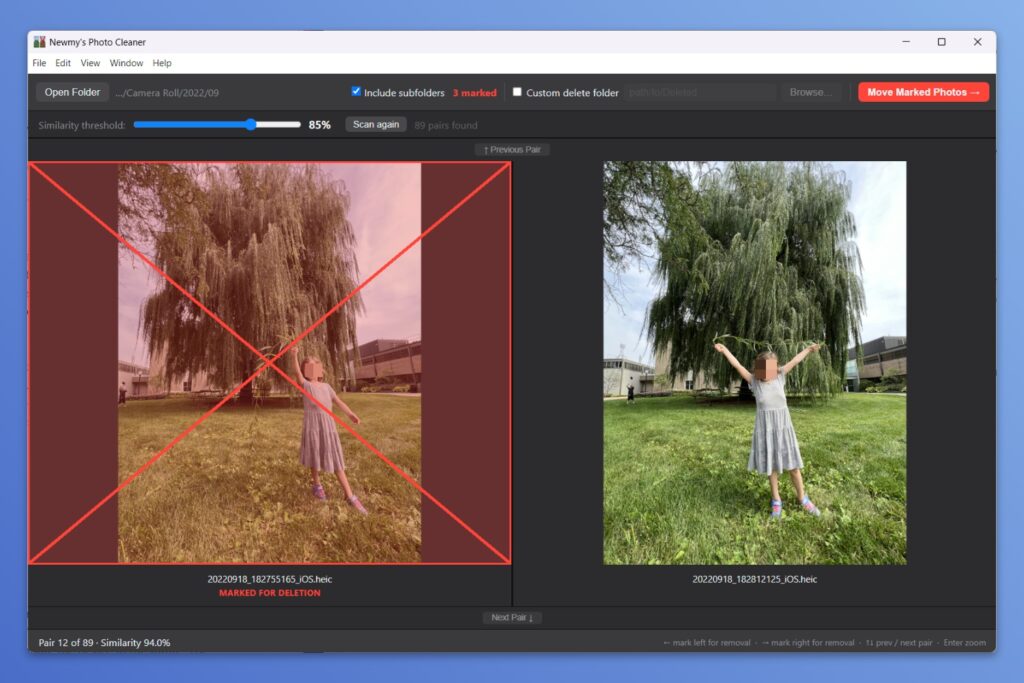
In case you missed it last week, I’ve made an app for banishing blurry images, outtakes, and other unwanted clutter from your photo library. Newmy’s Photo Cleaner scans any folder on a Windows PC or Apple silicon Mac to identify similar-looking images, then offers a speedy way to sort through them all. I’ve made it free for Advisorator members, and you can check out the details here.
In other vibe coding news, the long-awaited Mac version of Newmy’s YouTube Downloader is almost finished. I just need a little more time for testing and documentation, so stay tuned!
Thanks for reading!
If you enjoy this newsletter and want to continue sharpening your tech knowledge, please think about becoming a paying member. You’ll get my weekly feature story in each newsletter, plus helpful online resources and access to my friendly Tech Buds forum.
Until next week,
Jared
Did someone share this newsletter with you? Sign up to get it every Tuesday.