
My secret to remembering people

You should have a “People” note
Plus: Ring’s dog finder, new Spotify tricks, and a private voice assistant
 Jared Newman |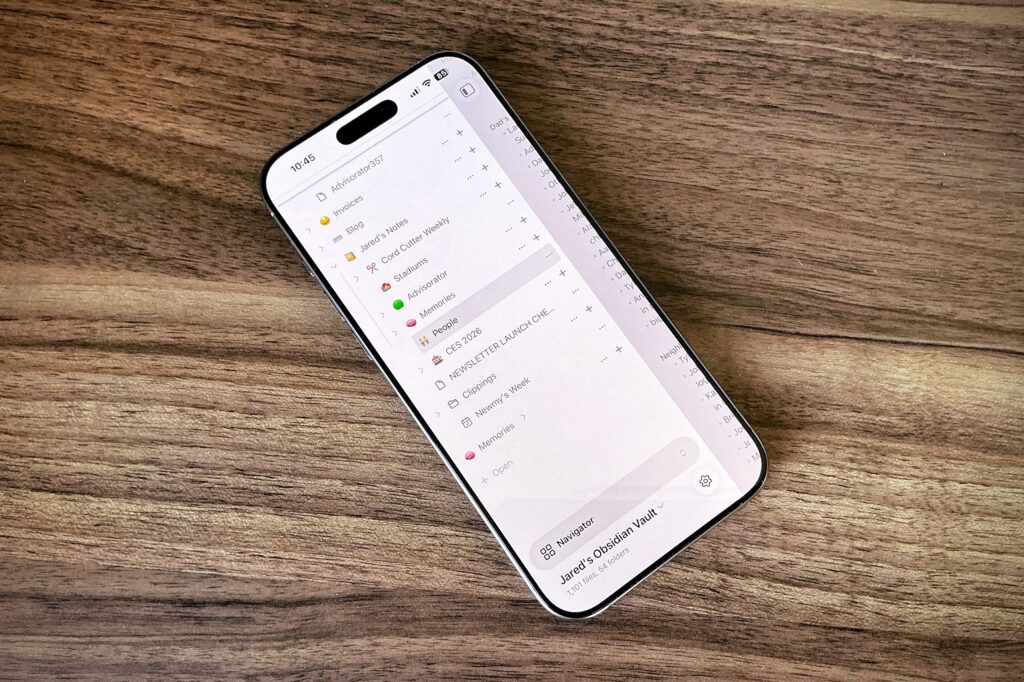
Hey there! I’m Jared Newman, a longtime tech journalist, and you’re reading the free edition of Advisorator, my weekly tech advice newsletter. Did someone share this newsletter with you? Sign up to get it every Tuesday.
Let me tell you my trick for remembering the names of people I meet: I don’t.
It’s not for lack of caring. It’s just that my stupid brain seems to only excel at remembering trivial things, like my family’s exact food orders at a random restaurant we went to in 2023. That same brain is largely worthless at matching names to faces, especially when it’s been a while.
So a couple years ago, I swallowed my pride and started maintaining a “People” note on my phone, which is basically just a list of folks I’ve met with some basic descriptions to help me remember them. It’s not fancy, but it’s already spared me from potential embarrassment on several occasions.
Here’s how it works:
- In Obsidian (my note taking app of choice) I have a note called “People.”
- The note has a series of headings for various social contexts, like “Neighborhood” and “School Parents.”
- Each heading has a list of people that I’ve met in those contexts, along with enough basic details to help me identify them in the future.
- I’ll try to glance over the list before heading into certain social scenarios, and will take a minute afterwards to add more people if needed, while the information is still fresh in my mind.
I’m not building entire dossiers here. Most of my notes are one-liners like “Steve: Tall dude, likes baseball,” which along with how I met this is usually enough to remember who’s who. Occasionally I’ll fill in some extra details to help with future conversations, but not so many that I can’t easily scan through the notes later.
You don’t have to use Obsidian for this purpose. Apple Notes, Google Keep, or any other note taking app will work. The important thing is being able to access your People note quickly and easily, even on your phone. You shouldn’t have to open a laptop to log your notes or dig through numerous menu layers to reference them.
It’s worth noting that an entire class of apps exist for the purpose of remembering details about people, such as Clay, Dex, and Monica. These “Personal CRM” apps, named after the Customer Relationship Management software that business use to keep track of clients, have extra features such as contact reminders, relationship mapping, and activity logging.
But these apps have always struck me as being overly heavy for the task. They might work for some folks, but I just wanted a fast and easy way to write down basic details, not an entire system for managing my social life. Besides, the important birthdays are already in my calendar, while the phone numbers and emails are in my contacts app.
Sometimes, instead of another app, all you really need is a note, plus a clear sense of what it’s for. If your brain is as bad at remember folks as mine is, maybe it’s time for a People note of your own.
New in the forum: Ask Me Anything!
Over the past week, I’ve been answering Advisorator members’ questions in the Tech Buds forum as part of my first monthly “Ask Me Anything” thread. Among the topics we’ve covered:
- Undoing some of the big design changes in iOS 26.
- How to safely dispose of an iPad that won’t turn on.
- Why some gadgets don’t like USB-C to USB-C cables.
- Why more streaming services don’t release entire seasons at once.
I’m really pleased with the response to this format and hope we can keep it going. My plan is to set up a fresh thread every month to keep things from getting unwieldy, and to occasionally spotlight some questions and answers here in the newsletter.
Forum access is available to Advisorator’s paying members, who support my work for roughly the cost of a monthly beer. Join us here →
News in brief
Ring’s dog finder: During the Super Bowl, Amazon’s Ring was advertising a “Search Party” feature that can locate lost dogs. Dog owners can initiate a search through the Ring app, at which point all cameras in the neighborhood will begin looking for the dog. When a camera detects a match, its owner will get an alert through the Ring app and can choose to notify the dog owner. The feature first launched last fall, but Ring has now opened the search feature to anyone through its app, no Ring camera required.
Much like monitoring your loved ones’ whereabouts through their phones, this one of those things that lands right on the line between useful and dystopian. No one wants families to lose their pets, but if Ring can activate its surveillance network to track down dogs, what’s stopping it from doing the same for people? If you don’t want your camera to be part of the network, you must manually opt out.
Other notable news items:
- You might start seeing ads in ChatGPT this week. (Read my previous coverage here.)
- Anthropic says its Claude AI “will remain ad-free” as it zings ChatGPT in its Super Bowl ads (but doesn’t permanently rule ads out).
- Amazon Music Unlimited quietly raises prices: Now $13 per month ($12 with Prime) for individuals and $22 per month (or $219 per year) for families. See other streaming music options here.
- YouTube Music puts song lyrics behind the Premium paywall.
- Google Home finally lets you trigger smart home routines with buttons.
- More smart home headaches as Ikea users report connection problems.
- More RAM shortage fallout: Valve’s Steam Machine PC delayed and may cost more.
- Rumor: New iPads and MacBooks could arrive in March.
New Spotify tricks, a private voice assistant, and more
Read the rest of this week’s newsletter with an Advisorator membership. I’ve got some new tricks for Spotify users, a private voice assistant option, a free source of stylish iPhone wallpapers, and a bunch of great deals. Hit the button below for more details.
Thanks for reading! Catch you next week.
Until then,
Jared
Did someone share this newsletter with you? Sign up to get it every Tuesday.