
5/16/2023: Stop paying full price for tech

How to pay less for tech
Plus: Google’s big week, iMessage in Windows (again), and cheaper Macs Mini

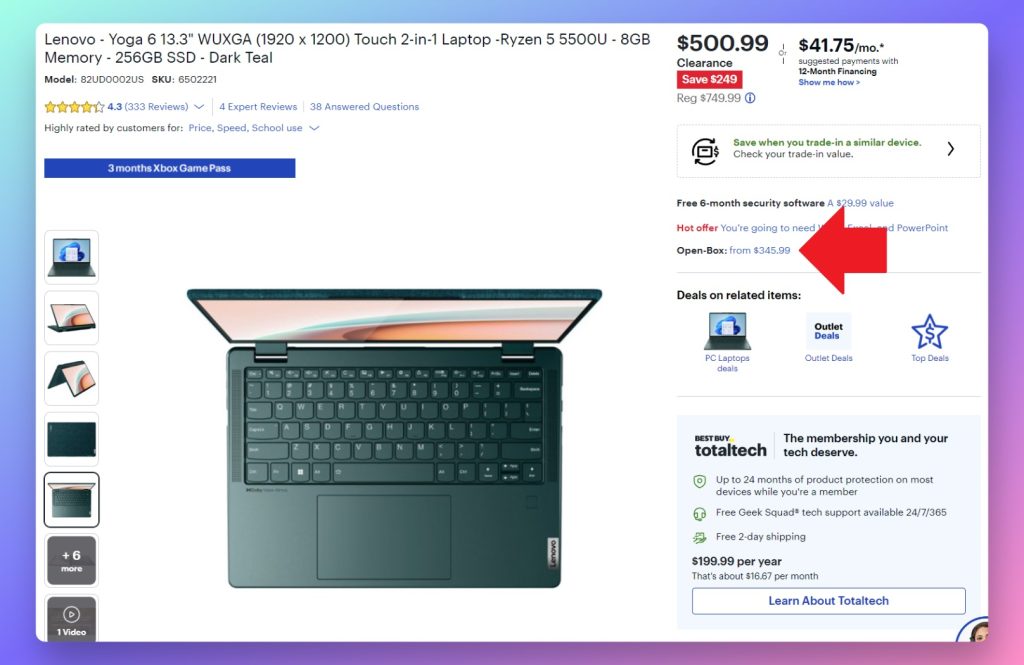
I run a pretty lean operation here at Advisorator, so while I often have to acquire more tech gear for “research purposes,” I’m reluctant to pay anything close to full price for it.
Waiting around for deals is one way to defray the costs, but when that’s not an option, I turn to the used, refurbished, and open-box markets. If you know where to look—and what to look for—you can essentially will your own price cuts into existence and still get good-as-new gadgets.
For this week’s feature column, I’ll discuss a handful of my go-to sources for cheap gadgets, along with a few things to be aware of before you go shopping.
Google’s big week
Google held its annual I/O conference last week, where it made some major announcements on Pixel hardware and generative AI. The news and its repercussions seemed to occupy the tech news cycle for the entire week.

Let’s start with the fun gadget stuff:
- Pixel 7a: Google’s latest lower-priced phone has a better camera system, a brighter screen with a smoother 90 Hz refresh rates, and (finally) wireless charging. Reviews seem positive. At $500, it sits between last year’s Pixel 6a (now $350) and the $600 Pixel 7, and you can order it now.
- Pixel Tablet: An 11-inch Android tablet that comes with a magnetic speaker dock. When attached, the tablet becomes a smart display for viewing photos, controlling smart home devices, and showing visual responses to “Hey Google” voice commands. It’s shipping in late June for $499, including the dock.
- Pixel Fold: A foldable phone with a 5.8-inch outer screen, unfurling to reveal a 7.8-inch display on the inside. It looks nicer than Samsung’s Galaxy Fold4—the outer screen is wider, and it’s much slimmer when folded up—and will probably have a better camera system, though it has its own trade-offs. It’s shipping in late June for $1,799, but we’re still waiting to hear about deals from wireless carriers.
The more impactful news had to do with generative AI. Google was caught off-guard last year by the rise of tools like ChatGPT and Stable Diffusion, which can generate human-like text and artwork from simple text prompts. That tech is now winding its way into all kinds of products—from Microsoft’s Bing search to Grammarly’s writing assistant—and Google used I/O to show how it will bring similar features to its own apps and services.
Some examples:
- Google plans to bring AI-generated answers to search results when appropriate, pushing web links further down the page.
- Google’s Workspace apps will get a slew of AI features, such as AI-written responses in Gmail and image generation in Google Slides.
- Generative AI will power a “Magic Editor” feature in Google Photos that can reposition subjects in the frame.
- A “Magic Compose” feature coming to Android will help tweak the tone of your text messages before sending them.
The AI news is kind of boring on some level, as ChatGPT’s underlying tech is already powering similar features elsewhere. Still, no other company stands to bring generative AI to the masses like Google, and I suspect the Gmail integration alone will lead to a lot more machine-generated writing—for better or worse.
Just don’t expect any big changes anytime soon. Most of these features are still in the experimental phase, and you’ll have to join a waitlist for a chance to try them.
More I/O tidbits: Google’s Home app gets an overhaul, Android gets AirTag-like item trackers, Search gets a “Perspectives” feature to surface more human discussions, Google’s smartwatch platform gets some improvements, and Pixel phones get a ringtone that sounds like Kenny G. TechCrunch has a nice roundup.
Tip of the moment

iMessages in Windows (again): Back in January, I wrote about an app from Intel that lets you handle text messages and phone calls on Windows PCs, even while using an iPhone. Now, Microsoft has added iPhone support to its own Phone Link app.
What’s the difference? Intel’s app is designed for only a limited number of PCs that use the company’s Evo processors, though in practice I’ve found that it works with practically any Windows 11 machine (including my $300 AMD-powered Mini PC). It also has a file transfer tool and photo viewer.
Microsoft’s Phone Link has no device restrictions—even on paper—and it’s a bit easier to set up. Just open the app on your PC, scan the QR code with your phone, then follow the setup steps. Thanks to an iOS feature called App Clips, you can complete the setup without even having to visit the App Store.
Both apps have similar restrictions: They can’t handle group messages or images, and there’s no message history beyond your current Bluetooth connection. But as a simple way to handle one-on-one messages with the speed of a full-sized keyboard—either on iOS or Android—both get the job done.
Now try this
A page for productivity: Daily.place is a free and simple website that combines a task manager, focus timer, and ambient sounds. You can set up multiple pages with different addresses (for instance, daily.place/work and daily.place/weekend), but everything’s stored locally in your browser. That means anyone who uses the same addresses will get their own, separate pages instead. Clever! (Via the Tech Productivity newsletter)
Around the web
- By me: Tech companies’ free products are getting stingier.
- Final Cut Pro and Logic Pro head to the iPad next week.
- A new home security system uses Wi-Fi light bulbs as motion sensors.
- Visit The Walkman Archive for a fun little nostalgia trip.
Spend wisely

Over at Amazon, Apple’s latest Mac Mini desktop has hit an all-time low price of $500. That’s $99 off the model with 256 GB of storage and 8 GB of RAM, though you can also grab the 512 GB version for $690, a $190 discount. If it’s more power you’re after, B&H has the Mac Mini with a speedier M2 Pro processor and 16 GB of RAM for $1099.
Thanks for reading!
Got questions about anything you’ve read here or feedback on this newsletter? Just reply to this email to get in touch.
Until next week,
Jared