
11/21/2023: Black Friday survival guide

The Advisorator guide to Black Friday
Plus: iMessage Android drama and smarter smartphone shopping


When it comes to Black Friday, I am fond of saying that time has no meaning anymore.
It’s the only way to explain why my inbox, even on the Tuesday prior, is flooded with alerts for deals that will undoubtably remain available throughout the week.
Not that I’m complaining too much. As the singular shopping holiday has given way to an entire week—or, I’m guessing, multiple weeks—of deals, we now have more time to deliberate and strategize. And in the case of this newsletter, I have time to post a guide that will remain viable for more than just a frantic 24-hour period.
All of which is to say that I have just published a comprehensive Black Friday guide on the Advisorator website, including:
- Highlighted deals that I think are especially noteworthy, with explanations.
- A longer list of notable deals broken down by category.
- Guidance on how to vet deals yourself and avoid wasting money.
As always, I never collect an affiliate fee or sales commission from any of the deals in this newsletter. My only goal here is to provide unbiased recommendations that you might find useful.
Last thing: This guide is not paywalled. If you value my work and want to help support it, consider a paid subscription. You’ll get an exclusive tech advice column from me every week, plus extra deals, helpful online tech tutorials, and full archives of every newsletter. Sign up here!
Check out the full Black Friday guide →
Need to know
iMessage on Android drama: The last week brought a couple of interesting developments for messaging between iPhone and Android users.
Let’s start with the news that Apple will support the RCS chat protocol on iOS next year. RCS is a successor to standard text messaging (known as SMS and MMS), allowing for high-resolution images and video, typing status indicators, read receipts, and larger group chats. In other words, it eliminates most of the annoyances that arise when iPhone and Android users chat with one another.
It will not, however, eliminate the weird social stigmas around chatting with green bubbles, at least in the United States. Apple has already indicated that it will stick with green for RCS chats, and it’s also not going to support the end-to-end encryption that Google has added to its own Messages app for Android. Instead, Apple will push for encryption in the RCS standard itself. (Arguably it should have been included from the start.) Expect Apple to continue marketing iMessage as an exclusive experience for iPhone users, even as its benefits diminish.
In the meantime, lots of companies have been trying to bring iMessage to Android with varying degrees of success. One example is Sunbird, which uses a network of virtual Macs to relay users’ messages onto Android phones. Sunbird launched in a closed alpha last year, but last week released a rebranded version of its app in conjunction with Nothing, an Android phone maker.
Unfortunately, researchers quickly discovered that Sunbird’s app was full of security holes, and was passing users’ message data through an unsecure online database despite the company’s claims that it preserved end-to-end encryption. Nothing quickly pulled the app “to fix several bugs,” while Sunbird itself has largely remained silent.
Sunbird isn’t alone in using the virtual Mac approach to bring iMessage to Android. I’ve been using another app called Beeper, which has been a mostly positive experience. (I’ll discuss it more in a future newsletter.) While this approach is inherently less secure than using iMessage on an iPhone—something Beeper itself even acknowledges—it sounds like Sunbird’s practices were especially shoddy, and Nothing should’ve done more due diligence before throwing weight behind it.
Tip of the moment
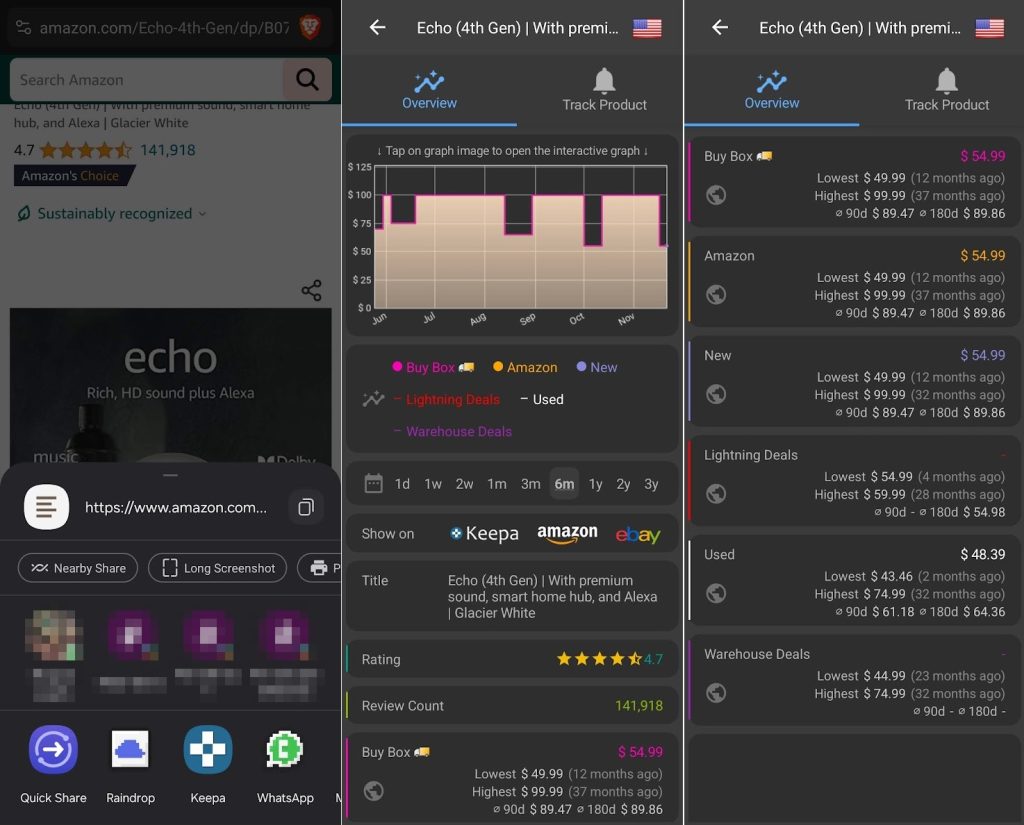
Smarter smartphone shopping: While I often mention CamelCamelCamel as a way to check the price history of items on Amazon, it’s not so easy on your phone, where you can’t install CamelCamelCamel’s excellent browser extension for one-click price checks.
That’s where Keepa comes in. Functionally it’s similar to CamelCamelCamel, except it also has proper iPhone and Android apps.
Once installed, tap the Share button while viewing any product on Amazon’s app or website, then look for the Keepa icon. Tapping it will bring up that product’s price history so you can tell if it’s a good deal. Similar to CamelCamelCamel, you can also set up alerts for when a product’s price drops below a certain threshold.
I find Keepa’s interface to be a bit messier than CamelCamelCamel overall, it’s easier to use when you’re shopping by phone instead of a computer.
Further reading
- Europe is getting a better version of Windows.
- Google Photos will soon help you delete similar pictures.
- Apple Music Classical finally gets proper iPad Support.
- iPhone 14 users get another free year of satellite SOS messaging.
- Android phones will get better magnetic charging soon.
Thanks for reading!
Got questions about any deals you’re looking at, or anything else you’ve read here? Just reply to this email to get in touch. And if you’re celebrating Thanksgiving here in the U.S., have a great one.
Until next week,
Jared