
9/5/2023: Fun with smart plugs

How to use a smart plug
Plus: The Alexa-Assistant alliance, grabbing stills from videos, and a charger for cheap.


It’s not often that two of my obsessions combine, but that’s what happened when I bought a new coffee maker a couple months ago.
The machine in question, Technivorm’s Moccamaster, makes a pretty good cup with its own standard dripper. But after reading about how some users have swapped in their favorite pour over drippers instead, my inner techie and coffee snob merged, and an especially nerdy brewing plan arose.
Using a TP-Link Kasa smart plug, I’ve now set up an Alexa routine that activates with the phrase “Alexa, make me a pour over.” The smart plug turns on the coffee maker for 35 seconds—just enough to saturate the grounds in my Hario V60 dripper—then turns it off for a 30-second bloom. The machine then turns on for a three-minute brew, followed by Alexa announcing “Your coffee’s ready!”
Why do I bring this up? Partly to boast, sure, but mainly to show some appreciation for the humble smart plug. In the grand scheme of smart home devices, plugs are arguably the simplest to set up, but they’re also the easiest to overlook because they don’t do anything on their own. Instead, they act as a blank canvas for creativity, leading to all kinds of neat possibilities.
Need to know
The Alexa-Google Assistant alliance: Last week, JBL announced the first smart speakers that support Alexa and Google Assistant simultaneously. That means you can say “Alexa” or “Hey Google,” and you’ll get a response from the corresponding assistant. They’ll even coordinate on certain tasks, for instance letting you start a timer with “Alexa” and stop it with “Hey Google.”
While Amazon has advocated for interoperable voice assistants since 2019, Google has always pushed back, arguing that users would get confused if they could use multiple assistants interchangeably. Amazon’s universal command system (as in the timer example above) might have helped sway the company, but I also suspect Google’s attitude has mellowed as the smart speaker wars cool off.
Anyway, JBL’s new speakers start at $350 and go up for pre-order next week. Hopefully we’ll see more cross-assistant speakers at different prices before too long.
Yet another Verizon plan: Verizon has added a third tier to its latest wave of unlimited data plans. “Unlimited Ultimate” costs $90 per month for one line (with autopay) and includes 60 GB of mobile hotspot use per month, versus 30 GB on its $80 per month “Unlimited Plus” tier. The plan also includes 10 GB of data in 210 countries, whereas cheaper plans only cover the United States and Canada.
I’ve updated my unlimited data plan comparison chart for Advisorator subscribers accordingly. You’ll also find a separate chart on that page for comparing Verizon’s new and old plans.
Tip of the moment
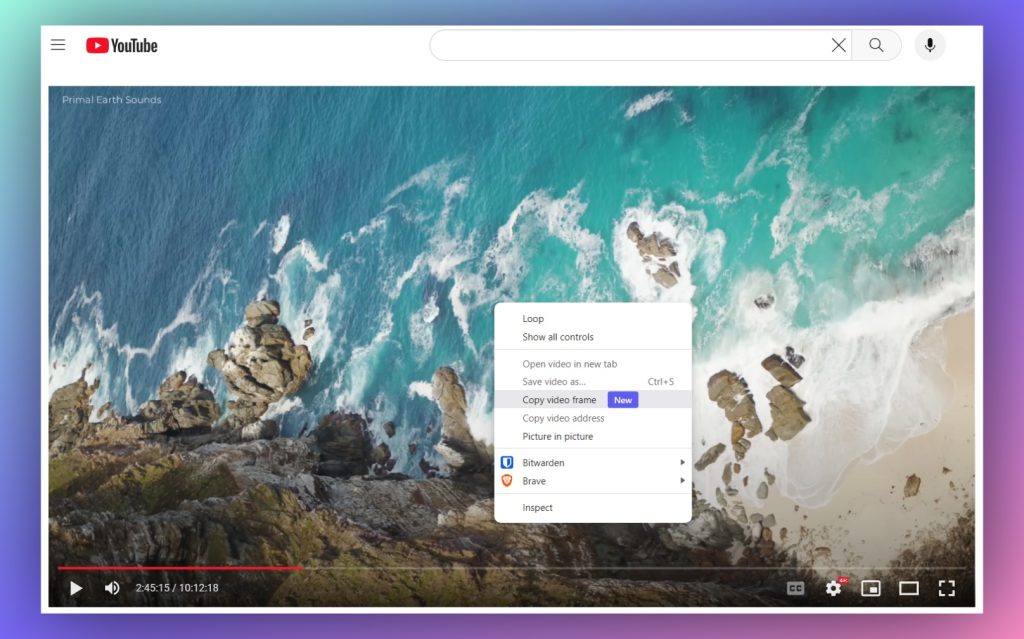
Turn videos into images: If you’re running the latest desktop version of Chrome—or other Chromium-based browsers such as Microsoft Edge and Brave—you can now capture still images from video frames on YouTube and some other sites. Try it yourself on this 4K nature video:
- Click the ⚙️ gear icon in the video player and set Quality to 4K.
- Right-click on the video, then click “Copy video frame.”
- If you don’t see this option, right-click again to find it.
- Paste the video into any image editor, such as Paint or Photopea, then save it.
Turning 4K nature videos into wallpapers is a fun use case, but this trick also works with your own videos on Google Photos. It’s better than taking a screenshot of the video player because it preserves the video’s full quality, even when it’s higher than your own screen resolution. It also gives you a cleaner image, with no blurring between frames or on-screen menu clutter.
Now try this
Chrome’s new extension store: Google is redesigning the Chrome Web Store for the first time in five years. The new look makes it easier to browse Chrome extensions by category and puts a bigger emphasis on editors’ picks. For now, you can choose between the new store and the old store, though they both have the same selection of extensions and themes.
When software updates cease: Endoflife.date is a great resource for looking up when your software will stop getting updates. While it’s largely focused on developer tools, it also lists end-of-life dates for Windows, Office, iPhones, iPads, and MacOS. Keep it in mind if you’re worried about the security risks that can come from using outdated software. (Thanks to fellow tech journo Dwight Silverman, who mentioned Endoflife.date in Advisorator’s Slack chat room over the weekend.)
Around the web
- Apple will almost certainly announce new iPhones and more next week.
- Microsoft’s new Bing ads in Windows look a lot like malware.
- Practice your Jeopardy! timing with this $65 USB buzzer.
- Report: Apple cuts back tech support on social media and its own forums.
- Google Workspace’s generative AI features will cost $30 per month, per user for businesses. No word on consumer pricing yet.
Spend wisely

A perennial favorite charger deal has cropped up once again. With the mildly-amusing coupon code DERP132, you can get RAVPower’s 30W charger for $10, including free shipping. That’s a buck more than previous offers, but still a nice price on a compact charger with both an 18W USB-C port and 12W USB-A port.
Thanks for reading!
Got questions or comments about anything you’ve read here? Just reply to this email to get in touch!
Until next week,
Jared