
8/29/2023: A new tech advice hub

Tech guides galore
Plus: How to test a notes app, share links without junk, and some great Labor Day deals


This week’s top section will be a little different than usual.
Instead of writing a new feature column, I invested that time (and then some) into revamping the guides section of the Advisorator website. This is a collection of in-depth, evergreen articles covering some of my favorite tech topics. For instance:
- How to actually use a password manager 🔓
- My updated list of essential apps 🔓
- Why you probably shouldn’t pay for antivirus
- How to solve your Wi-Fi problems
I’ve temporary unlocked the first two of those guides, so you can read them without a subscription. Advisorator subscribers can access the full collection, which now has 17 guides in total. Check out the full list of guides, and sign up for a free trial to read them all:
Need to know
Dropbox drops unlimited storage: Until last week, Dropbox offered an unlimited storage plan starting at $72 per month for three people, and I admittedly became aware of this only after reading that it’s going away. The company is now scaling back its Advanced plan to 15 TB across three people and blames a variety of supposed abuses, including cryptocurrency mining and sharing among unrelated users, rather than teams.
While I’m guessing most Advisorator subscribers are unaffected, I bring it up as yet another example of companies reneging on unlimited storage after users dare to take advantage. (Another example I haven’t seen much publicity about: iDrive quietly discontinued its unlimited photo storage plan in favor of a more limited offering earlier this year.)
I wrote about this phenomenon for Fast Company in 2015, and the story holds up pretty well today. If you see a company advertise unlimited cloud storage, just assume at the outset that it won’t last.
Threads in the browser: Instagram’s Twitter alternative Threads is now available on the web after launching on iOS and Android in early July. I still don’t particularly enjoy it—at least not compared to the geek-hippy vibes over at Mastodon—but at least now it’s possible to check in without using a phone.
Tip of the moment
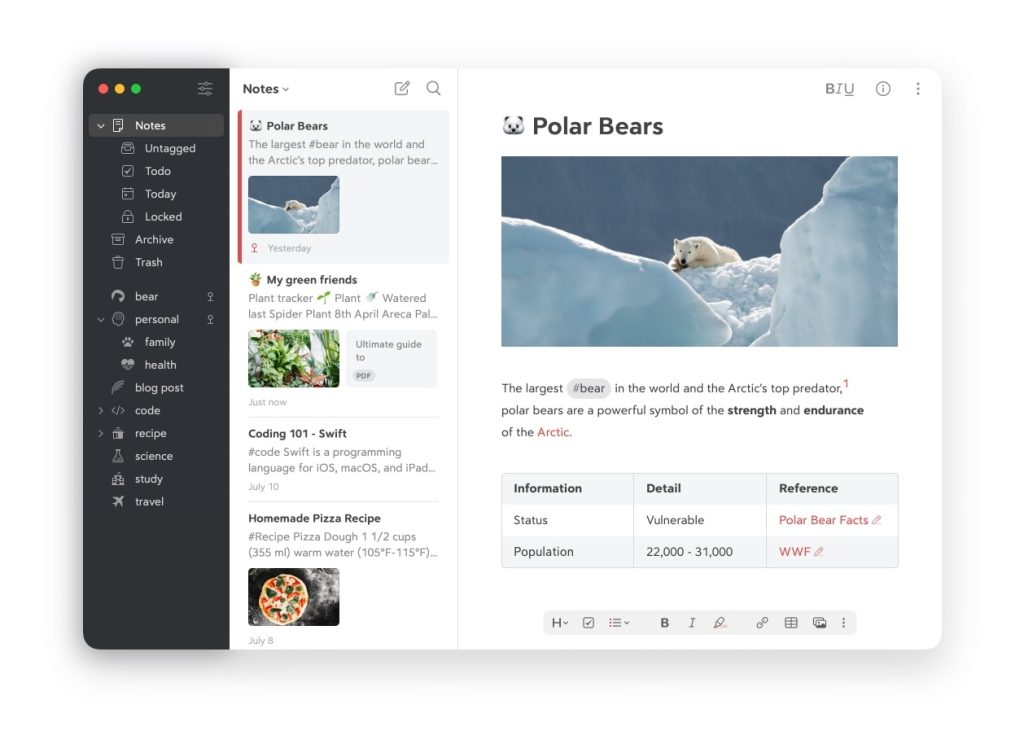
How to test a new notes app: Last week’s column on my Obsidian notetaking setup prompted a bunch of questions about switching from something else (most notably Evernote, which has been struggling lately).
While Obsidian does have a bunch of import options, my advice is not to go whole hog right away. If you want to try a new notes app, pick one specific use case for testing purposes. That way, you’ll get a feel for how the app works without getting overwhelmed by all your old notes.
In my case, I started using Obsidian instead of Typora to write my story drafts, but still used Notion for general notetaking. This went on for a few months until I was confident about replicating my Notion workflow. (Even then, I left some Notion content behind and focused on setting up a better workflow from scratch.)
On a related note: I just put together a list of other notetaking apps worth checking out over at Fast Company. (Use this link if you hit a paywall.) The approach holds true not just for Obsidian, but for any notetaking app you might want to try.
Now try this
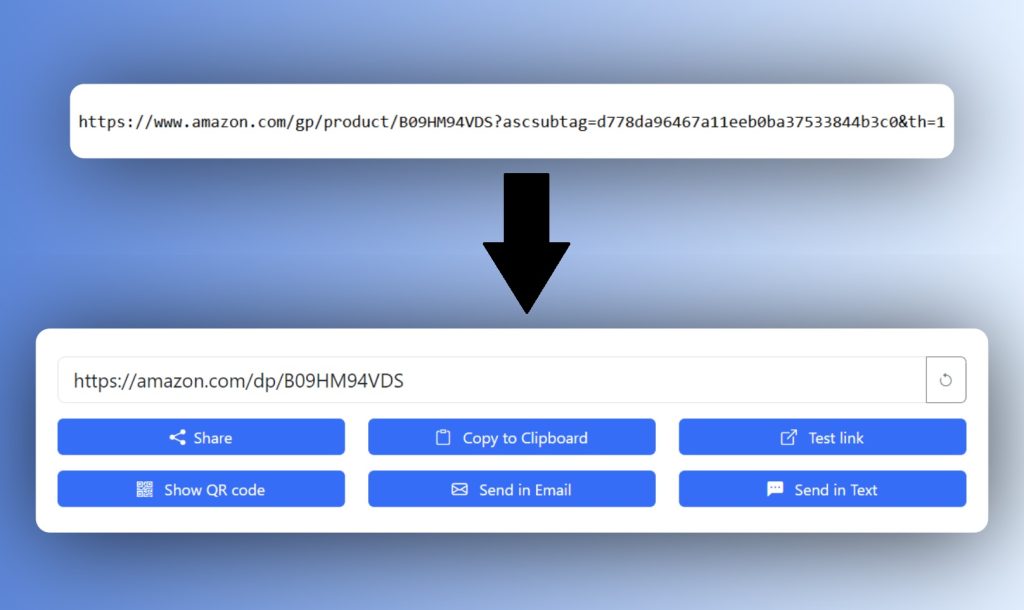
Share links without junk: Link Cleaner is a handy little site that removes unnecessary cruft from web links.
Websites often add tracking code to their links so other sites can see where their visitors come from. If a site collects sales commissions on product recommendations, for instance, it needs that extra tracking code to get credit for any resulting purchase. The result is a much longer, uglier link when you try to share it via email or social media.
Link Cleaner, from tech journalist Corbin Davenport, automatically removes that extra code and provides a set of one-click share and copy buttons. An iOS Shortcut version is also available, and I’ve added a one-click cleaner to (you guessed it) my guide on browser bookmarklets for Advisorator subscribers.
Around the web
- By me: Chrome’s sidebar apps are an overlooked new feature. (Use this link if you hit a paywall.)
- Also by me: An updated primer on Alexa smart home routines.
- Cool idea: An iPad screen cover and Apple Pencil tip that feel like drawing on paper.
- Shazam adds an iOS lock screen widget. (See more Shazam tricks in this old newsletter.)
- Google Flights starts telling you the best times to book.
- Why falling SSD prices haven’t made laptop storage cheaper.
- Rumor mill: An iPad Pro overhaul may happen next year.
Spend wisely

Sonos is having a sale on some of its refurbished speakers, most notably the Arc SL soundbar in “Shadow” black. This is Sonos’ high-end soundbar with Dolby Atmos support, and it’s selling for $509, down from $679 refurbished and $799 new. As the “SL” indicates, this model lacks a microphone for Alexa or Hey Sonos voice commands, but still supports playing music via Apple AirPlay, certain apps such as Spotify, and the Sonos app proper.
Also on sale: The Sonos One (Gen 2) with voice control for $134, and the One SL (sans voice) for $119, both refurbished.
Thanks for reading!
Got questions or comments about anything you’ve read here? Just reply to this email to get in touch!
Until next week,
Jared