
Tip of the week: A prettier Wikipedia

Tip of the week: A prettier Wikipedia

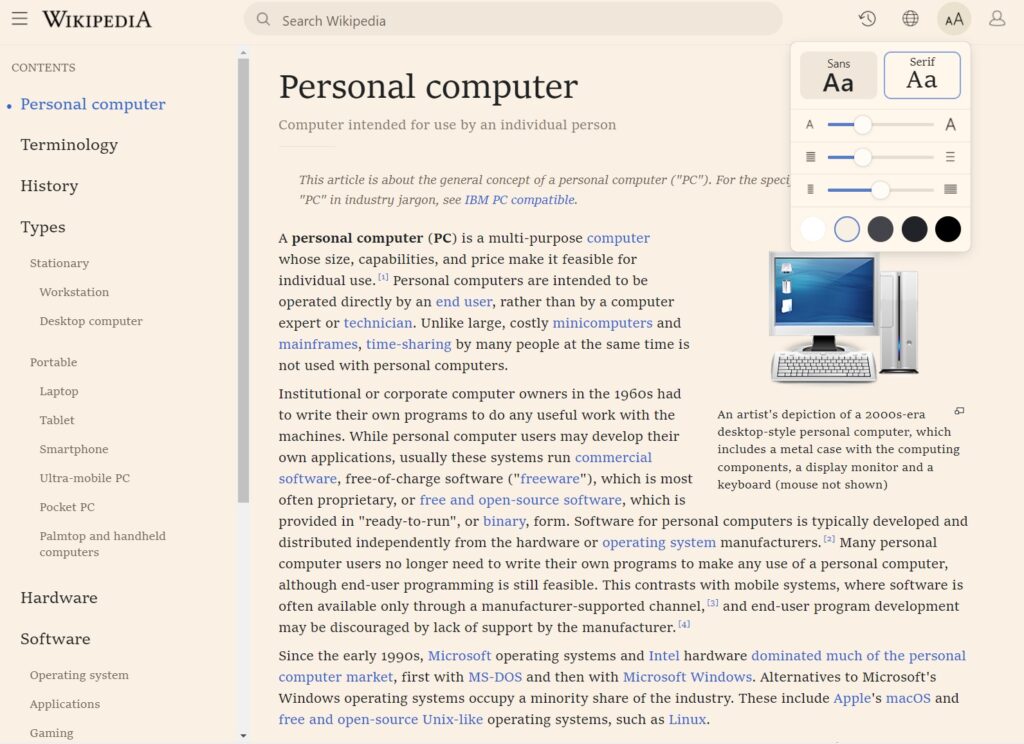
While Wikipedia is a terrific resource, its website looks like it hasn’t seen an update in a decade or two. Now, you can give it a makeover with Modern for Wikipedia, a free extension for Chrome, Firefox, and other Chromium-based browsers such as Edge and Vivaldi.
Once installed, Modern for Wikipedia gives the site some nicer fonts, collapses the text into narrower columns, and moves the table of contents to a persistent sidebar, all of which make the reading experience more pleasant.
You should also check out the toolbar in the top-right corner, where you can view your article history, switch languages, tweak the font sizes or line spacing, and choose between different background colors. According to the developer, the extension runs locally on the browser and doesn’t collect any data from you.
Modern for Wikipedia reminds me somewhat of Amazon Lite, another extension worth checking out if you’re tired of Amazon’s overly cluttered web design.
Thanks for checking out Advisorator’s tip of the week! Subscribe through the button below to get tips like this one in your inbox every Tuesday. Cheers – Jared