
Your library’s overlooked tech features

The free library tech features you should be using
Plus: Instagram’s AI image uproar, better fireworks photos, and de-crapified Amazon listings
 Jared Newman |
Hey there! I’m Jared Newman, a longtime tech journalist, and you’re reading the free edition of Advisorator, my weekly tech advice newsletter. Did someone share this newsletter with you? Sign up to get it every Tuesday.
Last week, I wrote about buying the cheapest printer possible, but maybe you don’t even need one at all.
As Kelsy H., a library services technician, pointed out in our Tech Buds forum, many libraries will print your documents for free or cheap. In some cases, you can even send documents from home and pick them up at your convenience.
That helpful tip got me thinking about all the other tech-related services you might be overlooking from your local library, many of which are free of charge …
News in brief
Instagram’s AI image uproar: Meta put Instagram users on edge last week with a feature called “Muse Edge,” which let users generate AI images based on photos in other users’ public profiles. The feature was enabled by default and required a trip to Instagram’s settings menu to opt out. Backlash came quickly from both regular users and celebrities who didn’t want their photos turned into AI slop without consent.
Meta disabled the feature a few days later, acknowledging that it “missed the mark.” Still, the whole ordeal is an argument for making your Instagram account private (that is, invite-only) in case the company tries something like this again.
More notable news and reads:
- AI-generated flyers and posters have become a scourge. (Paywalled, but you can get the gist from the free portion.)
- XReal’s $300 a01+ seem like a step up for cheap AR glasses.
- Spotify adds filtering options to its “Release Radar” new music playlist.
- ChatGPT’s voice conversation mode sounds more natural now. (Just don’t ask it to spell things.)
- Nothing’s Ear 3a earbuds have some clever features, including call recording and a way to save snapshots of what you’re listening to.
Tip of the week
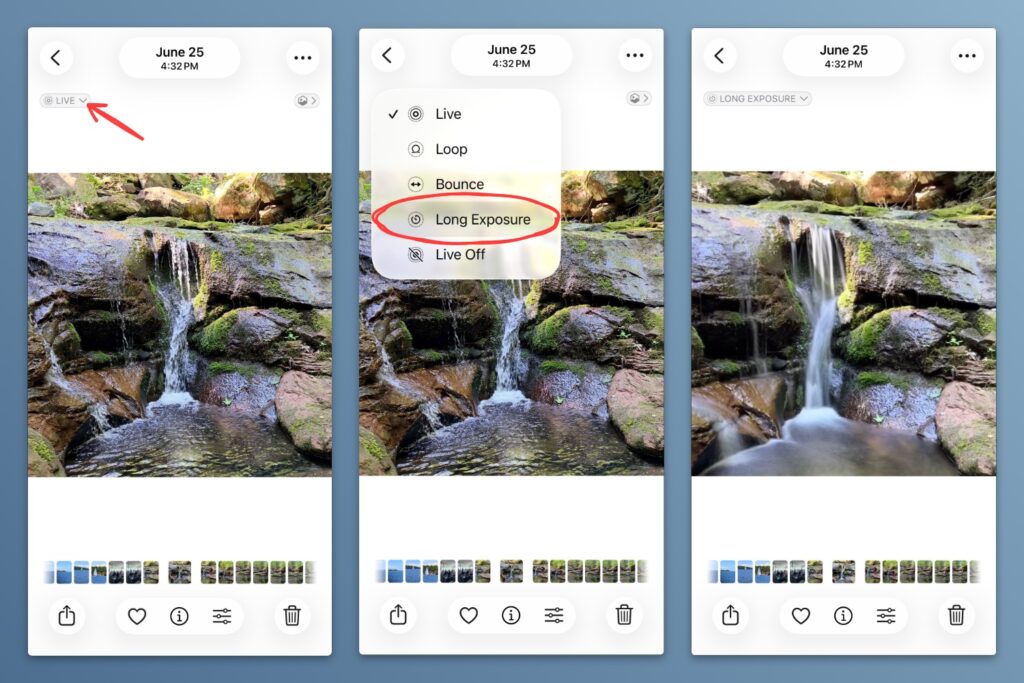
Long exposure photos: Too bad I didn’t catch this post from my pal Matt Swider on taking fireworks photos from your phone ahead of July 4. Even so, his tip on the using iPhone’s Long Exposure feature is worth remembering for waterfalls, moving trains, light shows, or anything else where it looks cool to capture a long stretch of motion. It can also work with fireworks photos you’ve taken already.
To create a long exposure shot, you’ll need to have captured the picture in Live Photo mode. Then, follow these steps:
- Open the Photos app and select your photo.
- Tap the “Live Photos” drop-down menu above the photo.
- Select “Long Exposure” from the effects list.
What about Android? Google’s Pixel phones also have a Long Exposure mode, but you must switch to it before taking the photo, not after. Swipe right in the Camera app to find it. (On Samsung phones, the only option for long exposure is to mess around with manual photo settings.)
Try these apps

Banish no-name brands from Amazon: Knockoff is a free web browser extension for filtering out unwanted Amazon store listings. By default, it flags products from unrecognizable brands like SZHLUX and NEWBULIG. If you click the extension’s icon, you’ll find more useful options, like removing sponsored listings and hiding suspect brands instead of just dimming them. Per Knockoff’s privacy policy, brand detection runs locally on-device, and the extension does not collect any browsing data.
No-name brands aren’t always worth avoiding—I’ve mostly enjoyed my $50 BIGASUO portable monitor—but it’s helpful to see them called out.
Virtual cycling routes: I don’t own an exercise bike, but PedalScape kind of makes me want one. This website offers a big list of scenic bike rides from the cyclist’s perspective, so it feels a bit like you’re moving somewhere while pedaling with a screen in front of you. The underlying videos are from YouTube, but the site has helpful filters for duration, scenery, and intensity. There’s also walking tour version for treadmill users. (Via Dense Discovery)
Spend wisely
This section of the newsletter may include affiliate links, which earn me a commission if you wind up purchasing something.
Woot is cutting prices on older iPhones in “Grade A” refurbished condition, most notably the iPhone 16 for $505 and the iPhone 15 for $376. All are carrier-unlocked and include a one-year warranty.
Other notable deals:
- Get a two-pack of tiny Anker 65W chargers for $36 total with code AFFUSA2663W27.
- ESR’s 3-in-1 charging station (iPhone, Apple Watch, earbuds) drops to $13 with code GLCVYER3.
- Anker refurbished audio deals include Space A40 earbuds for $33, Q30 noise-cancelling headphones for $45, and A30 sleep earbuds for $118.
- Apple Watch returns to $299, or open-box for less.
- Desktop gaming PC with 14th-gen Intel Core i5 CPU, Nvidia 5060 GPU, 32 GB RAM, and 1 TB SSD for $1,050. Really good price given RAM and storage costs.
- May pair well with a 27-inch Samsung OLED 1440p monitor for $300.
- Pixel 10 Pro dips to $700, about $50 lower than the usual sale price. Or, $622 open-box.
Think about an Advisorator membership!
It’s just $5 per month or $50 per year to support my work and get more in-depth tech advice from me. Learn more here →
That’s all for this week. Thanks for reading!
Until next week,
Jared
Did someone share this newsletter with you? Sign up to get it every Tuesday.