
10/10/2023: Stage Manager sold me on the Mac

How Stage Manager won me over
Google’s new Pixels, MacOS desktop widgets, and not-quite-Prime Day deals


Although I own a Mac Mini and dabble in using MacOS, my allegiance has always been to Windows.
I juggle a lot of tasks in my everyday PC use—from writing and researching to communicating via Slack and email—and Windows has always just felt faster. That’s largely because of the Windows taskbar and how it helps with managing, er, windows. I’ve never found a workflow on MacOS that felt as efficient.
That changed when I upgraded my Mac Mini to MacOS Sonoma last week and finally started using Stage Manager, the window management feature that Apple first introduced last year. While it’s sometimes maligned as unpolished, and could certainly use some improvements, it’s the one feature that finally made MacOS click for me.
Need to know

New Pixels: Google’s latest flagship phones, the Pixel 8 and Pixel 8 Pro, are shipping this week for $699 and $999, respectively, with AI features as the focal point. Take a photo of several people, for instance, and the new Pixels will let you choose the best facial expression for each person, melding them together from a series of consecutive shots. Meanwhile, an experimental feature in Google Photos will let you move people around inside a photo after taking the shot, with AI filling in the background automatically. It sounds impressive, but it’s also raising questions around authenticity and whether you’ll ever be able to believe what you see anymore.
Google’s also prolonging the life of its phones by promising seven years of software updates for both the Pixel 8 and Pixel 8 Pro. There’s some question as to whether the Pro model will benefit more than its smaller sibling, but it’s still great news that will make Pixels more valuable in the long run, especially for buyers of used and refurbished gear.
Want to compare specs? Check out Google’s comparison chart where you can mix and match different models.
Other Google tidbits from last week:
- The Pixel Watch 2 has some modest improvements over the original.
- The Fitbit Charge 6 has better heart rate tracking and more Google features.
- Android 14 arrives on Pixel phones with some useful hidden features. (I’m switching up my Pixel 6a’s lock screen widgets right now.)
- The Pixel Buds Pro get conversation detection, plus lower latency and better call quality when paired with the Pixels 8.
Tip of the moment
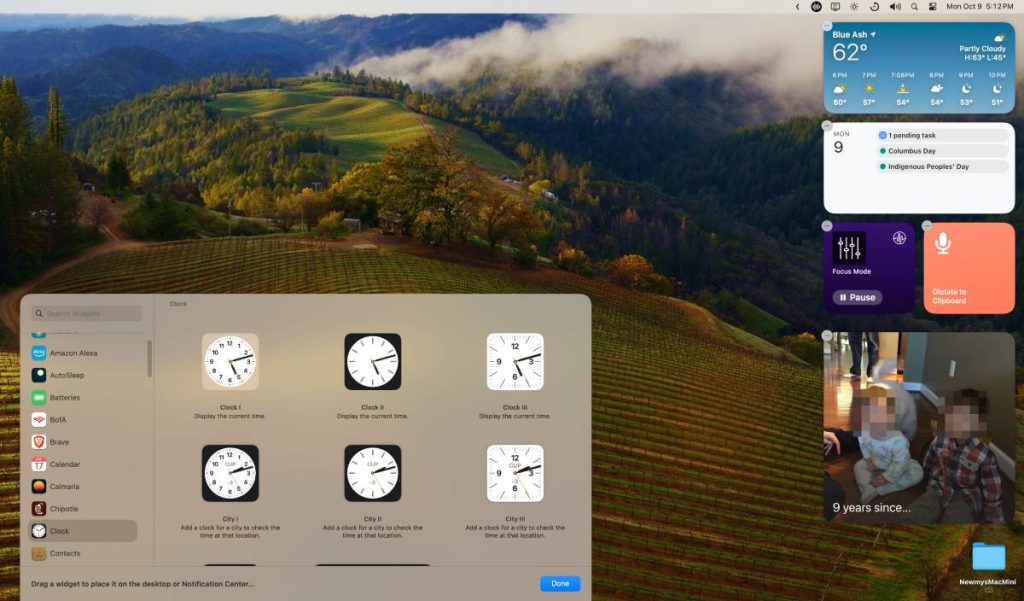
MacOS desktop widgets: Sticking with this week’s Mac theme, I’ve also been digging the new desktop widgets feature in MacOS Sonoma.
While modern widgets have been part of MacOS for a few years now, they were previously hidden out of sight in Notification Center. Now you can put them directly on the desktop. (And if you’re using the aforementioned Stage Manager, you’ll have an easier time clicking the desktop to view them).
Here are the two main ways you can add widgets to the MacOS desktop in Sonoma:
- Right-click the desktop, select “Edit Widgets…” to bring up the widget picker, then hit + for the widgets you want to add.
- Click the date and time to bring up Notification Center, then drag your existing widgets onto the desktop.
In widget picker, you’ll notice another big change: You can now add iPhone widgets to the MacOS desktop, which greatly expands the number of widgets at your disposal. Google Photos, for instance, doesn’t support widgets on MacOS, but now I can add the iPhone version to get photo memories on my desktop. (One caveat: Clicking on those widgets won’t accomplish anything if no corresponding Mac app is available.)
One last note: By default, MacOS’s desktop widgets will switch to grayscale when you’re focusing on another window. To have them always appear in color, head to System Settings > Desktop & Dock, look under Widget Style, and select “Full-color.”
Now try this

Arc’s AI features: Arc is a free web browser for MacOS with some clever features, including some new ones that use generative AI. My favorite example? Hold Shift while highlighting any web link, and you’ll get a quick pop-up summary of that link’s contents. Read more about the new features—and how to enable them—on Arc’s website. (A Windows version of Arc is supposedly coming this winter.)
Permission slip for Android: Not to leave out the Apple-averse among us, Consumer Reports’ excellent Permission Slip app is now available for Android. This free app helps manage the personal data that companies collect about you, and it can even automatically send deletion requests on your behalf. For more details, check out my primer from earlier this year.
Around the web
- Spotify’s AI-powered DJ and Daylist features are pretty neat.
- 23andMe leaked data for millions of users. Now it’s for sale.
- Microsoft Teams is now much faster and less of a memory hog.
- FTC: Scammers earn more from social media than anything else.
- iPhone 15 overheating issues should be fixed now.
- Zoom adds a document editor because companies can’t stay in their lane anymore.
Spend wisely

I’ve spotted a number of solid tech deals this morning from Amazon’s newly-invented “Prime Big Deal Days” sale, the most notable of which is Apple’s AirPods Pro for $189. That’s $60 off the list price, and a record low for the latest iteration with USB-C charging.
All the Amazon device deals I mentioned in last week’s newsletter remain available as well, so you can save on Echo speakers, Eero routers, Blink cameras and more.
Thanks for reading!
Got tech questions for me? Send me an email to get in touch.
Until next week,
Jared