
8/8/2023: I’m trying to drop Gmail

Replacing Gmail with Skiff (sort of)
Plus: Verizon’s network for less, nixing browser autoplay, and another Spotify savings trick


As I write this, I find myself trapped between two email providers.
The first is good old, dependable Gmail, which I’ve used since the invite-only days nearly two decades ago. The other is Skiff Mail, which has only been around for a year.
Although Gmail has mostly served me well, I’ve been seeking an off-ramp for a bunch of reasons:
- My inbox is becoming overrun by bad PR pitches, marketing emails, and other assorted junk despite my best efforts to tame it all.
- While Gmail’s Categories filter helps tame some of the above, it’s also unpredictable, and I’m tired of being at the whims of Google’s sorting algorithms.
- Google Photos continues to eat into my cloud storage space, and I’d rather not have my ability to receive email held ransom by my photo collection.
- I’d like to become less dependent on Google overall and wrestle back some control over my online identity.
All this has made a fresh start seem pretty appealing, Skiff’s recent launch of free custom domain support provided the perfect opportunity try an alternative. I’ve long been intrigued by the service’s slick interface and privacy focus, and I’ve been using it to handle all mail through my Advisorator and Cord Cutter Weekly email addresses for about a month now.
But while I’d love to make a complete break from Gmail, a few things are still holding me back.
Need to know
Verizon’s network for less: Visible, the wireless sub-brand operated by Verizon, has lowered its base price to $25 per month. This includes unlimited talk, text, and data, but with a catch: Your connection gets deprioritized if Verizon’s network is busy. (Hotspot use is also limited to 5 Mbps and one connected device at a time.)
Visible’s premium tier s till costs $45 per month, with at least 50 GB of prioritized data per month (or unlimited, on Verizon’s faster 5G bands), but an August promo code (VISIBLE35) knocks the price to $35 per month instead. It also includes a $10 per month discount on Verizon’s home internet service. Michael Timmerman has a great overview of the service, and you can check my data plan comparison to chart to see how the major carriers stack up.
Raspberry Pi supply: Since the pandemic, Raspberry Pi microcomputers have been nearly impossible to get at normal prices. That’s finally starting to change, as the company works through supply shortages for commercial customers and gets back to stocking up retail stores. Most stores on the Raspberry Pi website still show no inventory, but Canakit and Central Computer claim to have units in stock, at $45 with 2 GB of RAM and $55 with 4 GB.
The Pi is a little computer that you can program in all kinds of ways, such as running a media server, blocking ads across your entire Wi-Fi network, or creating a DIY smart home setup. You can also just use it as a cheap desktop running Linux or Android. If you’re up for a fun tech project, now might be the time to seek a Pi out.
Google Assistant’s shake-up: Google is reportedly rebooting its virtual assistant around generative AI, Axios reports based on an internal company email. Much like ChatGPT (and Google’s own Bard), this would make Assistant better at interpreting natural language queries and offering human-like answers (albeit occasionally wrong ones).
It’s unclear when this switch might happen, but I bring it up now because the core Assistant experience seems to be falling apart. My pal JR Raphael has documented examples in a recent Computerworld column, but I’ve had my own pent-up frustrations that sent me running to Alexa last year. Given Google’s history of leaving products for dead, I’d be wary of investing deeply into Nest smart displays or speakers right now. (Also: Virtual assistants are already money losers, and generative AI is expensive. Who’s going to pay for this overhaul in the end?)
Tip of the moment
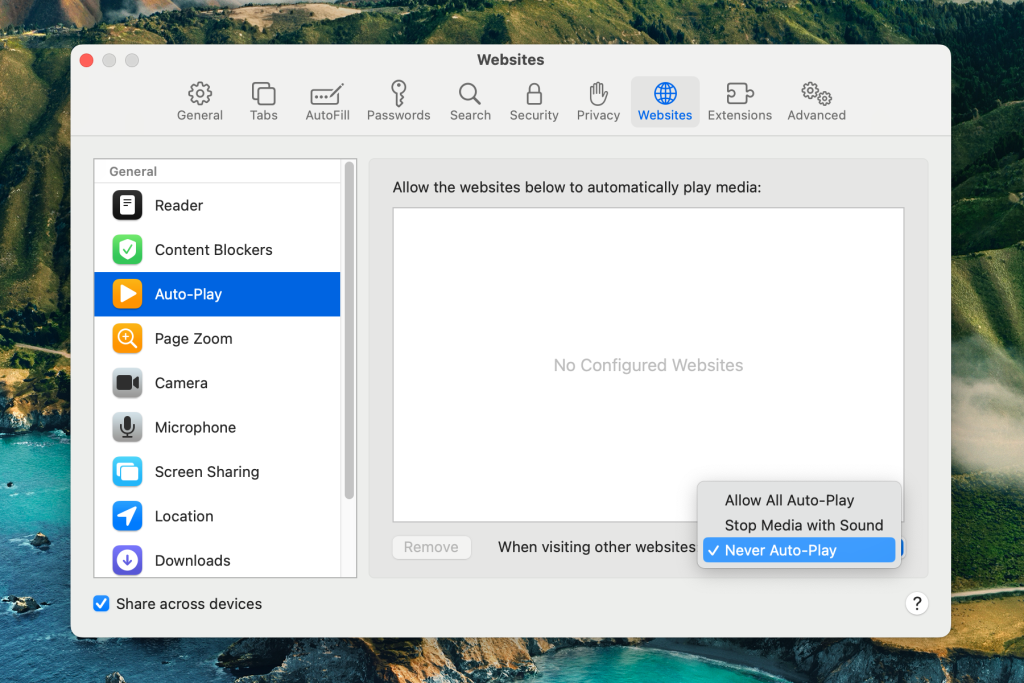
Browser autoplay, begone: One of the oldest web browsing annoyances is the way some websites start playing videos you never asked to see. It’s a distraction and a waste of data, and you can’t always stop it with ad blockers and anti-tracking tools.
With that in mind, here are some ways to prevent videos from playing until you actually click on them:
- Chrome: Google’s browser has no built-in way to disable autoplay, but you can install the AutoplayStopper extension as a workaround.
- Safari: Head to Safari > Settings, then click the Websites tab. Choose Auto-Play from the left sidebar, then use the “Settings for all websites” dropdown menu to select “Never Auto-Play.”
- Edge: Open edge://settings/content/mediaAutoplay in your address bar, then switch the dropdown menu from “Limit” to “Block.”
- Firefox: From the settings menu, head to Privacy & Security, scroll down to the Permissions section, and click “Autoplay.” Under “Default for all websites,” select “Block Audio & Video.”
- Brave: Open brave://settings/content/autoplay in your address bar, and choose “Block sites from autoplaying videos.”
Note that the above fixes only work on desktop websites. Blocking autoplay in mobile browsers is more complicated:
- iOS: For a one-time price of $10, a Safari extension called StopTheMadness can turn off autoplay and various other web annoyances. (Once installed, you must disable autoplay through the extension menu.)
- Android: A browser called Kiwi allows you to install desktop Chrome extensions, so you can use it with AutoplayStopper just like on your computer.
Around the web
- I wasted $20 to tell you not pay for ChatGPT Plugins.
- Engadget tests Galaxy Fold4 durability by spending a year with it.
- Apple Music gets a “Discovery” station for finding new music.
- Google Maps is becoming a bloated mess.
- A revamped Sonos Move speaker may arrive next month.
- Please don’t get your eyes scanned by the crypto orb.
Spend wisely
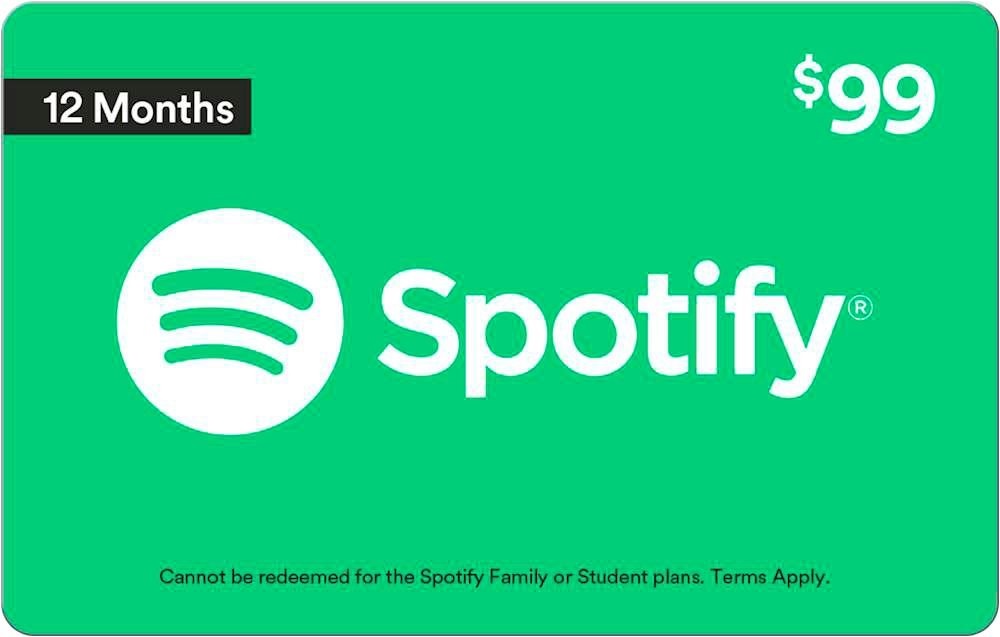
Another Spotify savings trick: In response to last week’s column on streaming music savings, Kevin S. sent along a great tactic that I overlooked. Both Amazon and Best Buy sell one-year Spotify gift cards for $99, saving $33 per year over the recently-increased price of $11 per month. Spotify doesn’t sell annual plans directly, so this is the only way to get a yearly discount. Thanks for the tip, Kevin!
Thanks for reading!
Got your own email dilemmas that need solving? Any other tech questions you’d like me to answer? Just reply to this email to get in touch.
Until next week,
Jared