
4/25/2023: Declutter those discs

How to digitize and declutter old discs
Plus: T-Mobile’s new data plan, camera roll cleanup, and more Windows tweaks


Hey folks! As mentioned last week, I’m trying out a new format for the free edition of Advisorator, with news, tips, and deals that were previously limited to paid subscribers. Let me know what you think!
Last week, I wrote a column for TechHive on ways to rent or buy DVDs without Netflix’s soon-to-be-dead DVD service. So it’s only fitting to now write the opposite story, about how to get rid of the optical media you no longer want.
First, we’ll cover how to digitize any DVDs or CDs you want to save, using freely available software. Once you’ve done that, you can easily sell those old discs in bulk for a modest profit.
Need to know
T-Mobile’s new data plans: For all its talk of being the “Un-carrier,” T-Mobile is acting quite carrier-like with its new “Go5G” and “Go5G Plus” offerings, and not just because of their clunky names. The new plans are nearly identical to T-Mobile’s existing Magenta and Magenta Max plans, but with more high-speed mobile hotspot and international data use. A rundown of the key differences:
– Magenta ($70/mo): 5 GB hotspot, 5 GB in Canada and Mexico
– Go5G ($75/mo): 15 GB hotspot, 10 GB in Canada and Mexico
– Magenta Max ($85/mo): 40 GB hotspot, 10 GB in Canada and Mexico
– Go5G Plus ($90/mo): 50 GB hotspot, 15 GB in Canada and Mexico
Factor in T-Mobile’s $60 per month Essentials plan, and customers must now choose between five tiers of wireless service. That’s a lot to consider, but assuming T-Mobile markets its new plans more heavily than its existing ones, it stands to make a little extra money from customers who don’t really need the added benefits. In other words, typical carrier tactics.
Anyway, you can use T-Mobile’s comparison tool for more specifics on each plan. Or, consult my guide to picking a data plan to compare every postpaid offering from AT&T, Verizon, and T-Mobile, all in a single chart. I’ve just updated it with all the latest info.
Google Pixel rumors: If you’re in the market for a new Android device, you should probably hold off until Google’s I/O event on May 10. Judging from the rumor mill, the company is likely to announce a foldable Pixel phone, the low-cost Pixel 7a, and the endlessly-teased Pixel Tablet with smart display dock. As I’ve noted before, the company seems excited about Android again in ways it hasn’t been in years.
Tip of the moment
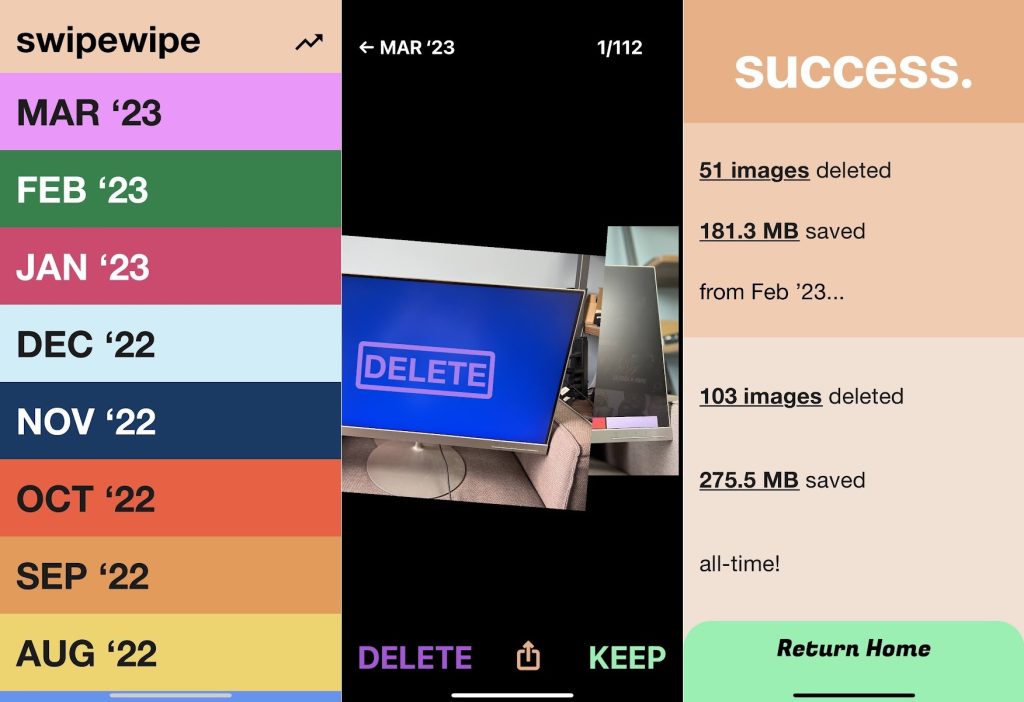
Declutter your camera roll: Keeping with this week’s cleanup theme, Swipewipe is a handy iPhone app for sorting through your camera roll, letting you delete or save images by swiping left or right on each one.
While Swipewipe isn’t the first app to try the “Tinder for photos” concept, I appreciate its uncluttered design and the way it breaks your camera roll into months, with a separate progress bar for each. That makes the job feel less daunting. Also: By dragging the current photo downward, you can see the previous photo behind it, which is helpful for quickly comparing two similar shots.
My only gripe with Swipewipe has nothing to do with the app itself: Because I automatically back my pictures to Google Photos, deleting them from my camera roll doesn’t help me reclaim any cloud storage space. For that, I’d have to delete my recent uploads from Google Photos first, then re-upload from the camera roll after slimming it down.
It’s still a useful tool, though, and one that would work even better for iCloud Photos users. The app claims to have some usage limits on its free version, though I’ve yet to run into them. Just make sure to click the “X” button on the initial subscription prompt. If you do decide to pay, it’s $9 for lifetime access.
Now try this
Explorer Patcher, explored: A couple months ago, I mentioned a free program called Explorer Patcher in my newsletter about fixing Windows 11 annoyances. Now, I’ve got a deeper dive on that tool over at PCWorld, covering the full range of ways that it can customize your Windows workflow.
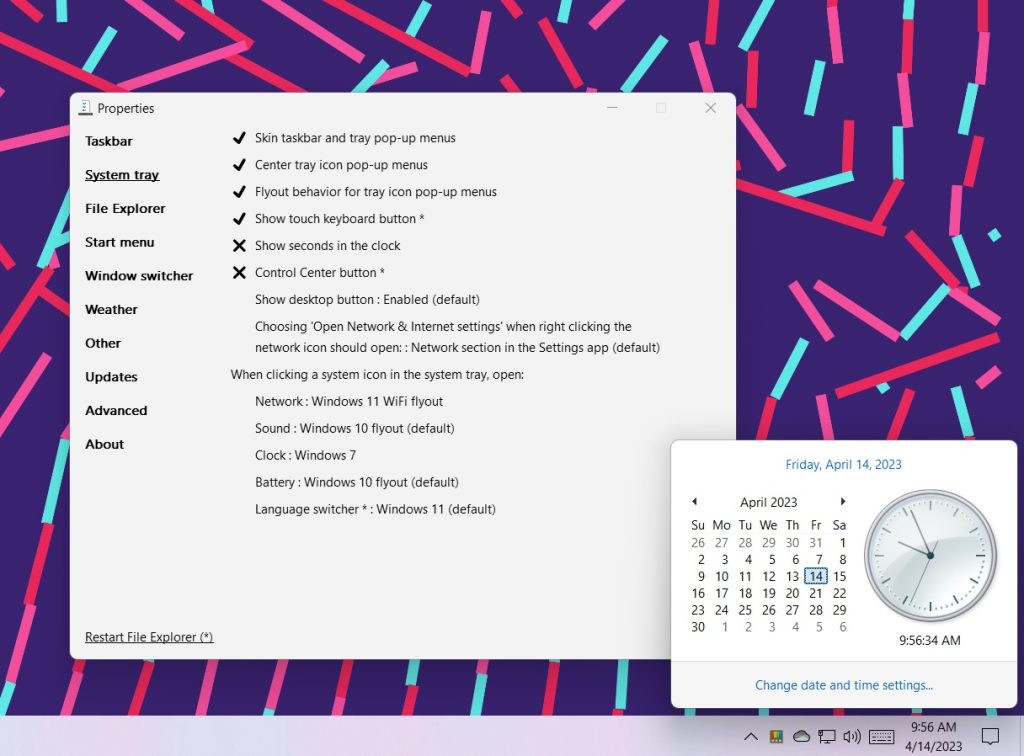
My favorite little gem? Bringing back the Windows 7-style clock as pictured above, though the idea that it now might qualify as retro-chic makes me feel just a little longer in the tooth. Anyway, check out the full PCWorld story for more details.
Around the web
- AT&T appears to be testing 5G home internet for DSL defectors.
- Canva’s AI can turn casual photos into formal headshots.
- Google rebrands its cell phone service as Google Fi Wireless.
- Proton launches a password manager, in beta for now.
- Officers raid Mullvad VPN, seeking customer data. It didn’t have any.
- An Imgur terms of service change could break a lot of image links online.
Spend wisely
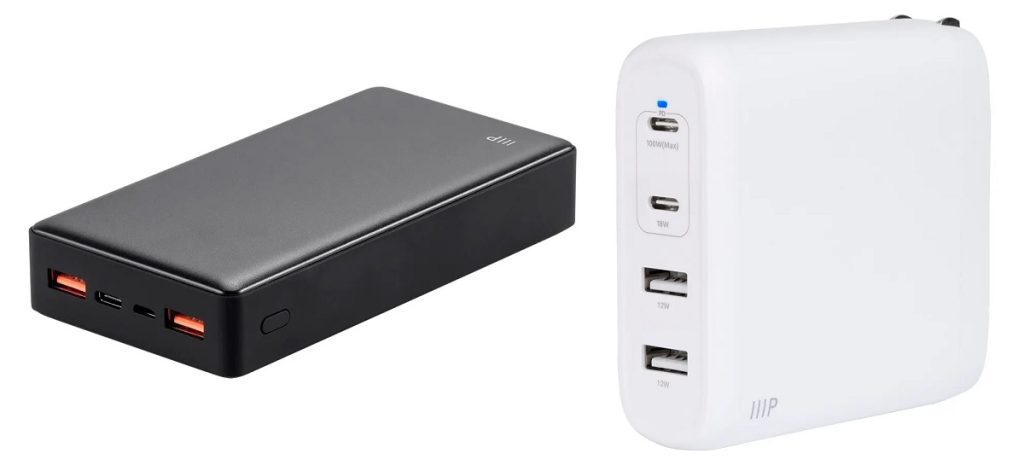
Monoprice is currently having a sale on various chargers, power banks, and cables. Look for items with the “Sale” tag on this page, then use the code MP20 to take an additional 20% off. Notable picks include a 20,000 mAh power bank for $26, a four-port 100W wall charger for $32, an 85W USB-C charger (with six-foot cable) for $13.44, and a compact 20W USB-C charger for $7.
Thanks for reading!
Got questions about anything you’ve read here or feedback on this format for the free newsletter? Just reply to this email to get in touch.
Until next week,
Jared