
Tip of the week: Pull in case of reminder


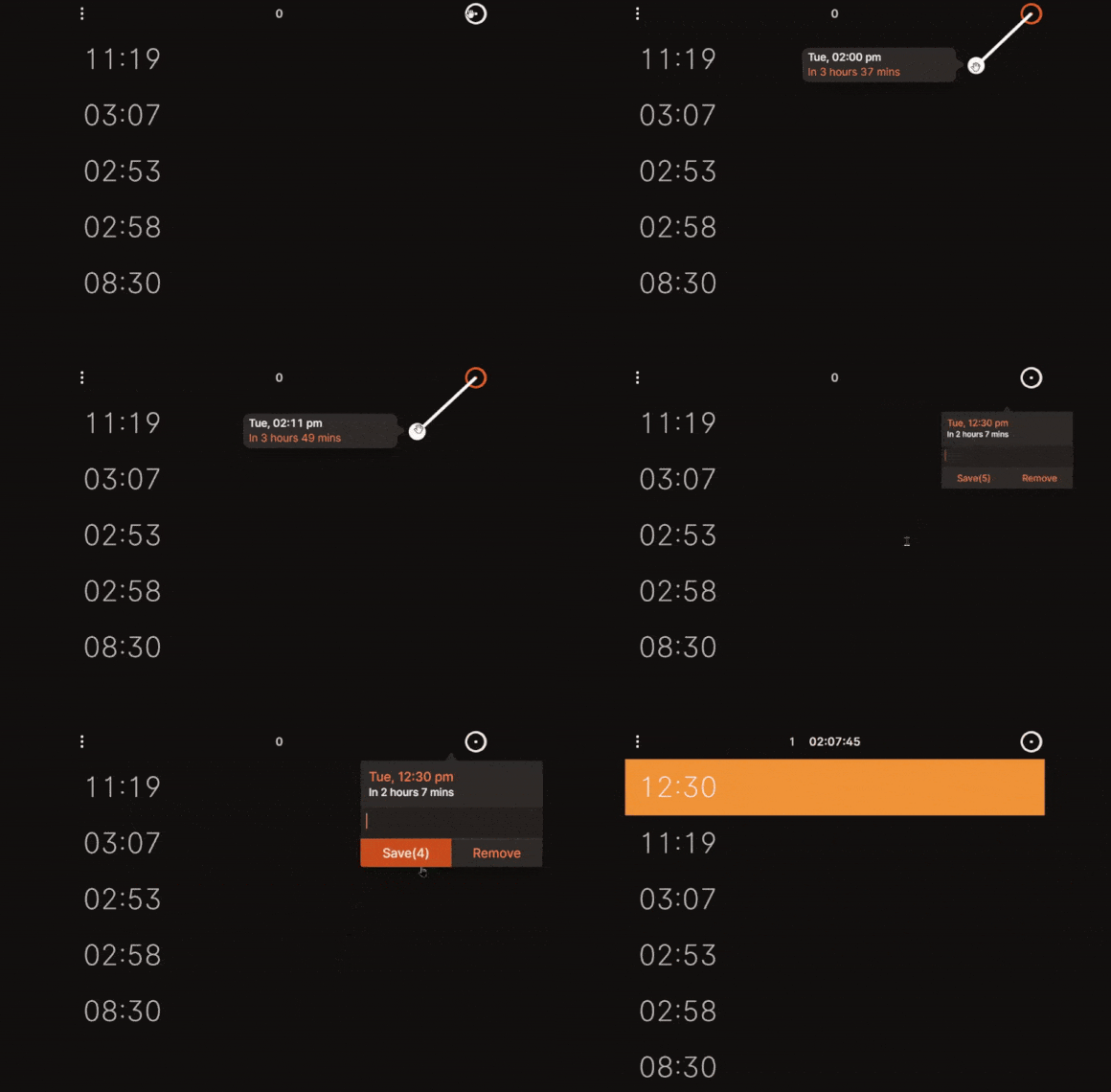
I’ve previously written about a neat MacOS timer app called Gestimer, which lets you set quick reminders by clicking and dragging the app’s menu bar icon. While I’ve yet to find a Windows equivalent, Pulltherope is a browser extension that offers similar pull-based timers in Chrome and other Chromium-based browsers, such as Microsoft Edge and Vivaldi.
Just click on the extension icon in your browser’s menu bar, then click and drag the circle icon to create a new reminder. You can set multiple timers at once and optionally give them names, and you’ll get system-level notifications in Windows or MacOS when time runs out. I’m using it to take timed breaks from work and to remember when I’ve turned on the electric kettle for coffee or tea. (You can also optionally set Pulltherope as your new tab page.)
Pulltherope has a pay-what-you-want price model and requires a license key to use, but you can also enter a price of $0 and sign up with just an email address. After signing up, install the extension from the Chrome Web Store, then enter the license key that you receive via email.
Pulltherope does have a few notable limitations: You can only set timers in one-minute increments—more granular control would be better—and you must always click the extension icon to set new timers or see how much time is left on existing ones. I also can’t find any way to delete timers once you’ve set them. For Mac users, Gestimer is worth its $4 asking price to remove those small points of friction.
I also still like Hourglass for Windows, even if it lacks the same pull mechanic. You can pin the app to your taskbar, then set timers by typing (“1 hour 30 minutes 45 seconds” or “1h30m45s”. The taskbar icon will then show a progress bar with how much time is left.
No matter which option you choose, you now have one less excuse for not remembering things.
More from me
My latest syndicated Advisorator column at PCWorld is all about why I bought a Mac Mini instead of a MacBook, and more broadly, why you might consider a desktop PC instead of a laptop.
Also, here’s a story I wrote for Fast Company on why you should stop dawdling and sell your old gadgets already. The value of used devices always depreciates over time, but chip shortages have resulted in a bump for certain products—particularly iPads and Apple Watches—so it’s a great time to unload them. Plus, we’re seeing new marketplaces emerge for selling your old gear, hopefully resulting in more competitive trade-in values. Read the full story for more details.
If you like this kind of tech advice, please consider a paid Advisorator membership. You’ll get an expanded tech advice newsletter every week with in-depth features, extra tips, and deals on the latest tech. Plus you’ll be supporting this humble foray into independent, ad-free tech journalism. You can try the paid version free for four weeks and it’s super easy to cancel.
Thanks for reading!
– Jared