
Tip of the week: Switch streaming music services


The big story in tech over the last week has been Neil Young’s decision to remove his music from Spotify in protest of Joe Rogan’s podcast. After Rogan hosted a vaccine critic on his show and offered little pushback, Young accused Spotify of spreading false information about COVID-19 vaccines, and he threatened to pull his catalog if Spotify didn’t drop Rogan. Spotify predictably stuck with its star podcaster, and Young stuck to his word. Several other artists followed him out the door, including Joni Mitchell and Nils Lofgren, sending both Spotify and Rogan into damage control mode.
Setting aside the topic how big tech platforms moderate content, and whether said moderation amounts to censorship, the whole episode underscores how Spotify’s zeal for podcasts can get in the way of the music. Its tendency to scatter podcasts throughout its interface was already irksome if you only used the service for music. Losing actual music because of those podcasts only exacerbates the issue. Joe Rogan drama aside, there’s something to be said for services that are more focused. (Incidentally, Young also knocked Spotify’s audio quality on his way out.)
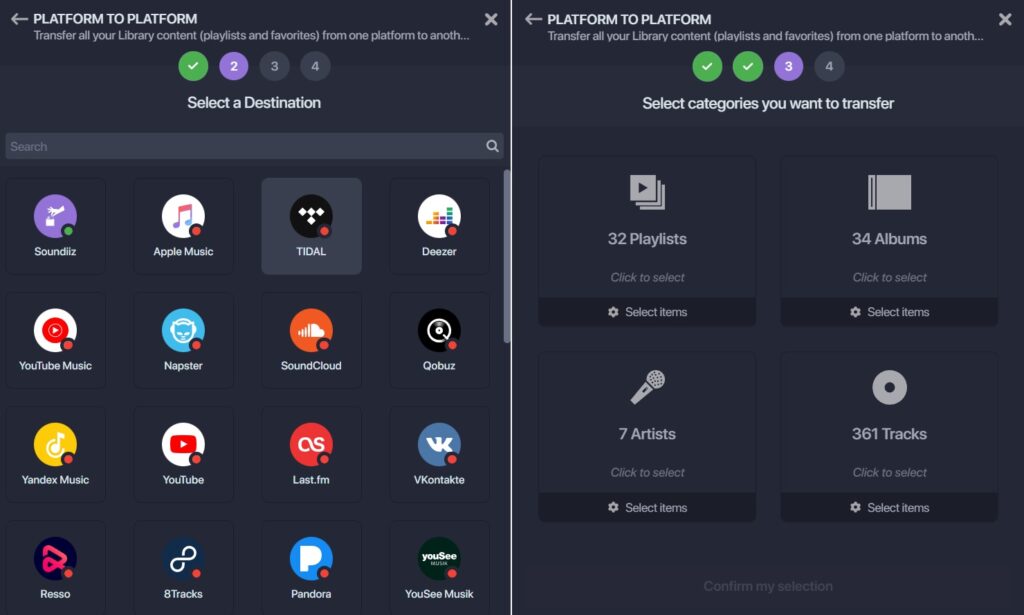
If all this is making you ponder a new streaming music platform, switching might be easier than you think. With a website called Soundiiz, you can easily transfer your music library and playlists between music services.
Just pick your source and destination music services, connect each account to Soundiiz, then choose what you want to transfer. (By default, it’ll move everything in your library and all your playlists.) My Spotify library is admittedly not huge, but moving it to all Tidal—where I recently snagged a cheap subscription—took less than 10 minutes.
The service is free for converting individual playlists one-by-one, but transferring your entire library requires a subscription at $4.50 per month or $36 per year. That said, you can always sign up for just a month and immediately cancel after the transfer is finished. Just make sure to choose the month plan rather than the annual one.
Soundiiz isn’t the only service of its kind. Free Your Music can also migrate an entire music library for a one-time fee of $15, though it requires installing a desktop or mobile app versus Soundiiz’s more convenient website. Tune My Music is another option, but it supports fewer music services and I found its interface to be clunkier.
My only gripe with Soundiiz is that it doesn’t tell you ahead of time if any songs in your current music service aren’t available on the one you’re moving to. Some advance notice would make switching even easier, and could even help you decide which service to adopt in the first place. (Even in Neil Young’s absence, it turns out Tidal’s catalog is inferior, at least for my weird tastes.)
A new guide to cord cutting

Hey folks, I’m really excited to share the new beginner’s guide to cord cutting that I’ve just posted on the Advisorator website. It’s a step-by-step guide to figuring out everything you need to drop cable or satellite TV and start saving money with streaming and over-the-air video,
The guide is loosely based on several articles I’ve written for TechHive over the years, but laid out exactly how I’d like it—see, for instance, the expandable Q&A sections scattered throughout—with no ads or other clutter.
While I don’t normally cover streaming and over-the-air TV in Advisorator—that’s what my Cord Cutter Weekly newsletter is for—my goal is to add more guides like this as I expand the members-only website in the months ahead.
Note that this particular guide is not behind a paywall, so please read and share it with anyone you like, and let me know if you have any questions or comments that might make it even better. Check it out!
The latest from PCWorld
Over at PCWorld, I’ve got a write-up on how to reclaim your Gmail storage without deleting any emails. It’s a delicate maneuver—I call it “Operation Free Gmail”—that involves moving old emails to a secondary account, then deleting them from your main account. While it makes looking up old emails a bit more cumbersome, I’m glad to have done it.
Anyway, the story is based on a newsletter I originally sent out to paid Advisorator subscribers a couple years ago, so if you enjoy this kind of tech advice, please consider subscribing!